What Is Two-Factor Authentication? A Complete Beginner’s Guide
Online accounts have become an important part of everyday life. People use accounts for email, social media, shopping, banking, education, work, cloud storage, and many other services.
A password is usually the first line of defense for an online account. However, passwords can sometimes be stolen, guessed, reused, or exposed through phishing attacks.
This is where two-factor authentication (2FA) can provide an additional layer of security.
Two-factor authentication helps protect an account by requiring an additional verification step after the password. Even if someone obtains your password, they may still need the second factor to access the account.
In this beginner-friendly guide, we will explain what two-factor authentication is, how it works, why it is important, the different types of 2FA, and how to use it safely.
What Is Two-Factor Authentication?
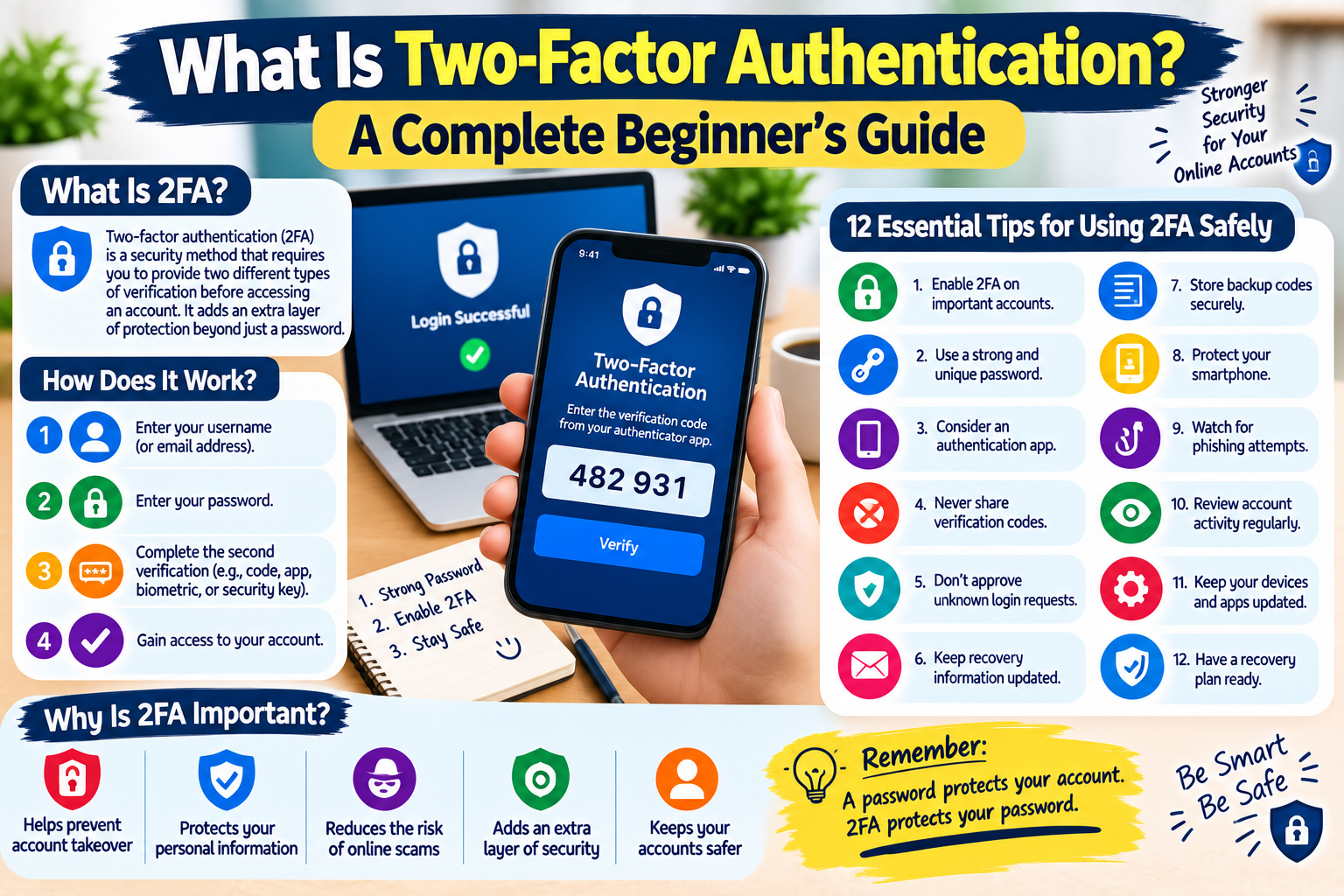
Two-factor authentication is a security method that requires users to provide two different types of verification before accessing an account.
Instead of relying only on a password, an account can require another piece of evidence that helps confirm the user’s identity.
For example, you might enter:
- Your password
- A verification code from an authentication app
This makes unauthorized access more difficult.
Two-factor authentication is also commonly called 2FA.
How Does Two-Factor Authentication Work?
The process is usually simple.
Step 1: Enter Your Username
You enter your username, email address, or other account identifier.
Step 2: Enter Your Password
You provide your normal account password.
Step 3: Complete the Second Verification
The service asks for another verification method.
This could be:
- An authentication app code
- A security key
- A code sent through SMS
- A notification on a trusted device
- Another supported verification method
Step 4: Access Your Account
After the second verification is successfully completed, the service allows you to sign in.
The exact process varies between services.
Why Is Two-Factor Authentication Important?
Passwords alone are not always enough to protect online accounts.
A password could be exposed through:
- Phishing
- Data breaches
- Password reuse
- Malware
- Weak security practices
- Social engineering
If someone obtains your password, they may try to sign in to your account.
With two-factor authentication enabled, the attacker may also need the second verification factor.
This can make account takeover significantly more difficult.
The Three Main Types of Authentication Factors
Security systems commonly describe authentication factors in three broad categories.
1. Something You Know
This is information that you know.
Examples include:
- Password
- PIN
- Security question
A password is the most common example.
2. Something You Have
This refers to something in your possession.
Examples include:
- Smartphone
- Security key
- Authentication device
- Trusted computer
For example, an authentication app on your phone can generate a temporary code.
3. Something You Are
This uses a physical characteristic associated with you.
Examples include:
- Fingerprint
- Face recognition
- Other supported biometric methods
Biometric authentication is commonly available on modern smartphones and computers.
Common Types of Two-Factor Authentication
Different services offer different 2FA methods.
Authentication Apps
Authentication applications can generate temporary security codes.
The code changes regularly, meaning an old code generally cannot be reused indefinitely.
Authentication apps can be a convenient option because they do not always require a text message.
SMS Verification Codes
Some services send a temporary code to a registered phone number.
You enter the code after entering your password.
SMS-based verification can provide additional protection compared with using only a password, although some other authentication methods can offer stronger protection against certain attacks.
Security Keys
A security key is a physical device used to verify your identity.
You may connect the key to a computer or use it with a compatible device.
Security keys can provide strong protection against certain types of phishing attacks.
Push Notifications
Some services can send a sign-in approval notification to a trusted device.
You may receive a message asking whether you want to approve the login.
Always check the login information carefully before approving an unexpected request.
Biometrics
Some devices allow you to use fingerprint or facial recognition as part of the authentication process.
Biometric methods can make authentication convenient while adding another security layer.
Is Two-Factor Authentication the Same as a Password?
No.
A password is generally one authentication factor.
Two-factor authentication combines the password with another factor.
For example:
Password + authentication code = two-factor authentication
The purpose is to create an additional barrier against unauthorized access.
10 Important Tips for Using 2FA Safely
1. Enable 2FA on Important Accounts
Start with your most important accounts.
Consider enabling 2FA on:
- Financial accounts
- Social media
- Cloud storage
- Work accounts
- Shopping accounts
Your email account can be particularly important because it may be used to reset passwords for other services.
2. Use a Strong Password Along With 2FA
Two-factor authentication does not mean you no longer need a strong password.
Use a long, unique password for each important account.
2FA and strong passwords work together to provide better protection.
3. Never Share Verification Codes
Treat authentication codes as private security information.
If someone asks you to send them a code that was generated for your account, do not share it.
This includes people claiming to be:
- Customer support
- Company employees
- Friends
- Technical specialists
- Account representatives
Unexpected requests for security codes should be treated with caution.
4. Don’t Approve Unknown Login Requests
If your account sends a login approval notification that you did not initiate, do not automatically approve it.
Someone may be attempting to access your account.
Instead, review your account security and change your password if necessary.
5. Keep Your Recovery Information Updated
Account recovery information can become important if you lose access to your normal authentication method.
Depending on the service, recovery options may include:
- Backup email
- Phone number
- Recovery codes
- Trusted devices
Make sure your recovery information is accurate and secure.
6. Store Backup Codes Safely
Some services provide backup or recovery codes when you enable 2FA.
These codes can sometimes help you access your account if you lose your normal authentication method.
Store them somewhere secure.
Do not post them publicly or send them to other people.
7. Protect Your Phone
If your authentication system relies on your smartphone, protect the phone itself.
Use appropriate device security such as:
- Screen lock
- PIN
- Fingerprint
- Face recognition
- Regular software updates
A protected device helps protect the authentication information stored on it.
8. Be Careful With Phishing
Two-factor authentication improves security, but you still need to watch out for phishing.
Never enter your password or authentication code into a suspicious website.
If you receive an unexpected security message, visit the service through its official website or application instead of clicking an unfamiliar link.
9. Review Account Security Regularly
Periodically check your account’s:
- Login activity
- Connected devices
- Recovery information
- Security settings
- Connected applications
Regular reviews can help you identify unusual activity.
10. Have a Recovery Plan
Think about what you would do if you lost your phone or authentication device.
Know where your backup codes are stored and understand the account recovery process.
Preparing in advance is easier than trying to recover an account during an emergency.
What Happens If You Lose Your Phone?
If your 2FA method is connected to your phone and you lose the device, your account may still be recoverable.
The available options depend on the service.
You may be able to use:
- Backup codes
- A trusted device
- Another registered authentication method
- Account recovery procedures
For this reason, setting up recovery options when enabling 2FA is important.
What If Someone Knows My Password but I Have 2FA Enabled?
If two-factor authentication is properly enabled, knowing your password may not be enough to access the account.
The person may still need your second authentication factor.
However, you should never assume that 2FA makes an account completely immune to attacks.
Continue using strong passwords and remain alert for phishing attempts and suspicious login requests.
Simple Two-Factor Authentication Checklist
Use this checklist to improve your account security:
- Enable 2FA on important accounts
- Use a unique password
- Consider using an authentication app
- Never share verification codes
- Do not approve unknown login requests
- Keep recovery information updated
- Store backup codes securely
- Protect your smartphone
- Watch for phishing attempts
- Review account activity regularly
Frequently Asked Questions
Is two-factor authentication worth using?
Yes. 2FA can provide an additional layer of protection beyond a password and can make unauthorized account access more difficult.
Is 2FA completely secure?
No security method is perfect. 2FA can significantly improve account security, but users should still use strong passwords and remain cautious about phishing and suspicious login requests.
Which is better: SMS or an authentication app?
Both can add protection compared with using only a password. An authentication app is often preferred when available because it does not depend on receiving a text message.
Can I use 2FA on multiple accounts?
Yes. Many online services support two-factor authentication. You can enable it separately on each supported account.
What should I do if someone asks for my 2FA code?
Do not share it. A verification code should be treated as private security information.
What happens if I lose my authentication device?
Use the recovery options provided by the service, such as backup codes, another trusted authentication method, or the official account recovery process.
Final Thoughts
Two-factor authentication is one of the simplest ways to add another layer of protection to an online account.
A strong password helps protect the first step of the login process, while a second authentication factor provides an additional security barrier.
For better protection, enable 2FA on your important accounts, keep recovery information updated, protect your devices, and never share authentication codes with other people.
Online security is not about making your accounts impossible to attack. It is about making unauthorized access more difficult and reducing unnecessary risks.
Use strong passwords, enable two-factor authentication, stay alert, and protect your digital accounts.