What Is DNS and How Does It Work? A Beginner’s Guide
When you visit a website, you usually type a simple domain name such as example.com into your browser. You do not normally need to remember a long numerical IP address to access the website.
Behind the scenes, a system called DNS helps your device find the network address associated with a domain name.
DNS stands for Domain Name System. It is an important part of how the internet works and helps make websites easier for people to access.
In this beginner-friendly guide, we will explain what DNS is, how DNS works, what a DNS server does, common DNS record types, DNS caching, common DNS problems, and basic steps for troubleshooting them.
What Is DNS?
DNS stands for Domain Name System.
DNS translates human-readable domain names into IP addresses that computers and network systems can use to locate online services.
For example, instead of remembering a numerical IP address, a user can enter a domain name into a web browser.
The DNS system helps determine which IP address is associated with that domain.
You can think of DNS as an internet directory that helps connect names with network addresses.
Why Is DNS Important?
DNS makes the internet much easier to use.
Imagine having to remember a different numerical address for every website you visit. It would be difficult for most people.
DNS allows users to work with familiar domain names instead.
DNS helps with:
- Finding websites
- Connecting applications to online services
- Resolving domain names
- Supporting email delivery
- Managing different online services
- Making internet addresses easier to remember
How Does DNS Work?
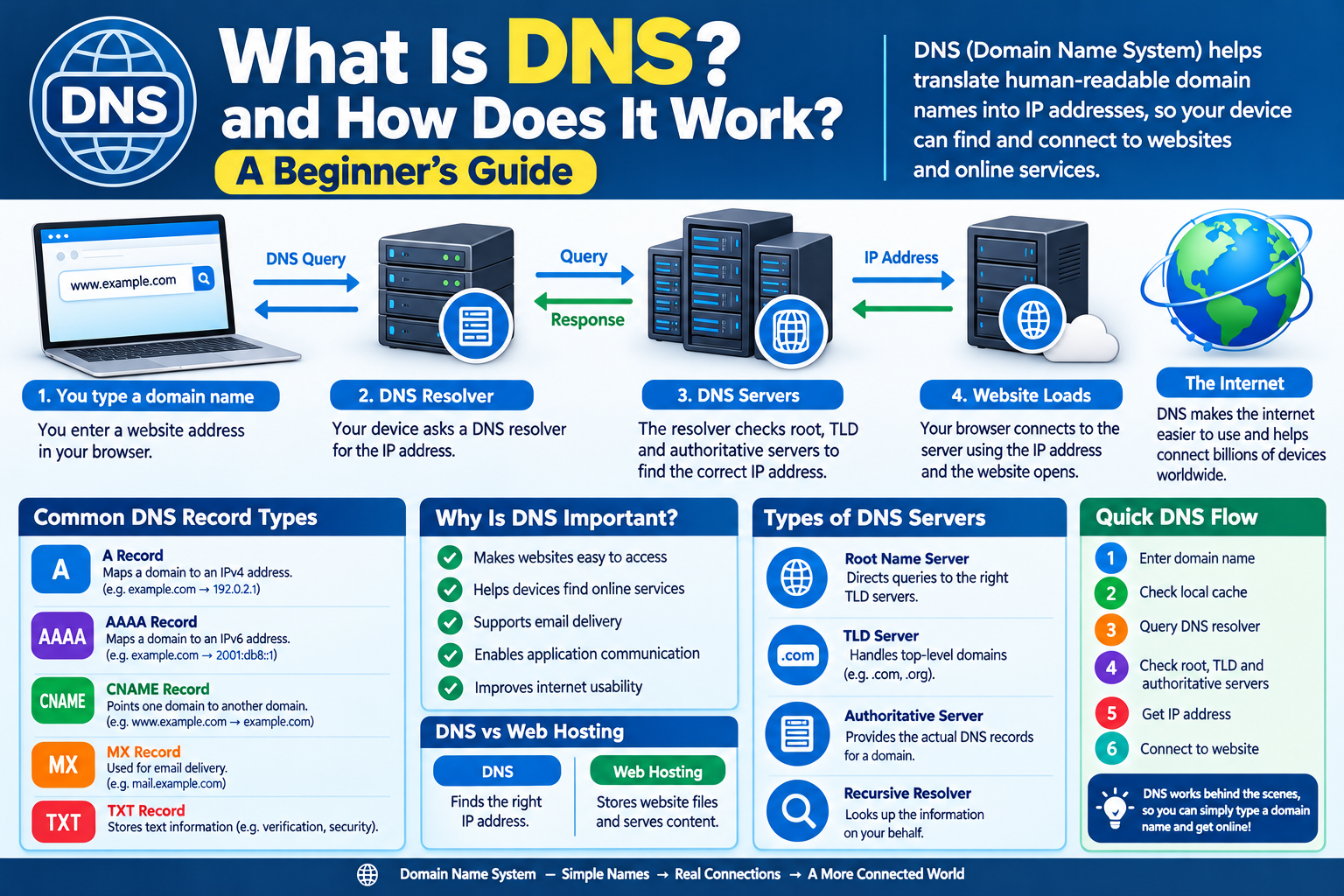
When you enter a domain name into your browser, several steps can occur.
A simplified process is:
- You enter a domain name.
- Your device checks whether the answer is already available locally.
- A DNS resolver may be contacted.
- The resolver searches for the appropriate DNS information.
- The domain is associated with an IP address.
- Your browser connects to the destination server.
- The requested website begins loading.
Modern DNS systems can involve several servers and caching mechanisms, so the actual process can be more detailed.
What Is a DNS Resolver?
A DNS resolver is a service that receives DNS queries and helps find the appropriate answer.
When your device needs to determine the IP address associated with a domain, it can send a DNS query to a configured resolver.
The resolver may already have the information stored in its cache. If not, it can query other DNS servers to find the required information.
What Is a DNS Query?
A DNS query is a request for information about a domain.
For example, your device may effectively ask:
“What IP address is associated with this domain?”
The DNS system processes the request and returns the relevant information when available.
Different types of DNS queries can request different kinds of information.
What Is a DNS Server?
A DNS server is a server that stores, processes, or provides DNS information.
There are different roles within the DNS system.
Important types include:
- Recursive resolvers
- Root name servers
- Top-level domain servers
- Authoritative name servers
Each plays a different role in resolving domain names.
What Is an Authoritative DNS Server?
An authoritative DNS server contains the official DNS information for a particular domain or zone.
For example, when a domain owner configures DNS records, those records are ultimately served by the authoritative DNS infrastructure for the domain.
The authoritative server provides information about where services associated with the domain can be found.
What Are Root DNS Servers?
Root DNS servers are an important part of the global DNS hierarchy.
They help direct DNS queries toward the appropriate top-level domain servers.
There are root server systems distributed around the world, operated through a coordinated infrastructure.
Users generally do not interact with root servers directly. They are part of the background system that makes DNS resolution possible.
What Is a TLD?
TLD stands for Top-Level Domain.
It is the final part of a domain name.
Examples include:
.com.org.net.edu- Country-code domains such as
.pk
TLD infrastructure helps DNS systems locate the authoritative servers responsible for particular domains.
What Is an A Record?
An A record is a DNS record that associates a domain or hostname with an IPv4 address.
For example, a simplified DNS configuration could contain:
example.com → 192.0.2.10
The actual address used by a website depends on its hosting and network configuration.
What Is an AAAA Record?
An AAAA record is used to associate a domain or hostname with an IPv6 address.
IPv6 addresses are much larger than IPv4 addresses and use a different format.
A website can have both A and AAAA records when it supports both IPv4 and IPv6 connectivity.
What Is a CNAME Record?
A CNAME record can point one hostname to another hostname.
For example:
www.example.com → example.com
CNAME records can be useful when multiple hostnames need to reference another domain name.
What Is an MX Record?
An MX record stands for Mail Exchange record.
MX records help identify the mail servers responsible for receiving email for a domain.
For example, when someone sends an email to an address using your domain, DNS information can help determine which mail servers should receive that message.
What Is a TXT Record?
A TXT record stores text information associated with a domain.
TXT records can be used for different purposes, including domain verification and email-related security configurations.
Website and email administrators may use TXT records as part of various services.
What Is DNS Caching?
DNS caching means storing DNS information temporarily so it does not need to be looked up repeatedly.
Caching can happen in several places, including:
- Web browsers
- Operating systems
- Routers
- DNS resolvers
Caching can reduce repeated DNS requests and improve response times.
However, cached information can also mean that DNS changes may not appear immediately everywhere.
What Is DNS TTL?
TTL stands for Time to Live.
In DNS, TTL determines how long a DNS response can generally remain cached before it should be refreshed.
For example, a DNS record might have a TTL of several hours.
The appropriate TTL depends on the needs of the domain and how frequently its DNS information changes.
Why Do DNS Changes Take Time?
When a DNS record is changed, different systems may still have the previous information stored in their caches.
As those cached records expire, systems can obtain the updated information.
This is why DNS changes may not appear instantly for every user.
The time required can depend on factors such as TTL values, caching behavior, and DNS configuration.
What Happens If DNS Stops Working?
If DNS resolution fails, your internet connection may still technically be active, but your device may have trouble finding websites by their domain names.
Possible symptoms include:
- Websites failing to open
- “DNS server unavailable” messages
- Domain names not resolving
- Some online services becoming inaccessible
DNS problems can occur because of local settings, router issues, resolver problems, network outages, or incorrect domain configuration.
Common DNS Problems
Incorrect DNS Records
A wrongly configured record can prevent a domain from pointing to the correct service.
Expired Domain
If a domain registration expires, associated services may stop working correctly.
Incorrect Nameservers
A domain must use the appropriate nameserver configuration for its DNS records.
DNS Cache Issues
Old cached information can temporarily cause users to see previous DNS settings.
Resolver Problems
A DNS resolver can occasionally experience service or connectivity issues.
How to Troubleshoot DNS Problems
If a website does not open, you can try a few basic troubleshooting steps.
1. Check Your Internet Connection
Make sure other websites or online services work normally.
2. Try Another Device
If the website works on another device, the problem may be local to your original device.
3. Restart Your Router
Restarting network equipment can sometimes resolve temporary DNS or connectivity issues.
4. Check DNS Settings
Your device or router may be configured to use a particular DNS resolver.
5. Clear Local DNS Cache
Some operating systems allow users to clear locally cached DNS information.
6. Check the Domain Configuration
If you manage the website, verify that the domain’s nameservers and DNS records are configured correctly.
DNS and Website Hosting
DNS and web hosting perform different jobs.
DNS helps users and devices find the correct network destination.
Web hosting provides the server environment where website files and applications are stored and delivered.
A website generally needs both a domain configuration and a hosting environment.
DNS and Domain Names
A domain name is the human-readable address used to access a website.
DNS is the system that helps translate that name into the information needed for network communication.
For example:
Domain name → DNS → IP address → Server → Website
This simplified chain shows how the different parts work together.
Is DNS a Security System?
DNS was originally designed primarily for naming and resolution rather than complete security.
However, DNS can be involved in security technologies and protections.
Some DNS-related security approaches can help with:
- Blocking known malicious domains
- Detecting suspicious requests
- Protecting users from certain harmful destinations
- Verifying domain ownership
- Supporting email authentication
DNS should still be considered only one part of a broader security strategy.
What Is DNSSEC?
DNSSEC, or Domain Name System Security Extensions, adds cryptographic protections to DNS information.
It is designed to help users and systems verify that DNS responses have not been improperly modified during resolution.
DNSSEC does not encrypt all internet traffic. Instead, it focuses on helping validate DNS data.
Public DNS vs. Private DNS
DNS can be used in both public and private environments.
Public DNS
Public DNS infrastructure helps resolve publicly available internet domain names.
Private DNS
Private DNS can be used within organizations or private networks to resolve internal names and services.
For example, a company may use private DNS for internal systems that should not be publicly accessible.
DNS and Privacy
DNS queries can reveal information about which domains a device is attempting to access.
Depending on the DNS setup, these queries may be visible to network operators, DNS service providers, or other systems involved in the connection.
Some modern technologies provide additional protection for DNS traffic.
Users should understand that DNS privacy is only one part of overall online privacy.
Common DNS Misunderstandings
DNS Is the Internet
DNS is an important internet service, but it is not the internet itself.
DNS Stores Website Content
DNS normally provides information about network services. It does not store the actual webpage content that you read.
Changing DNS Always Makes Internet Faster
Changing DNS providers can sometimes affect DNS lookup performance, but it does not automatically increase the speed of every part of your internet connection.
DNS Is the Same as Hosting
DNS and hosting have different functions. DNS helps locate services, while hosting provides the infrastructure that serves website content.
DNS Checklist for Beginners
Remember these basic points:
- DNS stands for Domain Name System.
- DNS helps translate domain names into network information.
- DNS resolvers process DNS queries.
- Authoritative servers provide domain DNS information.
- A records are used for IPv4 addresses.
- AAAA records are used for IPv6 addresses.
- MX records are related to email delivery.
- TXT records can store various types of text information.
- DNS caching can improve efficiency.
- DNS changes may take time to appear everywhere.
- DNS is different from web hosting.
Frequently Asked Questions
What does DNS stand for?
DNS stands for Domain Name System.
What does DNS do?
DNS helps translate human-readable domain names into network information, such as IP addresses, so devices can locate online services.
Is DNS the same as an IP address?
No. An IP address identifies a network destination, while DNS is the system that helps associate domain names with network information.
What is a DNS resolver?
A DNS resolver receives DNS queries and finds the appropriate DNS information, often using cached data or querying other DNS servers.
Why does a DNS change take time?
DNS information can be cached by browsers, operating systems, routers, and resolvers. Cached information may remain available until its TTL expires or the cache is refreshed.
Can DNS affect website access?
Yes. If DNS resolution fails or domain records are incorrectly configured, a website may be difficult or impossible to access using its domain name.
Final Thoughts
DNS is one of the fundamental systems that makes the internet easier to use. Instead of requiring users to remember numerical IP addresses, DNS allows people to access online services through familiar domain names.
From A and AAAA records to MX records, DNS caching, resolvers, and authoritative servers, many components work together behind the scenes.
Understanding the basics of DNS can help beginners troubleshoot common website and network problems and better understand what happens when they enter a website address into a browser.