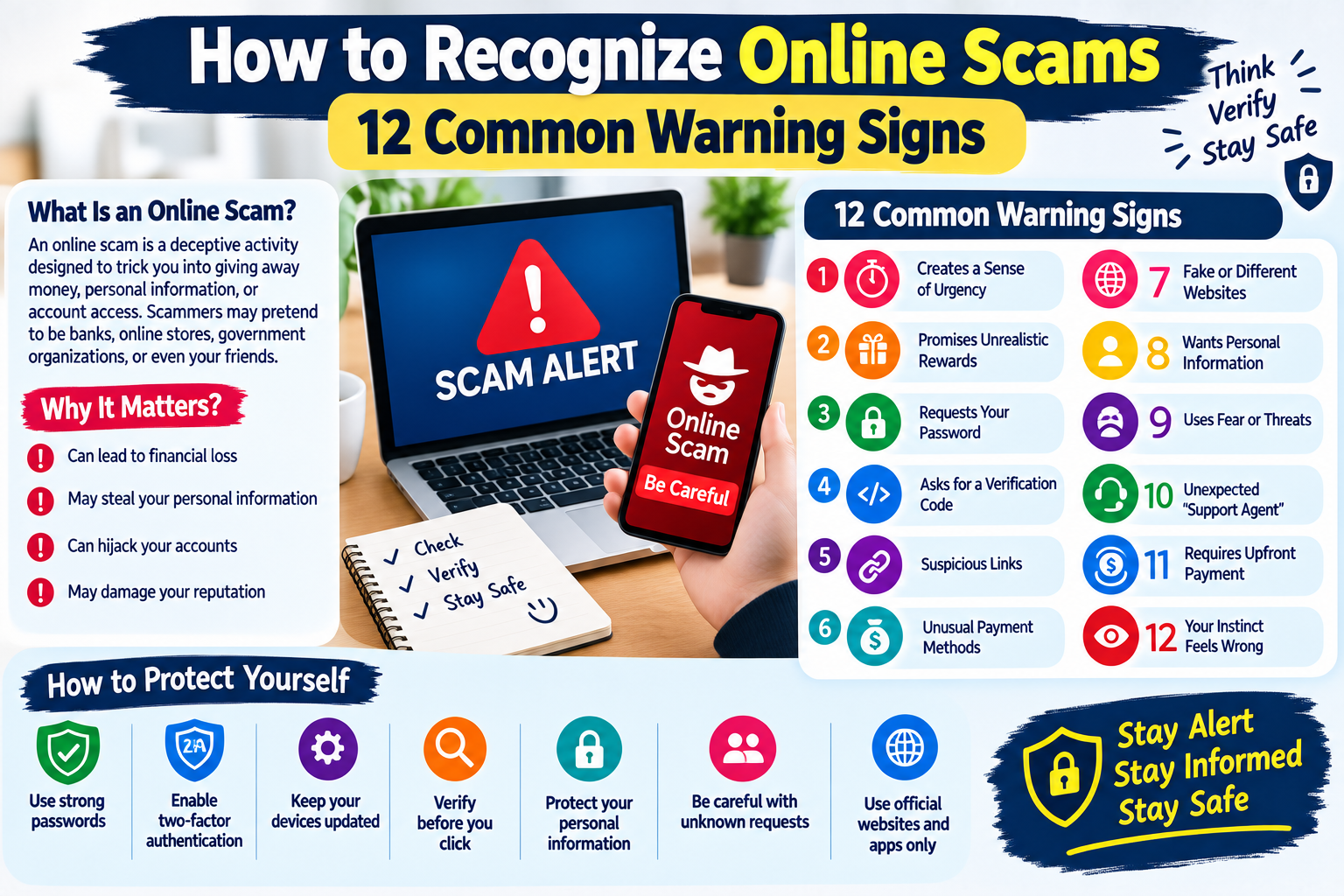
How to Recognize Online Scams: 12 Common Warning Signs
The internet has made it easier than ever to shop, communicate, work, study, and manage everyday activities online. However, the growth of online services has also created more opportunities for scammers to target internet users.
Online scams can appear in many different forms. A person may receive a suspicious email, a fake website link, an unexpected message, a fraudulent job offer, or a social media request. Some scams are easy to recognize, while others are designed to look professional and trustworthy.
Learning how to identify common warning signs can help you make safer decisions online.
In this guide, we will discuss 12 common signs of online scams, along with practical steps you can take to protect yourself.
What Is an Online Scam?
An online scam is a deceptive activity designed to trick someone into giving away money, personal information, account access, or other valuable information.
Scammers may pretend to be:
- Banks or financial companies
- Online stores
- Government organizations
- Technology companies
- Employers
- Friends or family members
- Customer support representatives
- Delivery companies
- Social media platforms
The goal is usually to make the victim trust the scammer and take a specific action.
That action might involve clicking a link, sending money, sharing a password, downloading software, or providing personal information.
Why Are Online Scams Difficult to Recognize?
Modern scams can look surprisingly convincing.
Scammers may copy company logos, create professional-looking websites, use realistic messages, or pretend to know basic information about their targets.
They may also create a sense of urgency so that people do not have enough time to think carefully.
For this reason, online safety requires more than simply looking for spelling mistakes or poor website design.
The most important skill is learning to pause, verify, and think before acting.
12 Common Warning Signs of Online Scams
1. The Message Creates a Sense of Urgency
One of the most common scam techniques is pressure.
A message may say:
- “Act immediately.”
- “Your account will be closed today.”
- “You must verify your information now.”
- “Your payment has failed.”
- “You have only a few minutes.”
The purpose is to make you react emotionally instead of checking whether the message is legitimate.
What to do
Stop and verify the information independently.
If a company claims there is a problem with your account, open its official website or application yourself rather than using a link from the suspicious message.
2. You Are Promised an Unrealistic Reward
Be careful when someone promises something that seems too good to be true.
Examples include:
- Guaranteed large profits
- Unexpected prize winnings
- Free expensive products
- Guaranteed jobs with little work
- Huge rewards for a small payment
Legitimate opportunities can certainly provide benefits, but unrealistic promises should always be investigated carefully.
Remember
A promise of easy money does not automatically mean the opportunity is genuine.
3. Someone Requests Your Password
Legitimate services generally do not need you to send your password to another person through email, chat, or social media.
Be suspicious if someone asks you to provide:
- Your password
- Login credentials
- Security questions
- Authentication codes
- Recovery codes
Never share sensitive login information simply because someone claims to be customer support.
4. You Are Asked for a Verification Code
Verification codes are designed to help protect accounts.
A scammer may try to obtain your code after already learning your username or password.
They might say:
“I just sent you a code. Please tell me the code so I can verify your account.”
Do not provide the code.
If you receive an unexpected verification code, check your account security rather than giving the code to someone else.
5. The Link Looks Suspicious
Before clicking a link, examine it carefully.
A suspicious link may contain:
- An unusual domain name
- Misspelled words
- Random characters
- Unexpected subdomains
- A shortened URL you do not recognize
- A domain that looks similar to a legitimate company
For important accounts, it is safer to type the official website address yourself or use the company’s official application.
6. Someone Asks for Payment Through an Unusual Method
Be cautious when someone unexpectedly asks you to pay using methods that offer limited protection or are difficult to reverse.
A scammer may pressure you to use:
- Cryptocurrency
- Gift cards
- Unusual money-transfer methods
- Direct transfers to personal accounts
The payment method alone does not prove that something is a scam, but an unusual payment request combined with pressure is a significant warning sign.
7. The Website Looks Different From the Official Website
A fake website may copy the design of a legitimate company.
Check the website address carefully.
Look for:
- Incorrect spelling
- Strange domain extensions
- Extra words in the domain
- Missing security information
- Unusual login pages
Do not assume that a professional-looking website is automatically legitimate.
A website’s appearance can be copied.
8. Someone Wants Personal Information
Be careful when an unexpected message asks for sensitive information.
This could include:
- Full name
- Home address
- Phone number
- Date of birth
- Account details
- Identification information
- Financial information
- Login credentials
Before providing information, ask yourself:
Why does this person need this information, and how can I verify who they are?
If you cannot independently confirm the request, do not provide the information.
9. The Person Uses Fear or Threats
Some scams rely on fear.
A message may claim that:
- You have committed a legal violation
- Your account will be permanently deleted
- You owe an unexpected payment
- Your device has been infected
- Your account has been compromised
- Legal action will happen immediately
Fear can cause people to make quick decisions.
Instead of reacting immediately, verify the claim through an official source.
10. You Are Contacted by an Unexpected “Support Agent”
Scammers sometimes pretend to work for technology companies, banks, marketplaces, or other services.
They may contact you unexpectedly and claim that your account has a serious problem.
A legitimate support team should not require you to hand over your password or security codes.
If you need assistance, contact the company through its official website or application.
Do not rely on contact information provided by the suspicious person.
11. The Opportunity Requires an Upfront Payment
Be especially careful with unexpected offers that require you to pay money before receiving a promised benefit.
Examples can include:
- Fake employment opportunities
- Fake investment opportunities
- Fake prizes
- Fake loans
- Fake business opportunities
- Fake service offers
An upfront payment does not always mean something is fraudulent, but you should carefully verify the organization, terms, and payment requirements before sending money.
12. Your Instinct Says Something Is Wrong
Sometimes the warning signs are difficult to explain individually, but the overall situation simply feels unusual.
Maybe:
- The story does not make sense.
- The person is rushing you.
- The offer seems unusually generous.
- The website feels unfamiliar.
- The payment request seems strange.
Do not ignore that feeling.
You are allowed to stop and investigate before making a decision.
When something feels suspicious, slowing down is one of the safest choices you can make.
What Should You Do If You Encounter a Scam?
If you believe you have encountered an online scam, avoid communicating further with the suspicious person.
Depending on the situation, you can:
- Stop the conversation.
- Do not click additional links.
- Do not provide passwords or verification codes.
- Avoid sending money.
- Save relevant information such as messages or transaction details.
- Report the account, message, or website through the appropriate service.
- Change passwords if you believe your credentials may have been exposed.
- Contact your bank or payment provider quickly if money was sent.
Taking action quickly can sometimes reduce the damage.
What If You Already Clicked a Suspicious Link?
Do not panic.
The appropriate response depends on what happened after clicking the link.
If you only opened the page and did not enter information or download anything, the risk may be lower.
If you entered a password, consider changing that password immediately from a trusted device.
If you entered financial information or sent money, contact the relevant financial institution as soon as possible.
If you downloaded an unfamiliar application or file, consider disconnecting the device from the internet and checking it with reputable security software.
Simple Online Scam Prevention Checklist
Use this checklist whenever you receive an unexpected online message:
- Stop before responding
- Check who contacted you
- Verify the website address
- Avoid suspicious links
- Never share passwords
- Never share authentication codes
- Be careful with unexpected payment requests
- Research unfamiliar companies
- Avoid unrealistic promises
- Do not let someone pressure you
- Contact organizations through official channels
- Report suspicious activity
Frequently Asked Questions
What is the easiest way to identify an online scam?
Look for combinations of warning signs such as urgency, unrealistic promises, requests for sensitive information, suspicious links, unusual payment methods, and pressure to act quickly.
Can a professional-looking website be a scam?
Yes. Scammers can create websites that look professional and may copy the design of legitimate organizations. Always check the website address and verify the organization independently.
Should I click a link from an unexpected email?
It is safer not to click unexpected or suspicious links. Instead, access the organization’s official website directly.
Can scammers pretend to be someone I know?
Yes. Scammers may use compromised accounts or copied profile information to impersonate other people. If a friend or relative suddenly asks for money or sensitive information, verify the request through another communication method.
What should I do if I gave a scammer my password?
Change the affected password immediately. If you reused the same password elsewhere, change it on those accounts too. Enable two-factor authentication where available and review recent account activity.
Are all online offers scams?
No. Many legitimate offers exist online. The important thing is to verify the company, understand the terms, and avoid making decisions based only on pressure or unrealistic promises.
Final Thoughts
Online scams are constantly changing, but many of them rely on familiar psychological techniques: urgency, fear, curiosity, trust, and unrealistic rewards.
The best defense is to slow down and verify information before taking action.
Never share passwords or security codes with unexpected contacts, be careful with suspicious links, research unfamiliar offers, and use official channels when contacting companies.
A few extra minutes of caution can help protect your accounts, money, and personal information.
Think before you click, verify before you trust, and never let online pressure make the decision for you.