What Is a QR Code and How Does It Work? A Beginner’s Guide
QR codes have become a common part of everyday life. You may see them on restaurant menus, product packaging, posters, websites, tickets, payment systems, advertisements, and business cards.
Although QR codes look like simple patterns of black and white squares, they can store information that a smartphone camera can quickly read. They make it easy to access websites, share contact details, open applications, and perform other digital tasks.
In this beginner-friendly guide, we will explain what a QR code is, how it works, where it is used, and how to scan QR codes safely.
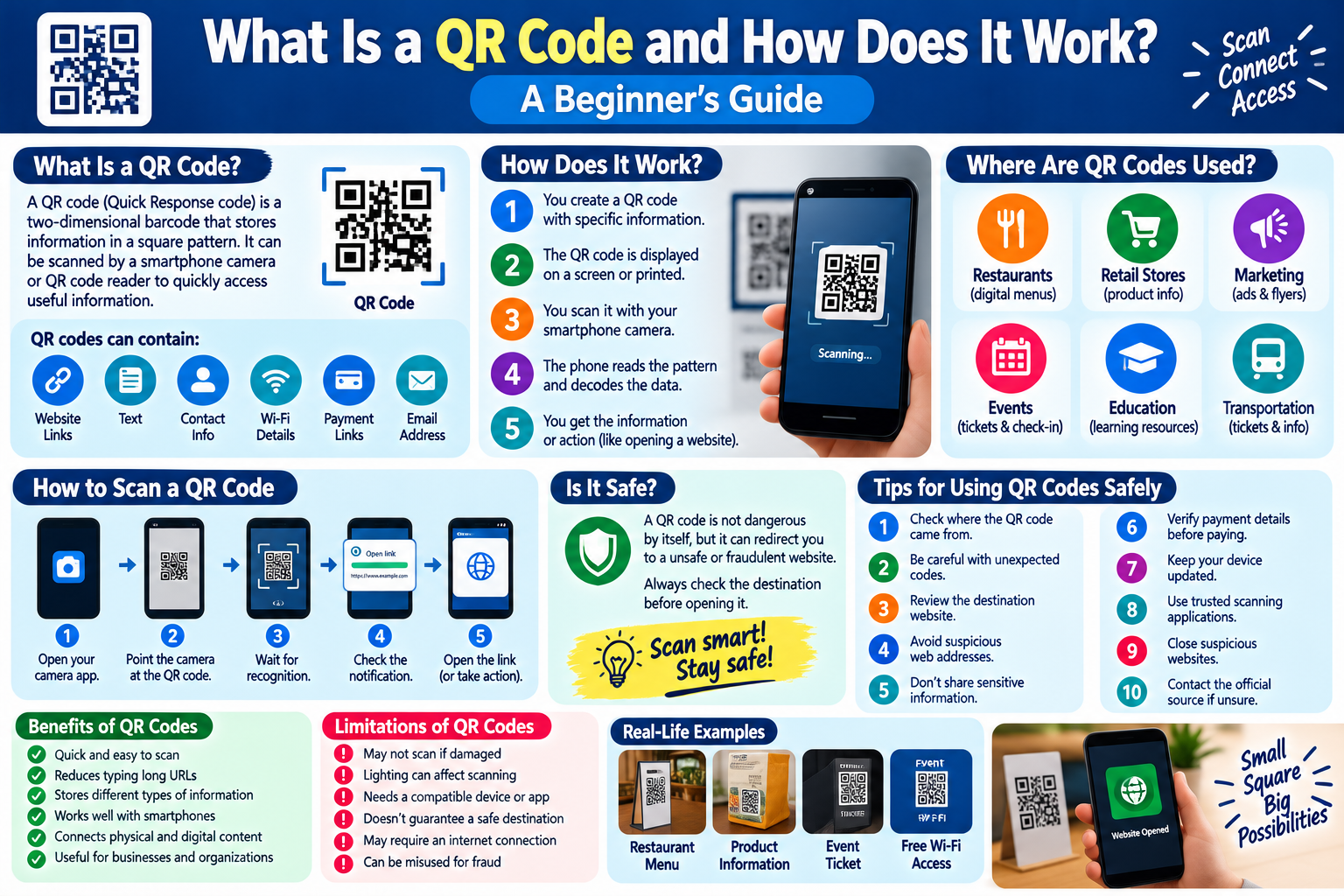
What Is a QR Code?
QR stands for Quick Response.
A QR code is a type of two-dimensional barcode that can store information in a square pattern. Unlike traditional barcodes that generally store information in one direction, QR codes can store information across both horizontal and vertical dimensions.
A smartphone camera or QR scanning application can recognize the pattern and convert it into useful information.
Depending on how it was created, a QR code may contain:
- A website address
- Text
- Contact information
- Wi-Fi details
- A payment-related link
- An email address
- A phone number
- An application link
- Event or ticket information
How Does a QR Code Work?
Using a QR code is relatively simple.
The process usually works like this:
- A person creates a QR code containing specific information.
- The QR code is displayed on a screen or printed on a physical surface.
- A smartphone camera scans the code.
- The phone recognizes the pattern.
- The encoded information is processed.
- The user receives an action or information, such as opening a website.
For example, a restaurant may place a QR code on a table. When a customer scans it, their phone may open the restaurant’s digital menu.
What Information Can a QR Code Store?
QR codes can be used for different types of information.
Website Links
One of the most common uses is directing users to a website.
Instead of typing a long web address manually, users can scan the QR code and open the page directly.
Contact Information
QR codes can contain contact information such as a person’s name, phone number, email address, or business details.
Wi-Fi Information
Some QR codes can contain Wi-Fi network information. A compatible smartphone may allow the user to connect to the network without manually entering the password.
Text
A QR code can also contain simple text messages or instructions.
Digital Tickets
Events, transportation services, and other organizations may use QR codes as part of digital ticketing systems.
Where Are QR Codes Used?
QR codes are now used in many different industries.
Restaurants
Restaurants can use QR codes to provide digital menus, ordering systems, or other information.
Retail Stores
Businesses may place QR codes on product packaging to provide additional product information.
Marketing
Companies can use QR codes on posters, flyers, signs, and printed advertisements to direct customers to online resources.
Events
QR codes can be used for event registration, tickets, check-in systems, and schedules.
Education
Schools and educational organizations can use QR codes to provide access to online learning materials and resources.
Transportation
Some transportation systems use QR codes for tickets, boarding information, or travel-related services.
How to Scan a QR Code
Most modern smartphones can scan QR codes using the built-in camera.
Step 1: Open Your Camera
Open the standard camera application on your smartphone.
Step 2: Point the Camera at the QR Code
Hold the phone so the complete QR code appears clearly on the screen.
Step 3: Wait for Recognition
The camera may automatically recognize the QR code.
Step 4: Check the Notification
A notification or link may appear on the screen.
Step 5: Verify Before Opening
Look carefully at the destination address before opening it, especially when the QR code comes from an unfamiliar source.
Are QR Codes Safe?
A QR code itself is simply a way of encoding information. The safety concern usually comes from where the QR code sends you.
For example, a QR code could direct someone to a legitimate website, but it could also lead to a fraudulent or malicious website.
Therefore, users should treat QR codes like links received through other methods.
Before opening a QR code destination, check the web address and make sure it appears legitimate.
How to Use QR Codes Safely
Follow these simple safety practices.
1. Check the Destination
After scanning a QR code, look at the website address before continuing.
2. Be Careful With Unexpected QR Codes
If someone sends you an unexpected QR code through a message, email, or printed notice, think carefully before scanning it.
3. Avoid Entering Sensitive Information
Do not enter passwords, banking information, or other sensitive information on a website simply because a QR code directed you there.
4. Look for Suspicious Web Addresses
Be cautious if the destination uses a strange domain name, unusual spelling, or an address that does not match the organization you expected.
5. Keep Your Phone Updated
Install operating system and security updates to help protect your device.
6. Use Trusted Applications
If your phone requires a separate QR scanning application, download it from a reputable application store.
7. Do Not Trust Printed QR Codes Automatically
A QR code placed in a public location could potentially be replaced or altered. If something seems unusual, verify the information through another trusted source.
8. Avoid Urgent Requests
Be especially careful if a QR code tells you that you must immediately provide payment details, passwords, or other sensitive information.
9. Verify Payment Requests
Before making a payment after scanning a QR code, confirm the recipient, amount, and other transaction details.
10. Close Suspicious Pages
If a scanned QR code opens a suspicious website, close the page and avoid entering any information.
QR Codes and Online Privacy
QR codes can make digital services convenient, but users should also consider privacy.
Scanning a QR code may open a website that records normal web information such as your IP address, browser type, device information, or interaction with the website.
Before using a QR code for an unfamiliar service, consider whether you trust the organization behind it and understand what information you are providing.
Static vs. Dynamic QR Codes
There are two commonly discussed types of QR codes: static and dynamic.
Static QR Codes
A static QR code contains information directly in the code. Once created, the information generally cannot be changed without creating a new QR code.
They are useful for simple information such as a fixed website address or contact details.
Dynamic QR Codes
A dynamic QR code can point to a destination that can be changed or managed through a service.
This can be useful for businesses that want to update the destination without replacing the printed QR code.
Dynamic QR services may also provide analytics, depending on the provider and plan.
Benefits of QR Codes
QR codes provide several practical advantages.
- They are quick to scan.
- They reduce the need to type long web addresses.
- They can store different types of information.
- They work well with smartphones.
- They can connect physical materials to online resources.
- They are useful for businesses and organizations.
- They can make digital services more convenient.
Limitations of QR Codes
QR codes also have some limitations.
- A damaged code may not scan correctly.
- Poor lighting can make scanning difficult.
- Users need a compatible device or application.
- A QR code does not guarantee that the destination is safe.
- Some services require an internet connection after scanning.
- QR codes can be misused to direct people toward fraudulent websites.
QR Code Safety Checklist
Before scanning or using a QR code, remember:
- Check where the QR code came from.
- Scan unexpected codes carefully.
- Review the destination website.
- Avoid suspicious web addresses.
- Never provide sensitive information without verification.
- Verify payment details before confirming a transaction.
- Keep your smartphone updated.
- Use trusted QR scanning tools.
- Close websites that look suspicious.
- Contact the organization through an official channel if something seems wrong.
Frequently Asked Questions
What does QR stand for?
QR stands for Quick Response. It refers to the ability of QR codes to be quickly scanned and interpreted by compatible devices.
Can any smartphone scan a QR code?
Many modern smartphones can scan QR codes using their built-in camera. Older devices may require a separate scanning application.
Can a QR code contain a website link?
Yes. Website links are one of the most common types of information stored in QR codes.
Can QR codes be dangerous?
The QR code itself is not normally dangerous, but it can direct users to unsafe websites or fraudulent services. Always check the destination before taking action.
Do QR codes work without internet access?
A QR code can contain information that can be read without internet access, such as plain text. However, an internet connection may be required if the QR code opens an online website or service.
Can QR codes store personal information?
Yes. QR codes can encode information such as contact details. Users should be careful about what personal information they share through QR codes.
Final Thoughts
QR codes are a simple and convenient technology that connects physical objects with digital information. They are used in restaurants, stores, businesses, events, education, transportation, and many other areas.
Using a QR code is usually easy, but convenience should not replace caution. Always check where a QR code came from, review the destination before opening it, and avoid providing sensitive information unless you have verified that the website or service is legitimate.
By understanding how QR codes work and following basic safety practices, users can take advantage of this useful technology while making smarter decisions online.