What Is Cloud Computing and How Does It Work? A Beginner’s Guide
Cloud computing has become an important part of modern technology. People use cloud-based services every day, often without realizing how much of their digital activity depends on the cloud.
When you store photos online, use web-based email, stream videos, collaborate on documents, or access an application through the internet, you may be using cloud computing.
For businesses, cloud computing can provide access to computing resources without requiring them to own and maintain all the necessary physical hardware themselves.
But what exactly is cloud computing, and how does it work?
In this beginner-friendly guide, we will explain what cloud computing is, how it works, the main types of cloud services, its benefits, potential challenges, and practical examples of everyday cloud use.
What Is Cloud Computing?
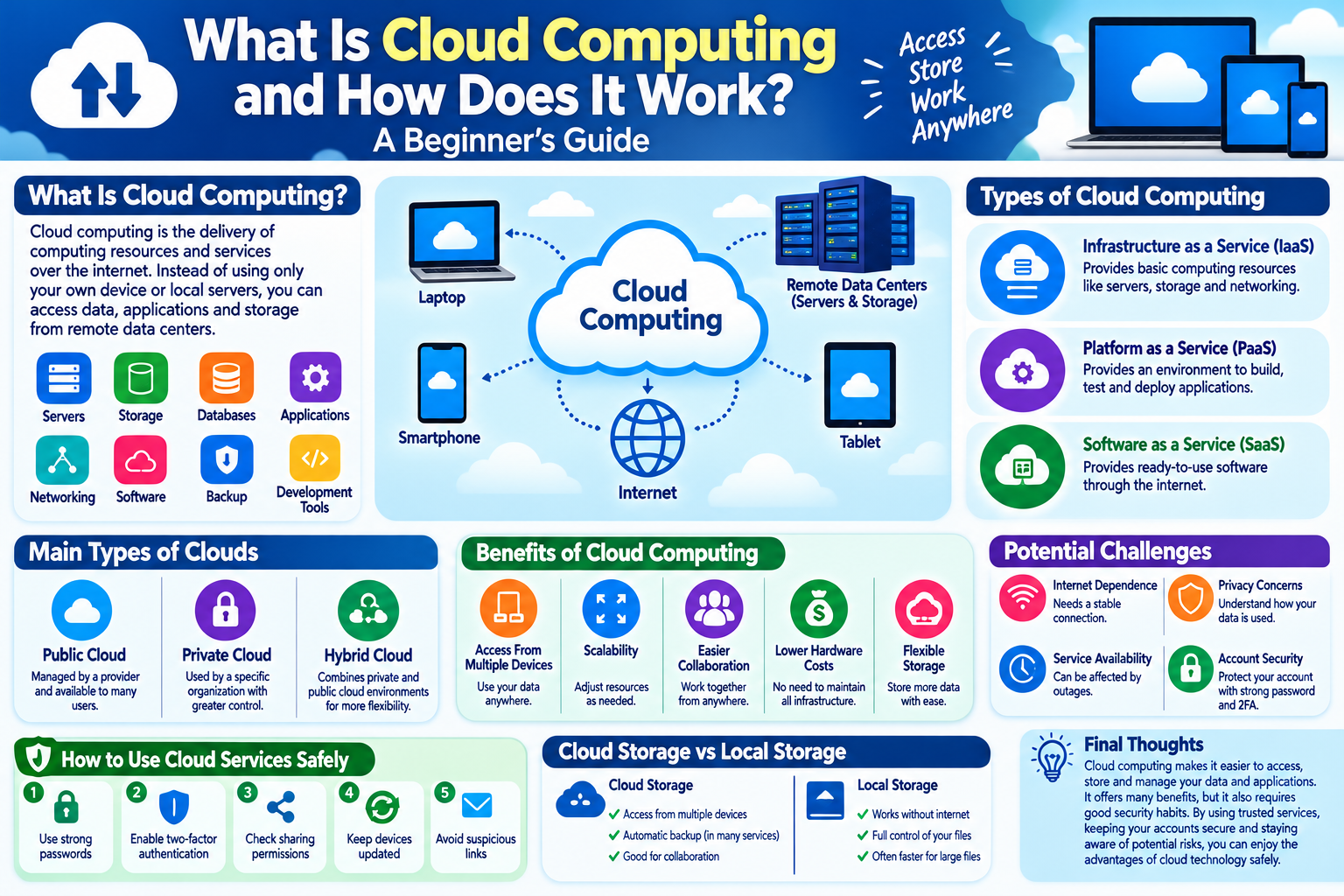
Cloud computing is the delivery of computing resources and services over the internet.
Instead of relying entirely on hardware located in your home or office, cloud services can provide access to resources hosted in remote data centers.
These resources can include:
- Storage
- Computing power
- Databases
- Software
- Networking
- Servers
- Backup systems
- Development tools
The word “cloud” does not mean that your information is floating somewhere in the sky. It generally refers to remote computing infrastructure that you access through a network, usually the internet.
How Does Cloud Computing Work?
Cloud computing depends on large networks of physical servers and other infrastructure.
When you use a cloud service, your device communicates with remote systems that process requests and store or deliver information.
For example, when you upload a photo to cloud storage:
- You select the photo on your device.
- The application sends the photo through the internet.
- The cloud service receives the file.
- The file is stored on remote infrastructure.
- You can later access it from supported devices.
The exact technology behind the service can be very complex, but the basic idea is simple: computing resources are provided remotely instead of being located entirely on your own device.
Examples of Cloud Computing
Cloud computing is used in many everyday situations.
Examples include:
- Online email
- Cloud photo storage
- Online document editing
- Video streaming
- File synchronization
- Website hosting
- Online collaboration tools
- Business applications
- Data backup
- Software development platforms
You may already use cloud services without thinking about the underlying technology.
The Main Types of Cloud Computing
Cloud computing can be divided into several categories.
1. Infrastructure as a Service
Infrastructure as a Service, commonly called IaaS, provides basic computing resources such as servers, storage, and networking.
Instead of buying physical servers, an organization can rent computing infrastructure from a cloud provider.
This can provide flexibility when computing requirements change.
2. Platform as a Service
Platform as a Service, or PaaS, provides an environment where developers can build, test, and deploy applications.
The cloud provider manages much of the underlying infrastructure, allowing developers to focus more on their applications.
3. Software as a Service
Software as a Service, commonly known as SaaS, provides software through the internet.
Users generally access the application through a web browser or dedicated application rather than installing and maintaining the entire system themselves.
Email platforms, online office applications, and many business tools can operate using this model.
Public, Private, and Hybrid Clouds
Cloud environments can also be categorized according to how infrastructure is managed.
Public Cloud
Public cloud services are provided through infrastructure operated by a cloud provider.
Organizations can use computing resources without owning all of the underlying physical infrastructure.
Private Cloud
A private cloud environment is designed for use by a specific organization.
It can provide greater control over infrastructure and configuration, depending on how it is designed and managed.
Hybrid Cloud
A hybrid cloud combines private and public cloud environments.
An organization may keep certain workloads in a private environment while using public cloud resources for other tasks.
Benefits of Cloud Computing
Cloud computing offers several potential advantages.
1. Access From Different Devices
Cloud services can allow users to access information and applications from multiple devices.
For example, a document stored online may be accessible from:
- Laptop
- Desktop computer
- Tablet
- Smartphone
The exact availability depends on the service.
2. Flexible Storage
Cloud storage can make it easier to store large amounts of information without relying entirely on local device storage.
Users can also access stored information from supported devices when an internet connection is available.
3. Scalability
Businesses can increase or decrease computing resources according to their needs.
This can be useful for organizations whose traffic or workload changes over time.
4. Easier Collaboration
Cloud-based applications can allow multiple people to work with shared files or projects.
This can make remote collaboration easier because team members may be able to access the same resources from different locations.
5. Reduced Hardware Requirements
Organizations using cloud services may not need to purchase as much physical infrastructure for certain workloads.
Instead, they can use resources provided by a cloud provider.
However, cloud services still involve costs, and organizations need to choose solutions appropriate for their requirements.
Potential Challenges of Cloud Computing
Cloud computing has many advantages, but it also has limitations.
Internet Dependence
Many cloud services require an internet connection.
If your connection is unavailable or unreliable, access to certain cloud resources may be limited.
Privacy Considerations
When information is stored with a cloud provider, users should understand how the service handles and protects their data.
Always review the provider’s privacy and security information.
Service Availability
Cloud services depend on infrastructure operated by service providers.
Technical problems or outages can sometimes temporarily affect access.
Account Security
A cloud account may provide access to important information.
If an account is compromised, stored data could potentially be exposed.
Strong passwords and additional authentication methods can help protect cloud accounts.
How to Use Cloud Services Safely
1. Use Strong Account Security
Protect cloud accounts with strong, unique passwords.
Avoid reusing the same password across multiple services.
2. Enable Two-Factor Authentication
If a cloud service supports two-factor authentication, consider enabling it.
This provides an additional security layer beyond your password.
3. Review Sharing Permissions
Cloud services often allow users to share files and folders.
Before sharing information, check who can access it.
Avoid making sensitive files publicly accessible unless there is a genuine reason to do so.
4. Keep Your Devices Updated
Your cloud account may be accessed through computers, smartphones, and tablets.
Keep those devices and their applications updated with appropriate security updates.
5. Be Careful With Suspicious Login Messages
Scammers may send fake messages claiming that your cloud account needs verification.
Do not automatically click links in unexpected messages.
Instead, open the official application or website directly.
Cloud Storage vs Local Storage
Cloud storage and local storage work differently.
Local Storage
Your files are stored directly on a device or storage device.
Examples include:
- Computer hard drive
- SSD
- USB drive
- External hard drive
- Memory card
Cloud Storage
Your files are stored on remote infrastructure and accessed through a network.
Both options have advantages.
Local storage can provide direct access without an internet connection, while cloud storage can make synchronization and access across multiple devices easier.
For important information, maintaining appropriate backups can provide additional protection.
Is Cloud Computing the Same as Cloud Storage?
No.
Cloud storage is one type of cloud service.
Cloud computing is a much broader concept that includes:
- Storage
- Computing
- Databases
- Networking
- Applications
- Development platforms
- Data processing
Cloud storage focuses primarily on storing and accessing data, while cloud computing covers a much wider range of technology services.
Why Do Businesses Use Cloud Computing?
Businesses use cloud technology for many different purposes.
For example, a company may use cloud services for:
- Website hosting
- Data storage
- Employee collaboration
- Business software
- Customer applications
- Data analysis
- Backup systems
- Application development
Cloud computing can provide flexibility, but businesses still need to consider security, cost, performance, compliance, and reliability.
Simple Cloud Computing Checklist
If you use cloud services, remember these basic practices:
- Use a strong password
- Use a unique password
- Enable two-factor authentication
- Review file-sharing permissions
- Keep devices updated
- Avoid suspicious login links
- Back up important information
- Review account activity
- Understand the provider’s privacy policies
- Remove access for people who no longer need it
Frequently Asked Questions
Is cloud computing safe?
Cloud computing can be used safely when appropriate security practices are followed. However, no technology is completely risk-free. Account security, privacy settings, provider security, and user behavior all matter.
Do I need the internet to use cloud services?
Many cloud services require an internet connection, although some applications provide limited offline functionality.
Is cloud storage a backup?
Cloud storage can help protect and access files, but not every cloud-storage setup should automatically be considered a complete backup solution. Important data may benefit from having multiple appropriate copies.
Can I access cloud files from multiple devices?
Many cloud services support access from multiple devices, provided the service and account support those devices.
Is cloud computing only for businesses?
No. Individuals use cloud services every day for email, photos, documents, file storage, streaming, and other online activities.
What is the biggest benefit of cloud computing?
One major benefit is flexible access to computing resources and services without requiring users or organizations to maintain all of the underlying physical infrastructure themselves.
Final Thoughts
Cloud computing has changed how people and organizations use technology.
Instead of keeping every application, file, and computing resource on a local device, cloud services allow many resources to be accessed remotely through the internet.
Cloud computing can provide flexibility, scalability, collaboration, and convenient access to information. At the same time, users should pay attention to account security, privacy, sharing permissions, and reliable backups.
Understanding the basics of cloud technology can help you make better decisions about the online services you use every day.
Cloud computing is not just a technology for large companies. It is already an important part of how modern internet services work.