What Is a QR Code and How Does It Work? A Beginner’s Guide
QR codes have become a common part of everyday life. You may see them on restaurant menus, product packaging, posters, tickets, business cards, advertisements, websites, and payment services.
Instead of typing a long website address or manually entering information, users can scan a QR code with a smartphone and quickly access the information stored in it.
But what exactly is a QR code, how does it work, and what information can it contain?
In this beginner’s guide, we will explain QR codes in simple terms, how they work, where they are used, and how to scan them safely.
What Is a QR Code?
QR code stands for Quick Response code.
A QR code is a two-dimensional barcode that can store information in a pattern of black and white or differently colored areas.
Unlike traditional barcodes, which usually store information in one direction, QR codes can store information across two dimensions.
A smartphone camera or QR scanning application can read the pattern and convert it into useful information.
What Does a QR Code Look Like?
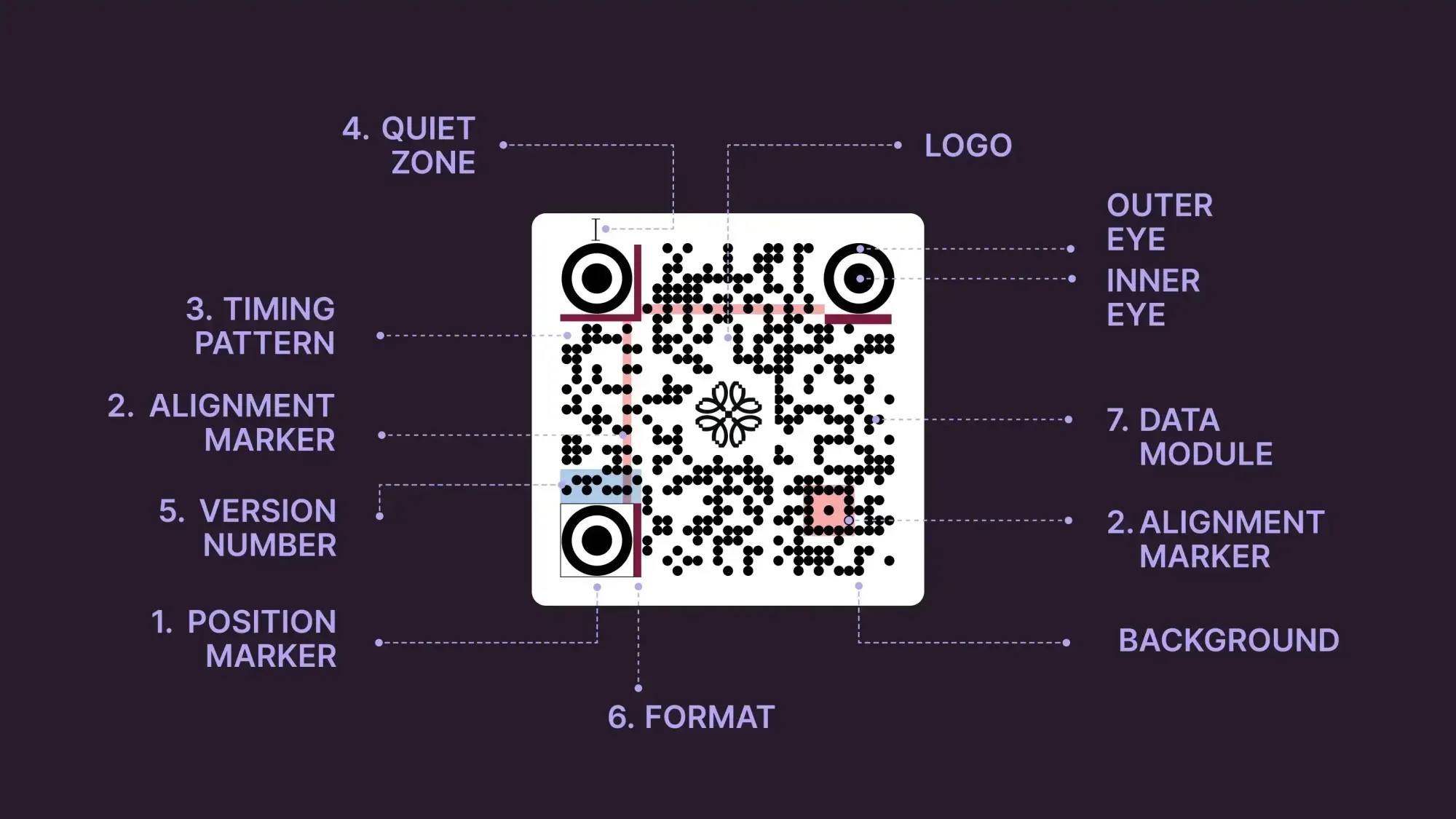
A typical QR code looks like a square containing many small blocks.
You will usually notice three larger square patterns near the corners. These help a scanner identify the position and orientation of the QR code.
The remaining pattern contains the encoded information.
Although many QR codes look similar, the information stored inside them can be completely different.
For example, one QR code might open a website while another might contain contact information.
How Does a QR Code Work?
The basic process is simple:
- Information is converted into a QR code.
- The QR code is displayed or printed.
- A user points a smartphone camera toward it.
- The camera captures the QR code.
- Software recognizes the pattern.
- The encoded information is decoded.
- The phone presents the information or performs the associated action.
For example, if the QR code contains a website address, your phone may display a notification asking whether you want to open that website.
What Can a QR Code Contain?
QR codes can contain different types of information.
Common examples include:
- Website URLs
- Text
- Contact information
- Email addresses
- Phone numbers
- Wi-Fi connection details
- Calendar information
- Location information
- Payment-related information
The exact information a QR code can store depends on how it was created.
QR Codes and Websites
One of the most common uses of QR codes is opening websites.
For example, a business might place a QR code on a poster.
When a customer scans it, the phone can open a webpage containing:
- Business information
- Product details
- Online menus
- Registration forms
- Event information
- Contact details
This makes it easier for people to move from a physical item to a digital resource.
QR Codes on Restaurant Menus
Many restaurants use QR codes to provide digital menus.
A customer can scan the code and open a webpage containing the restaurant’s menu.
This can reduce the need for printed menus and makes it easier for businesses to update information online.
However, users should still check the website address before entering personal or payment information.
QR Codes for Wi-Fi
A QR code can also contain Wi-Fi connection information.
Instead of manually entering a long wireless password, a compatible smartphone may allow the user to scan the QR code and connect to the network.
This can be convenient for:
- Homes
- Offices
- Hotels
- Restaurants
- Events
- Guest networks
Users should only connect to networks they trust.
QR Codes and Contact Information
QR codes can contain contact information.
For example, a business card may include a QR code that contains:
- Name
- Phone number
- Email address
- Website
- Business information
A compatible device can then offer to save the information as a contact.
QR Codes and Payments
QR codes are also used by various payment systems.
A payment-related QR code may contain information needed by a payment application to identify a recipient, transaction, or payment request.
Payment QR codes are particularly important to verify carefully because scanning the wrong code could direct a payment to an unintended destination.
Before confirming a payment, always check the recipient and transaction details displayed by your payment application.
Static vs. Dynamic QR Codes
There are different ways to create QR codes.
Static QR Code
A static QR code normally contains information directly encoded into the QR pattern.
For example, it might contain a specific website address.
If the encoded information changes, the QR code generally needs to be replaced with a new one.
Dynamic QR Code
A dynamic QR code can be associated with a service that allows the destination or information to be changed without replacing the printed QR code.
For example, a business might print one QR code and later change the webpage to which it directs visitors.
The exact features of dynamic QR services depend on the provider.
How to Scan a QR Code
Most modern smartphones can scan QR codes using the built-in camera.
A basic process is:
- Open your phone’s camera.
- Point it toward the QR code.
- Keep the code visible on the screen.
- Wait for the phone to recognize it.
- Tap the notification or link if you trust the destination.
Some devices may require a dedicated QR scanner or another compatible application.
Do You Need a QR Scanner App?
Many modern smartphones can recognize QR codes directly through their camera applications.
Older devices may require a separate scanning application.
If you install a QR scanner app, download it from a reputable app store and check the application’s permissions and developer information.
Avoid installing unknown applications simply because a website tells you to do so.
Are QR Codes Safe?
A QR code itself is simply a way of encoding information. The safety of scanning one depends largely on what the QR code leads to or what action it causes.
A QR code could direct you to:
- A legitimate website
- A phishing page
- An unwanted download
- A fake login page
- A payment request
- Another potentially unsafe destination
Therefore, you should treat QR codes similarly to unfamiliar links.
How to Use QR Codes Safely
Follow these simple safety practices.
1. Check the Website Address
After scanning a QR code, look at the destination address before opening it.
2. Be Careful With Login Pages
If a QR code opens a login page, make sure the domain belongs to the legitimate service before entering your username or password.
3. Verify Payments
Before approving a QR-based payment, check the recipient, amount, and other transaction details.
4. Avoid Unknown Downloads
Do not install applications or files simply because a QR code asks you to.
5. Be Careful With Public QR Codes
QR codes placed in public areas can potentially be replaced or modified by someone else.
If a code looks damaged, covered, or suspicious, consider finding the organization’s official website directly instead.
QR Code Scams
QR-code-based scams can use familiar-looking codes to direct users to fraudulent websites.
For example, a fake QR code could be placed over a legitimate QR code on a poster or payment location.
A scammer may try to convince users to:
- Enter passwords
- Provide financial information
- Download software
- Make payments
- Share personal information
The QR code itself may look completely normal, which is why checking the destination is important.
QR Codes and Privacy
QR codes can contain or lead to information involving privacy.
For example, a QR code may direct you to a website that collects:
- IP address
- Browser information
- Account information
- Contact details
- Analytics information
The information collected depends on the destination website and its technology.
Before submitting personal information, review the website and its privacy practices when appropriate.
Advantages of QR Codes
QR codes have several practical advantages.
Quick Access
Users can access information without typing a long address.
Easy to Share
A QR code can be printed on many physical materials.
Contactless
Users can access digital information without handling shared printed materials.
Flexible
QR codes can be used for websites, contact information, Wi-Fi, tickets, and other purposes.
Convenient
A smartphone can scan a QR code within seconds.
Limitations of QR Codes
QR codes also have some limitations.
Requires a Compatible Device
Users generally need a camera-equipped smartphone or another suitable scanner.
Poor Printing Can Cause Problems
Damaged, blurry, or very small QR codes may be difficult to scan.
Destination May Change
A dynamic QR code may lead to different content over time.
Security Risks
A QR code can direct users to an unsafe website or unwanted action.
QR Codes vs. Traditional Barcodes
Traditional barcodes and QR codes are both machine-readable systems, but they have different designs and capabilities.
Traditional Barcode
- Usually one-dimensional
- Often stores a limited amount of information
- Commonly used for product identification
QR Code
- Two-dimensional
- Can store more types of information
- Can be scanned using many modern smartphones
- Commonly used for websites, contact information, payments, and other digital interactions
How Businesses Use QR Codes
Businesses can use QR codes in many ways.
For example:
- Restaurant menus
- Product information
- Customer surveys
- Event registration
- Business cards
- Digital coupons
- Website links
- Contact information
- Instructions and manuals
The best use depends on the business and its audience.
Tips for Creating a Good QR Code
If you create QR codes for your own website or business, keep these points in mind:
- Make the QR code large enough to scan.
- Use good contrast.
- Avoid placing it on a visually confusing background.
- Test it with multiple smartphones.
- Make sure the destination works correctly.
- Keep the destination mobile-friendly.
- Do not change the destination unexpectedly without informing users.
- Place the QR code where people can easily access it.
QR Code Checklist
Before scanning a QR code:
- Check where the code came from.
- Scan only codes from trusted sources.
- Check the destination URL.
- Avoid suspicious downloads.
- Verify payment details.
- Do not enter passwords on unfamiliar websites.
- Be careful with public QR codes.
- Keep your smartphone and browser updated.
If you create QR codes:
- Test the code before publishing.
- Use a clear design.
- Make it easy to scan.
- Check the destination regularly.
- Keep the linked webpage working.
- Make sure the webpage works well on mobile devices.
Frequently Asked Questions
1. What does QR stand for?
QR stands for Quick Response.
2. Can a QR code open a website?
Yes. A QR code can contain a website URL, allowing a compatible smartphone to open that address.
3. Do all phones scan QR codes?
Many modern smartphones can scan QR codes using their built-in camera, although capabilities can vary by device and software version.
4. Can QR codes contain passwords?
QR codes can encode different types of text, including information used for certain Wi-Fi configurations. However, sensitive information should be handled carefully because anyone who can scan the code may be able to access the encoded information.
5. Can QR codes be dangerous?
The QR code itself is an encoding method, but the destination or action associated with it can be unsafe. Always check links, downloads, login pages, and payment details before proceeding.
6. Can a QR code stop working?
Yes. A QR code may stop working if its destination webpage is removed, a service expires, the code becomes damaged, or a dynamic QR service changes or disables its destination.
Final Thoughts
QR codes provide a convenient connection between physical objects and digital information. They can help users open websites, access menus, connect to networks, share contact information, register for events, and perform other tasks.
However, convenience should not replace caution. A QR code can lead to any destination, so users should check links carefully and verify important information before entering passwords, downloading files, or making payments.
By understanding how QR codes work and following basic safety practices, you can use this technology more confidently and responsibly.
QR codes have become a common part of everyday life. You may see them on restaurant menus, product packaging, posters, tickets, business cards, advertisements, websites, and payment services.
Instead of typing a long website address or manually entering information, users can scan a QR code with a smartphone and quickly access the information stored in it.
But what exactly is a QR code, how does it work, and what information can it contain?
In this beginner’s guide, we will explain QR codes in simple terms, how they work, where they are used, and how to scan them safely.
What Is a QR Code?
QR code stands for Quick Response code.
A QR code is a two-dimensional barcode that can store information in a pattern of black and white or differently colored areas.
Unlike traditional barcodes, which usually store information in one direction, QR codes can store information across two dimensions.
A smartphone camera or QR scanning application can read the pattern and convert it into useful information.
What Does a QR Code Look Like?
A typical QR code looks like a square containing many small blocks.
You will usually notice three larger square patterns near the corners. These help a scanner identify the position and orientation of the QR code.
The remaining pattern contains the encoded information.
Although many QR codes look similar, the information stored inside them can be completely different.
For example, one QR code might open a website while another might contain contact information.
How Does a QR Code Work?
The basic process is simple:
- Information is converted into a QR code.
- The QR code is displayed or printed.
- A user points a smartphone camera toward it.
- The camera captures the QR code.
- Software recognizes the pattern.
- The encoded information is decoded.
- The phone presents the information or performs the associated action.
For example, if the QR code contains a website address, your phone may display a notification asking whether you want to open that website.
What Can a QR Code Contain?
QR codes can contain different types of information.
Common examples include:
- Website URLs
- Text
- Contact information
- Email addresses
- Phone numbers
- Wi-Fi connection details
- Calendar information
- Location information
- Payment-related information
The exact information a QR code can store depends on how it was created.
QR Codes and Websites
One of the most common uses of QR codes is opening websites.
For example, a business might place a QR code on a poster.
When a customer scans it, the phone can open a webpage containing:
- Business information
- Product details
- Online menus
- Registration forms
- Event information
- Contact details
This makes it easier for people to move from a physical item to a digital resource.
QR Codes on Restaurant Menus
Many restaurants use QR codes to provide digital menus.
A customer can scan the code and open a webpage containing the restaurant’s menu.
This can reduce the need for printed menus and makes it easier for businesses to update information online.
However, users should still check the website address before entering personal or payment information.
QR Codes for Wi-Fi
A QR code can also contain Wi-Fi connection information.
Instead of manually entering a long wireless password, a compatible smartphone may allow the user to scan the QR code and connect to the network.
This can be convenient for:
- Homes
- Offices
- Hotels
- Restaurants
- Events
- Guest networks
Users should only connect to networks they trust.
QR Codes and Contact Information
QR codes can contain contact information.
For example, a business card may include a QR code that contains:
- Name
- Phone number
- Email address
- Website
- Business information
A compatible device can then offer to save the information as a contact.
QR Codes and Payments
QR codes are also used by various payment systems.
A payment-related QR code may contain information needed by a payment application to identify a recipient, transaction, or payment request.
Payment QR codes are particularly important to verify carefully because scanning the wrong code could direct a payment to an unintended destination.
Before confirming a payment, always check the recipient and transaction details displayed by your payment application.
Static vs. Dynamic QR Codes
There are different ways to create QR codes.
Static QR Code
A static QR code normally contains information directly encoded into the QR pattern.
For example, it might contain a specific website address.
If the encoded information changes, the QR code generally needs to be replaced with a new one.
Dynamic QR Code
A dynamic QR code can be associated with a service that allows the destination or information to be changed without replacing the printed QR code.
For example, a business might print one QR code and later change the webpage to which it directs visitors.
The exact features of dynamic QR services depend on the provider.
How to Scan a QR Code
Most modern smartphones can scan QR codes using the built-in camera.
A basic process is:
- Open your phone’s camera.
- Point it toward the QR code.
- Keep the code visible on the screen.
- Wait for the phone to recognize it.
- Tap the notification or link if you trust the destination.
Some devices may require a dedicated QR scanner or another compatible application.
Do You Need a QR Scanner App?
Many modern smartphones can recognize QR codes directly through their camera applications.
Older devices may require a separate scanning application.
If you install a QR scanner app, download it from a reputable app store and check the application’s permissions and developer information.
Avoid installing unknown applications simply because a website tells you to do so.
Are QR Codes Safe?
A QR code itself is simply a way of encoding information. The safety of scanning one depends largely on what the QR code leads to or what action it causes.
A QR code could direct you to:
- A legitimate website
- A phishing page
- An unwanted download
- A fake login page
- A payment request
- Another potentially unsafe destination
Therefore, you should treat QR codes similarly to unfamiliar links.
How to Use QR Codes Safely
Follow these simple safety practices.
1. Check the Website Address
After scanning a QR code, look at the destination address before opening it.
2. Be Careful With Login Pages
If a QR code opens a login page, make sure the domain belongs to the legitimate service before entering your username or password.
3. Verify Payments
Before approving a QR-based payment, check the recipient, amount, and other transaction details.
4. Avoid Unknown Downloads
Do not install applications or files simply because a QR code asks you to.
5. Be Careful With Public QR Codes
QR codes placed in public areas can potentially be replaced or modified by someone else.
If a code looks damaged, covered, or suspicious, consider finding the organization’s official website directly instead.
QR Code Scams
QR-code-based scams can use familiar-looking codes to direct users to fraudulent websites.
For example, a fake QR code could be placed over a legitimate QR code on a poster or payment location.
A scammer may try to convince users to:
- Enter passwords
- Provide financial information
- Download software
- Make payments
- Share personal information
The QR code itself may look completely normal, which is why checking the destination is important.
QR Codes and Privacy
QR codes can contain or lead to information involving privacy.
For example, a QR code may direct you to a website that collects:
- IP address
- Browser information
- Account information
- Contact details
- Analytics information
The information collected depends on the destination website and its technology.
Before submitting personal information, review the website and its privacy practices when appropriate.
Advantages of QR Codes
QR codes have several practical advantages.
Quick Access
Users can access information without typing a long address.
Easy to Share
A QR code can be printed on many physical materials.
Contactless
Users can access digital information without handling shared printed materials.
Flexible
QR codes can be used for websites, contact information, Wi-Fi, tickets, and other purposes.
Convenient
A smartphone can scan a QR code within seconds.
Limitations of QR Codes
QR codes also have some limitations.
Requires a Compatible Device
Users generally need a camera-equipped smartphone or another suitable scanner.
Poor Printing Can Cause Problems
Damaged, blurry, or very small QR codes may be difficult to scan.
Destination May Change
A dynamic QR code may lead to different content over time.
Security Risks
A QR code can direct users to an unsafe website or unwanted action.
QR Codes vs. Traditional Barcodes
Traditional barcodes and QR codes are both machine-readable systems, but they have different designs and capabilities.
Traditional Barcode
- Usually one-dimensional
- Often stores a limited amount of information
- Commonly used for product identification
QR Code
- Two-dimensional
- Can store more types of information
- Can be scanned using many modern smartphones
- Commonly used for websites, contact information, payments, and other digital interactions
How Businesses Use QR Codes
Businesses can use QR codes in many ways.
For example:
- Restaurant menus
- Product information
- Customer surveys
- Event registration
- Business cards
- Digital coupons
- Website links
- Contact information
- Instructions and manuals
The best use depends on the business and its audience.
Tips for Creating a Good QR Code
If you create QR codes for your own website or business, keep these points in mind:
- Make the QR code large enough to scan.
- Use good contrast.
- Avoid placing it on a visually confusing background.
- Test it with multiple smartphones.
- Make sure the destination works correctly.
- Keep the destination mobile-friendly.
- Do not change the destination unexpectedly without informing users.
- Place the QR code where people can easily access it.
QR Code Checklist
Before scanning a QR code:
- Check where the code came from.
- Scan only codes from trusted sources.
- Check the destination URL.
- Avoid suspicious downloads.
- Verify payment details.
- Do not enter passwords on unfamiliar websites.
- Be careful with public QR codes.
- Keep your smartphone and browser updated.
If you create QR codes:
- Test the code before publishing.
- Use a clear design.
- Make it easy to scan.
- Check the destination regularly.
- Keep the linked webpage working.
- Make sure the webpage works well on mobile devices.
Frequently Asked Questions
1. What does QR stand for?
QR stands for Quick Response.
2. Can a QR code open a website?
Yes. A QR code can contain a website URL, allowing a compatible smartphone to open that address.
3. Do all phones scan QR codes?
Many modern smartphones can scan QR codes using their built-in camera, although capabilities can vary by device and software version.
4. Can QR codes contain passwords?
QR codes can encode different types of text, including information used for certain Wi-Fi configurations. However, sensitive information should be handled carefully because anyone who can scan the code may be able to access the encoded information.
5. Can QR codes be dangerous?
The QR code itself is an encoding method, but the destination or action associated with it can be unsafe. Always check links, downloads, login pages, and payment details before proceeding.
6. Can a QR code stop working?
Yes. A QR code may stop working if its destination webpage is removed, a service expires, the code becomes damaged, or a dynamic QR service changes or disables its destination.
Final Thoughts
QR codes provide a convenient connection between physical objects and digital information. They can help users open websites, access menus, connect to networks, share contact information, register for events, and perform other tasks.
However, convenience should not replace caution. A QR code can lead to any destination, so users should check links carefully and verify important information before entering passwords, downloading files, or making payments.
By understanding how QR codes work and following basic safety practices, you can use this technology more confidently and responsibly.