What Is a Domain Name and How Does It Work? A Beginner’s Guide
Every time you visit a website, you usually type or click a web address such as a website name followed by an extension. These easy-to-remember addresses are called domain names.
Domain names are an important part of how the internet works. They make it easier for people to access websites without having to remember complicated numerical addresses.
Whether you are browsing the internet, starting a blog, creating an online business, or simply learning how websites work, understanding domain names is useful.
In this beginner-friendly guide, we will explain what a domain name is, how it works, its different parts, common domain extensions, and how to choose one safely.
What Is a Domain Name?
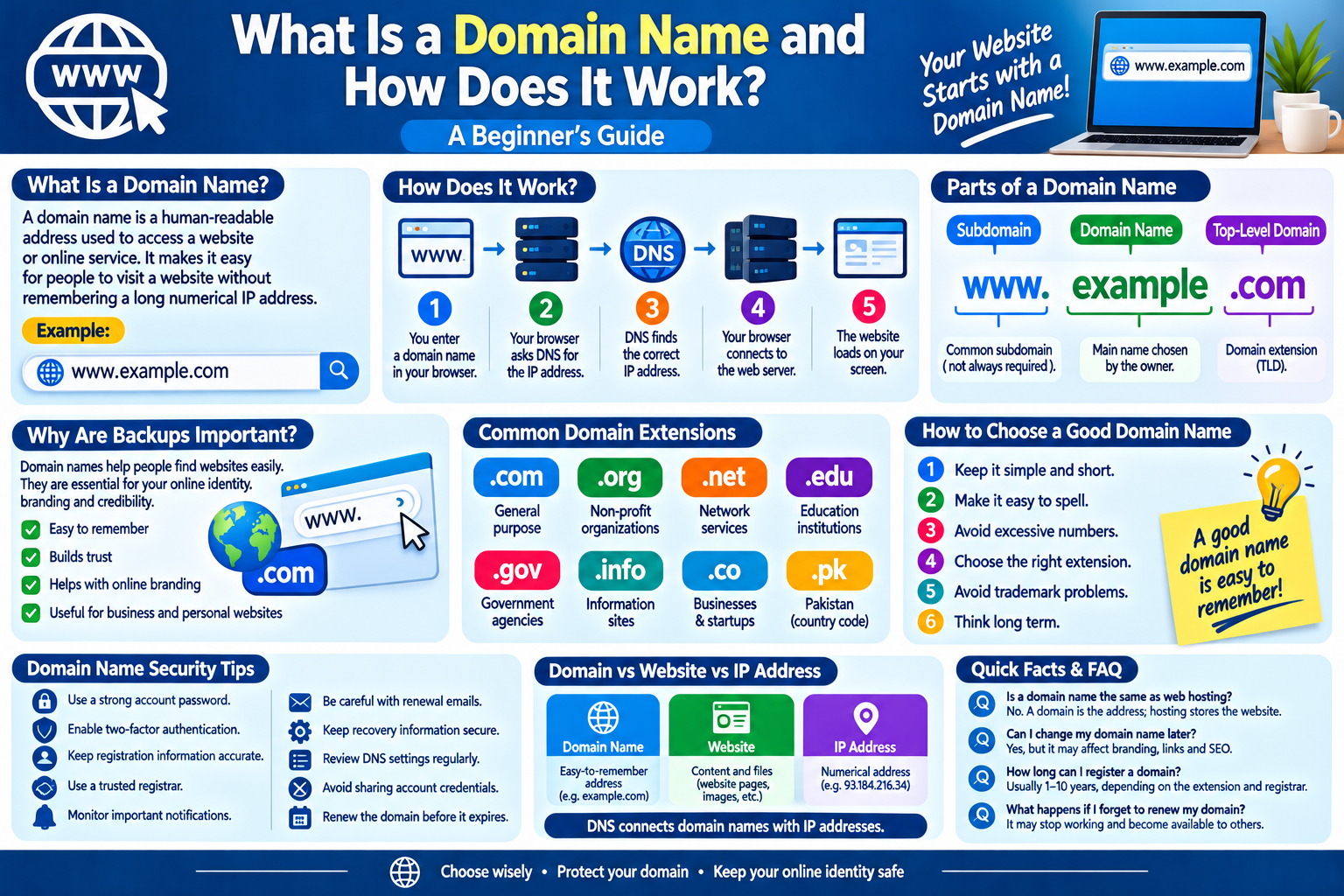
A domain name is a human-readable address used to access a website or other internet service.
For example:
example.com
Instead of remembering a numerical IP address, users can type a simple domain name into a web browser.
A domain name acts like an easy-to-remember address for an online destination.
Why Do Websites Need Domain Names?
Computers communicate across networks using numerical IP addresses. These addresses can be difficult for people to remember.
A domain name provides a much simpler way to identify a website.
For example, remembering:
example.com
is much easier than remembering a long numerical IP address.
This makes the internet more convenient for users.
How Does a Domain Name Work?
When you enter a domain name into your browser, several steps happen behind the scenes.
Step 1: You Enter a Domain Name
You type a website address into your browser.
Step 2: The Browser Looks for the Address
The browser needs to determine which server is associated with that domain.
Step 3: DNS Finds the IP Address
The Domain Name System (DNS) helps translate the domain name into an IP address.
Step 4: Your Browser Connects to the Server
Once the appropriate address is found, your browser communicates with the web server.
Step 5: The Website Loads
The server sends the requested information back to your browser, and the website appears on your screen.
This process usually happens very quickly.
What Is DNS?
DNS stands for Domain Name System.
It is often described as the internet’s address book because it helps translate human-readable domain names into IP addresses that computers can use.
For example:
Domain name → DNS → IP address → Web server
Without DNS, people would generally have to use numerical addresses to reach many internet services.
Parts of a Domain Name
A domain name can contain several parts.
Consider this example:
WWW
The www portion is a subdomain commonly associated with websites. However, websites do not necessarily need to use it.
Example
The middle portion is the main domain name chosen by the website owner.
.com
The final portion is called a top-level domain, or TLD.
Common examples include:
- .com
- .org
- .net
- .edu
- .gov
- .info
Different domain extensions can have different purposes and eligibility requirements.
What Is a Top-Level Domain?
A top-level domain is the final part of a domain name.
For example, in:
example.com
the .com is the top-level domain.
There are many different TLDs available today, including general-purpose and country-specific extensions.
What Are Country-Code Domains?
Country-code top-level domains, often called ccTLDs, are associated with particular countries or territories.
Examples include:
- .uk
- .pk
- .ca
- .au
- .de
- .jp
Some country-code domains may have registration requirements or specific rules.
What Is a Subdomain?
A subdomain is an additional part placed before the main domain.
For example:
blog.example.com
Here, blog is a subdomain of example.com.
Organizations may use subdomains for blogs, applications, support pages, stores, or other sections of a website.
Domain Name vs. Website
A domain name and a website are not exactly the same thing.
A domain name is the address used to reach an online destination.
A website consists of pages, files, images, scripts, databases, and other resources that are delivered to visitors.
You can think of it this way:
Domain name = address
Website = the content located at that address
Domain Name vs. IP Address
An IP address identifies a network location using numbers or, in some cases, letters and numbers under newer internet protocols.
A domain name is easier for humans to remember.
DNS connects these two concepts by helping translate domain names into the appropriate network addresses.
How Do People Register Domain Names?
Domain names are generally registered through companies called domain registrars.
The registration process usually involves:
- Searching for an available domain.
- Choosing a domain extension.
- Providing required registration information.
- Paying the registration fee.
- Completing the registration process.
- Managing DNS and other domain settings.
The exact process depends on the registrar and domain extension.
How to Choose a Good Domain Name
If you plan to create a website, choosing an appropriate domain name is important.
1. Keep It Simple
A short and easy-to-remember name is generally easier for visitors to use.
2. Make It Easy to Spell
Avoid complicated words or unusual spellings when possible.
3. Avoid Excessive Numbers
Numbers can sometimes make a domain harder to communicate verbally.
4. Choose an Appropriate Extension
A common extension such as .com may be suitable for many general websites, while other extensions may be appropriate for specific purposes.
5. Avoid Trademark Problems
Before registering a domain, make sure the name does not improperly use another organization’s protected brand or trademark.
6. Think Long Term
Choose a name that can continue to represent your website if the site’s content or purpose expands.
How to Check if a Domain Is Available
Most domain registrars provide a search tool.
You enter the name you want, and the service checks whether it is available for registration.
If the domain is already registered, you may need to choose another name or extension.
What Is Domain Privacy?
Some domain registrations involve information about the person or organization that registered the domain.
Depending on the domain extension and applicable rules, certain registration information may be publicly accessible or protected through privacy services.
Before registering a domain, review the registrar’s privacy information and understand what details may be collected or displayed.
Domain Name Security Tips
Your domain is an important part of your website, so it should be protected.
Follow these practices:
- Use a strong registrar account password.
- Enable two-factor authentication when available.
- Keep registration information accurate.
- Use a trusted registrar.
- Monitor important domain notifications.
- Be cautious with unexpected renewal emails.
- Keep recovery information secure.
- Review DNS settings regularly.
- Avoid sharing account credentials.
- Renew the domain before it expires.
Beware of Fake Domain Renewal Messages
Domain owners may receive emails claiming that their domain is about to expire.
Some of these messages may be legitimate, while others can be phishing attempts.
If you receive an unexpected renewal message, do not immediately click its links.
Instead, open your registrar’s official website directly and check your domain status from your account.
What Happens When a Domain Expires?
A domain name generally needs to be renewed periodically.
If it expires and is not renewed according to the registrar’s policies, the website and related services may eventually stop working.
This can potentially affect:
- Website access
- Email addresses
- Online services
- Business communications
- Search visibility
Domain owners should keep track of renewal dates.
Common Domain Name Mistakes
New website owners sometimes make avoidable mistakes.
Choosing a Complicated Name
Long or difficult names can be harder for visitors to remember.
Forgetting Renewal Dates
An expired domain can cause website problems.
Using Weak Account Security
If someone gains access to your registrar account, they may be able to make changes to the domain.
Ignoring Suspicious Emails
Phishing messages can attempt to steal registrar login information.
Choosing a Name Too Quickly
A domain can become an important part of a website’s identity, so it is worth considering the choice carefully.
Domain Name Checklist
Before registering a domain, consider:
- Is the name easy to remember?
- Is it easy to spell?
- Is the extension appropriate?
- Have you checked for trademark conflicts?
- Is the registrar reputable?
- Is two-factor authentication available?
- Have you reviewed privacy options?
- Do you know the renewal date?
- Are your account recovery details secure?
- Have you checked for suspicious registration emails?
Frequently Asked Questions
What is a domain name?
A domain name is a human-readable internet address used to access a website or online service.
What does DNS do?
DNS helps translate domain names into IP addresses so that browsers and other internet systems can find the appropriate servers.
Is a domain name the same as web hosting?
No. A domain is the website’s address, while web hosting provides the server space and resources used to store and deliver website content.
Can I change my domain name later?
Yes, a website owner can move to a different domain, but changing domains can involve technical work and may affect branding, links, email, and search visibility.
How long can I register a domain?
The registration period depends on the domain extension and registrar. Many domains can be registered for multiple years.
What happens if I forget to renew my domain?
The consequences depend on the domain extension and registrar’s policies. An expired domain may eventually stop working and could become available for registration again.
Final Thoughts
Domain names make the internet easier to use by replacing complicated numerical addresses with memorable names. They work together with DNS, web servers, and browsers to help users reach websites quickly.
If you plan to create a website, choose your domain carefully, protect your registrar account, monitor renewal dates, and be cautious with unexpected domain-related emails.
A domain name may look simple, but it is an important part of a website’s identity and accessibility.