What Is Web Hosting and How Does It Work? A Beginner’s Guide
When you visit a website, you may see pages containing text, images, videos, forms, and other digital content. But where is all this information stored, and how does it appear on your screen when you enter a website address?
The answer involves web hosting.
Web hosting is one of the basic technologies behind websites. Anyone planning to create a blog, business website, portfolio, online store, or other online project can benefit from understanding how hosting works.
In this beginner-friendly guide, we will explain what web hosting is, how it works, the main types of hosting, important features to consider, and common mistakes beginners should avoid.
What Is Web Hosting?
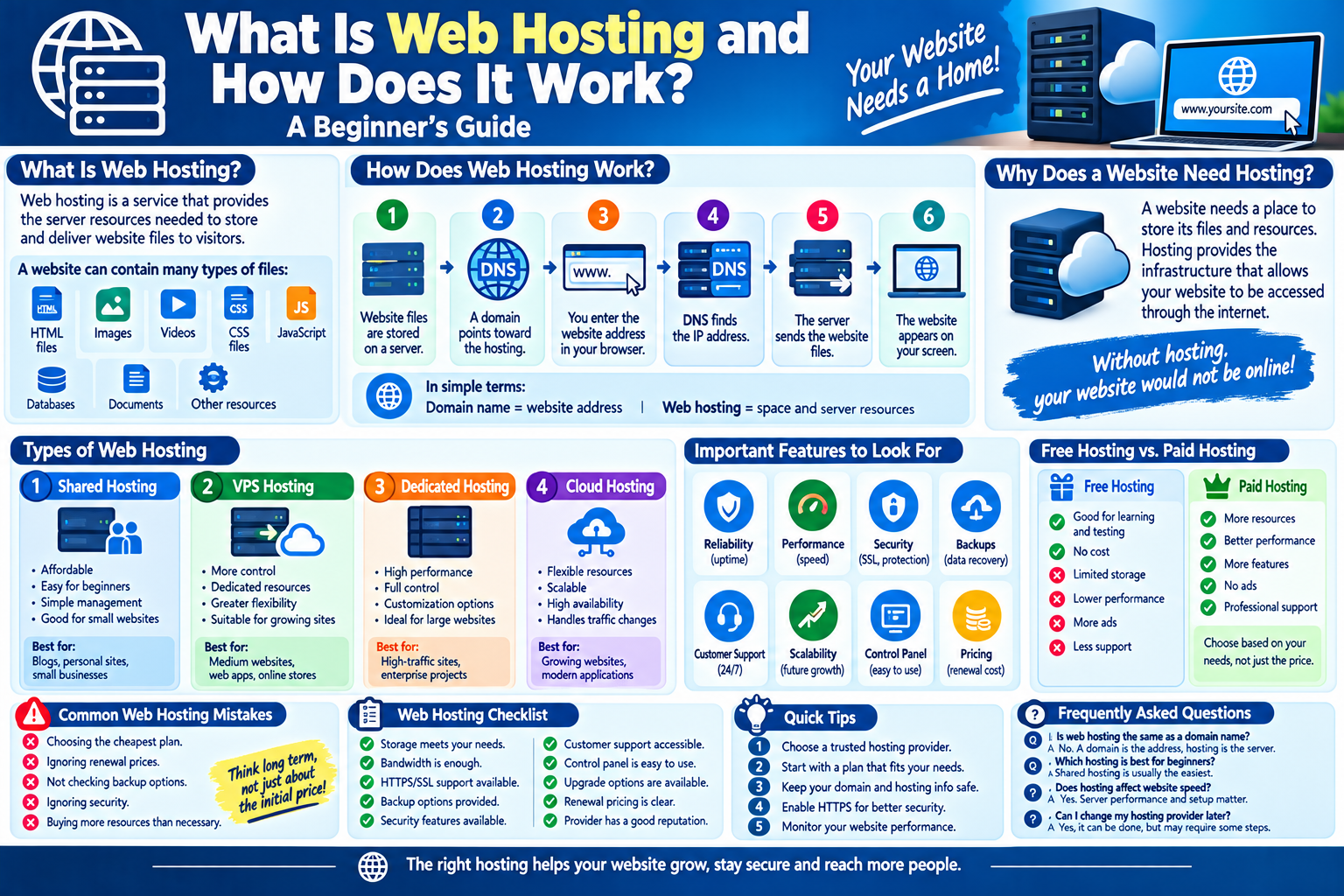
Web hosting is a service that provides the server resources needed to store and deliver website files to visitors.
A website can contain many types of files, including:
- HTML files
- Images
- Videos
- CSS files
- JavaScript
- Databases
- Documents
- Other website resources
These files need to be stored on a server that can communicate with visitors’ browsers.
A hosting provider provides the infrastructure needed to keep these files available online.
How Does Web Hosting Work?
The basic process is fairly simple.
Step 1: Website Files Are Stored on a Server
Website files are uploaded to a server provided by a hosting company.
Step 2: A Domain Points Toward the Hosting
The website’s domain name is configured to connect visitors with the appropriate server.
Step 3: A Visitor Enters the Website Address
The visitor types the domain name into a web browser or clicks a link.
Step 4: The Browser Finds the Server
DNS helps determine where the website is hosted.
Step 5: The Server Sends the Website
The hosting server sends the requested files or information to the visitor’s browser.
Step 6: The Website Appears
The browser processes the files and displays the website.
In simple terms:
Domain name = website address
Web hosting = space and server resources where the website is stored
Why Does a Website Need Hosting?
A website needs somewhere to store its files and resources.
Without a server or hosting environment, visitors would not have a reliable place from which to retrieve the website’s content.
Hosting provides the infrastructure that allows website files to be accessed through the internet.
Main Types of Web Hosting
Different websites have different hosting requirements. The most common hosting categories include shared hosting, VPS hosting, dedicated hosting, and cloud hosting.
1. Shared Hosting
Shared hosting means multiple websites use resources on the same physical server.
Advantages
- Usually affordable
- Easy for beginners
- Simple management
- Suitable for many small websites
Limitations
Because resources are shared, performance can sometimes be affected by other websites on the same server.
Shared hosting can be a practical starting point for smaller websites.
2. VPS Hosting
VPS stands for Virtual Private Server.
A physical server is divided into multiple virtual environments. Each environment can have allocated resources and greater control than typical shared hosting.
Advantages
- More control
- Dedicated resource allocations
- Greater flexibility
- Suitable for growing websites
Limitations
VPS hosting can require more technical knowledge and may cost more than basic shared hosting.
3. Dedicated Hosting
With dedicated hosting, an entire physical server is generally assigned to one customer.
Advantages
- High level of control
- Significant server resources
- Greater customization
- Useful for demanding applications
Limitations
Dedicated hosting can be expensive and may require technical expertise to manage effectively.
4. Cloud Hosting
Cloud hosting uses multiple connected servers or infrastructure resources to provide hosting services.
Depending on the provider, cloud environments can offer flexible resource allocation and scalability.
Advantages
- Flexible resources
- Scalability
- Useful for growing websites
- Can support changing traffic levels
Limitations
Pricing and configuration can be more complicated than basic hosting plans.
What Is a Server?
A server is a computer or computing system designed to provide resources or services to other devices over a network.
Web servers are used to deliver websites and web applications.
Hosting companies operate servers in data centers and provide customers with access to some of their resources.
What Is Bandwidth?
Bandwidth refers to the amount of data that can be transferred through a network over a period of time.
For a website, bandwidth can be affected by factors such as:
- Number of visitors
- Page size
- Images
- Videos
- Downloads
- Other website resources
A website with many visitors or large files may require more bandwidth than a simple text-based website.
What Is Storage?
Hosting storage is the space available for your website’s files, databases, emails, and other resources, depending on the hosting plan.
Before choosing a hosting package, consider how much storage your website actually needs.
A simple blog may require much less storage than a website containing large videos or downloadable files.
What Is an SSL Certificate?
An SSL/TLS certificate helps establish an encrypted connection between a visitor’s browser and a website.
Websites using HTTPS display a secure connection in modern browsers.
HTTPS is especially important when a website handles information such as:
- Login credentials
- Personal information
- Forms
- Payment information
Website owners should use appropriate HTTPS protection for their websites.
What Is Uptime?
Uptime refers to the period during which a hosting service is available and functioning.
Hosting companies often advertise uptime percentages.
For example, a provider may advertise a high availability target. However, website owners should read the provider’s actual terms and understand how uptime guarantees are measured.
What Should You Look for in a Hosting Provider?
Choosing a hosting provider requires more than simply comparing prices.
1. Reliability
Look for a provider with a good reputation for maintaining service availability.
2. Performance
Server performance can affect how quickly your website responds to visitors.
3. Security
Check what security features the provider offers.
4. Backups
Regular backups can help recover website data after certain problems.
5. Customer Support
Good technical support can be useful when something goes wrong.
6. Scalability
Choose a hosting environment that can grow with your website.
7. Control Panel
A simple control panel can make website management easier for beginners.
8. Pricing
Compare the initial price with the renewal price and additional costs.
Free Hosting vs. Paid Hosting
Some services offer free hosting plans.
Free hosting can be useful for experimentation, learning, or simple projects, but it may have limitations.
Possible restrictions include:
- Limited storage
- Limited bandwidth
- Fewer features
- Advertising
- Limited support
- Fewer customization options
Paid hosting generally provides more resources and features, although the quality varies between providers.
Common Web Hosting Mistakes
Beginners sometimes make hosting decisions based only on price.
Choosing the Cheapest Plan
A low price does not always mean good value.
Ignoring Renewal Prices
Some hosting plans have introductory pricing that increases when the plan renews.
Not Checking Backup Options
A website owner should understand how backups work and how restoration is handled.
Ignoring Security
Website security should be considered from the beginning.
Buying More Resources Than Necessary
Beginners do not always need an expensive hosting plan. Start with requirements appropriate for your website and upgrade when necessary.
How to Prepare Your Website for Hosting
Before purchasing a hosting plan, consider:
- What type of website you are creating.
- How much storage you need.
- How much traffic you expect.
- Whether you need email hosting.
- Whether you need a database.
- Whether you need a specific software environment.
- Whether automatic backups are available.
- Whether the provider offers technical support.
Understanding these requirements can make the selection process easier.
Web Hosting Checklist
Before choosing a hosting service, check:
- Storage meets your requirements.
- Bandwidth is appropriate.
- HTTPS/SSL support is available.
- Backup options are provided.
- Security features are available.
- Customer support is accessible.
- The control panel is easy to use.
- Upgrade options are available.
- Renewal pricing is clear.
- The provider has a suitable reputation.
Frequently Asked Questions
Is web hosting the same as a domain name?
No. A domain name is the address people use to reach a website, while web hosting provides the server resources used to store and deliver the website.
Do all websites need web hosting?
Most publicly accessible websites need some form of hosting or server infrastructure to deliver their content to visitors.
Which hosting is best for beginners?
Shared hosting is often easier for beginners because it is generally affordable and simple to manage. The right choice depends on the website’s requirements.
Can I change my hosting provider later?
Yes. Websites can generally be moved from one hosting provider to another, although the process may require technical steps.
Does hosting affect website speed?
Yes. Server performance, infrastructure, configuration, location, caching, and website optimization can all influence how quickly a website responds.
Do I need expensive hosting for a small website?
Not necessarily. A small website may work well with a basic hosting plan. It is usually better to choose resources based on actual requirements rather than paying for unnecessary capacity.
Final Thoughts
Web hosting is one of the fundamental components of a website. It provides the server resources needed to store website files and deliver them to visitors over the internet.
Understanding the differences between shared, VPS, dedicated, and cloud hosting can help website owners choose an appropriate solution.
Before selecting a hosting provider, consider reliability, performance, security, backups, support, storage, bandwidth, and future growth. A good hosting decision can provide a stronger foundation for a website as it develops.