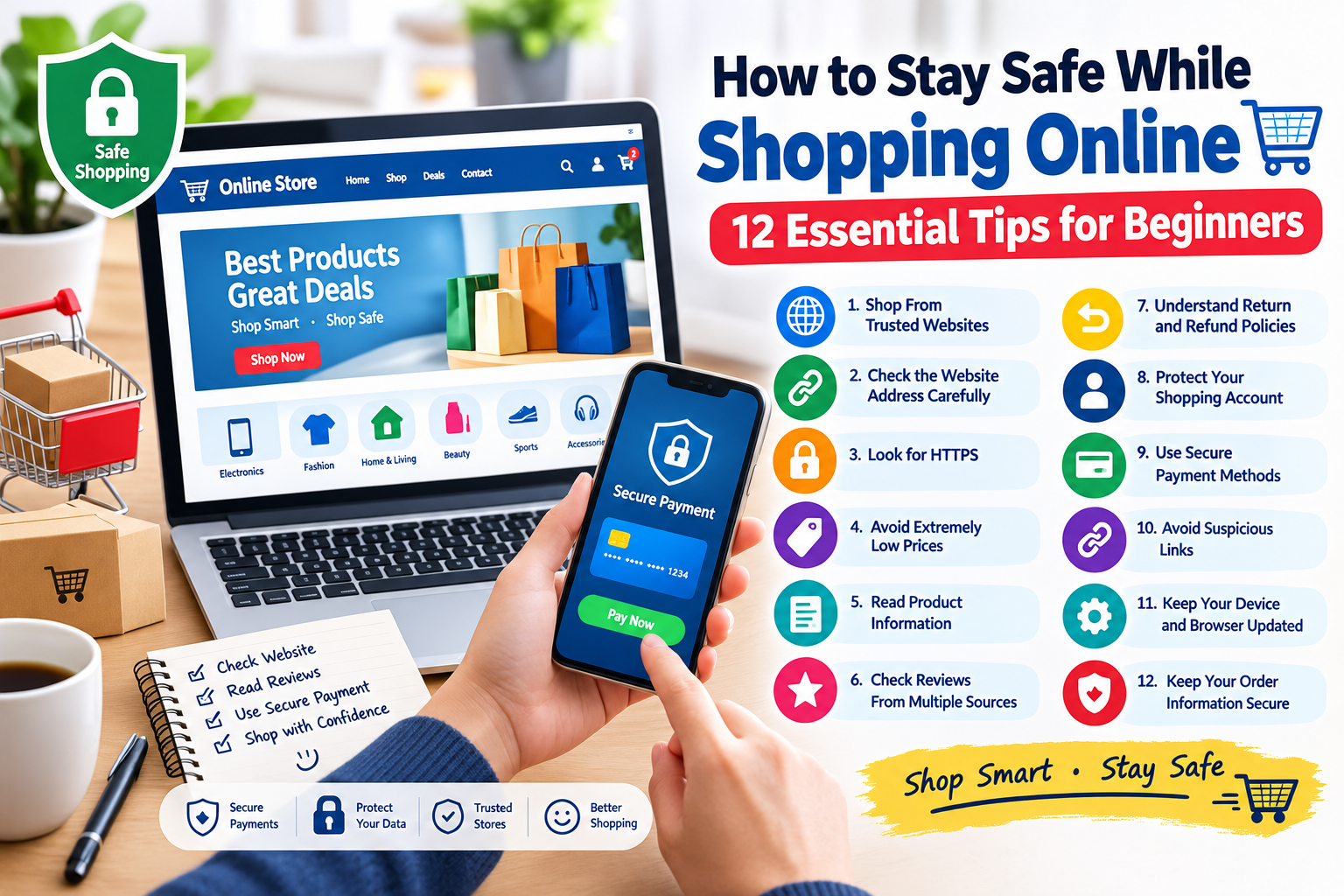
How to Stay Safe While Shopping Online: 12 Essential Tips for Beginners
Online shopping has become a convenient way to purchase products and services from home. People can compare prices, read reviews, discover new products, and place orders using computers and smartphones.
However, shopping online also requires some basic safety precautions. Not every online store, advertisement, seller, or offer is trustworthy. Some websites may use misleading information, while others may attempt to collect personal or payment information through fraudulent methods.
The good news is that shoppers can reduce many common risks by following a few simple security and privacy practices.
In this guide, you will learn 12 essential online shopping safety tips for beginners.
What Is Online Shopping Safety?
Online shopping safety means taking reasonable steps to protect your personal information, payment details, accounts, and devices while purchasing products or services on the internet.
Safe online shopping involves more than finding a good price. Before completing an order, shoppers should consider whether the website is legitimate, whether the payment process appears secure, and whether the seller provides clear information about the product and purchase.
Important information involved in online shopping can include:
- Name
- Email address
- Phone number
- Delivery address
- Account information
- Payment details
- Order information
Protecting this information can help reduce unnecessary privacy and security risks.
Why Is Online Shopping Safety Important?
Online shopping provides many benefits, but there are also potential risks.
Unsafe shopping practices may expose users to:
- Fake websites
- Phishing scams
- Fraudulent sellers
- Fake discounts
- Unauthorized charges
- Account theft
- Malicious downloads
- Privacy problems
Learning how to recognize warning signs can help shoppers make better decisions.
1. Shop From Trusted Websites
One of the easiest ways to improve online shopping safety is to use websites you recognize and trust.
Before purchasing from an unfamiliar store, research the business and check whether it provides useful information about its products, policies, and customer service.
Look for:
- A clear website address
- Product information
- Contact details
- Shipping information
- Return policies
- Privacy information
- Customer support options
Do not assume that a professional-looking website is automatically trustworthy.
2. Check the Website Address Carefully
Always check the website address before entering personal or payment information.
Scammers sometimes create websites with names that look similar to legitimate businesses.
Pay attention to:
- Spelling mistakes in the domain
- Extra characters
- Unusual domain names
- Suspicious links
- Unexpected website redirects
If you received a shopping link through an email, text message, or social media post, consider visiting the retailer’s website directly instead of clicking the unexpected link.
3. Look for HTTPS
Before entering sensitive information, check whether the website uses HTTPS.
HTTPS helps protect information as it travels between your browser and the website.
However, HTTPS alone does not prove that an online store is legitimate. Fraudulent websites can also use encrypted connections.
Therefore, check the complete website address and investigate the business before making a purchase.
4. Be Careful With Extremely Low Prices
Online shoppers naturally look for discounts, but an unusually low price can sometimes be a warning sign.
If a product normally costs hundreds of dollars but an unfamiliar website offers it for a very small amount, investigate before purchasing.
Compare prices from several established sources.
Ask yourself:
- Is the discount realistic?
- Is the seller well known?
- Are there independent reviews?
- Is the product information complete?
- Does the website provide clear policies?
A low price is not automatically evidence of a scam, but an unrealistic offer deserves additional attention.
5. Read Product Information Carefully
Before buying a product, read the available information.
Check:
- Product specifications
- Size or dimensions
- Materials
- Features
- Quantity
- Included accessories
- Shipping information
- Warranty information
Do not rely only on product photographs.
Understanding what you are actually purchasing can help prevent misunderstandings and disappointing purchases.
6. Check Reviews From Multiple Sources
Customer reviews can help you understand how other shoppers experienced a product or seller.
However, do not rely on reviews displayed only on the seller’s website.
Look for information from multiple independent sources when possible.
Pay attention to repeated complaints about:
- Products not arriving
- Incorrect products
- Poor customer service
- Unexpected charges
- Difficult refunds
- Misleading product descriptions
A few negative reviews do not necessarily mean a business is fraudulent. Look for overall patterns.
7. Understand the Return and Refund Policy
Before completing an order, check the store’s return and refund policy.
A clear policy should explain important details such as:
- Whether returns are accepted
- How long you have to request a return
- Who pays return shipping
- How refunds are processed
- Whether certain products are excluded
- How to contact customer support
Reading these details before purchasing can help you avoid problems later.
8. Protect Your Shopping Account
If an online store allows you to create an account, protect it with a strong and unique password.
Avoid using the same password for your shopping account and other important services.
If the store supports additional security features such as two-factor authentication, consider enabling them.
Your shopping account may contain:
- Delivery addresses
- Order history
- Contact information
- Saved payment methods
- Personal preferences
Keeping the account secure helps protect this information.
9. Use Secure Payment Methods
Pay attention to how an online store accepts payments.
Use payment methods that you understand and trust.
Before confirming a transaction, check:
- The website address
- The final purchase amount
- Shipping costs
- Taxes or additional fees
- The selected payment method
Be cautious if an unfamiliar seller asks you to send money through an unusual method or outside the normal checkout process.
Never share passwords or authentication codes with a seller.
10. Avoid Shopping Through Suspicious Links
Online advertisements, emails, messages, and social media posts can contain links to shopping websites.
Some links may lead to legitimate stores, while others may lead to fraudulent pages.
Be especially cautious when a message says you must purchase something immediately or claims that an account will be closed unless you act quickly.
If you are unsure about a link, search for the company independently and access its official website directly.
11. Keep Your Device and Browser Updated
Online shopping is safer when your device and software are kept up to date.
Regularly update:
- Smartphone operating systems
- Computer operating systems
- Web browsers
- Shopping applications
- Security software
Updates can include security fixes that address known vulnerabilities.
You should also avoid installing unknown browser extensions or applications simply because a shopping website recommends them.
12. Keep Your Order Information Secure
After making a purchase, keep important order information private.
This may include:
- Order numbers
- Receipts
- Delivery information
- Account details
- Payment confirmations
Avoid publicly posting screenshots that reveal personal or financial information.
If you need to contact customer support, use the official contact method provided by the retailer.
How to Recognize a Suspicious Online Store
There is no single sign that proves a website is fraudulent, but several warning signs together should make you cautious.
Possible warning signs include:
- Extremely unrealistic prices
- Missing contact information
- Poorly written policies
- Pressure to make an immediate payment
- Suspicious website addresses
- Unexpected payment methods
- Numerous independent complaints
- Unclear refund procedures
- Requests for unnecessary personal information
If several warning signs appear at the same time, consider using another retailer.
What Should You Do If You Think You Have Been Scammed?
If you believe you have provided information or payment to a fraudulent website, act quickly.
Consider these steps:
- Stop communicating with the suspicious seller.
- Save relevant order and payment records.
- Contact your payment provider if necessary.
- Change passwords if you created an account on the website.
- Enable two-factor authentication on important accounts.
- Monitor your financial accounts for unusual activity.
- Contact the relevant company through its official website.
- Report the suspected fraud to the appropriate service or authority.
Do not provide additional personal information to someone who contacts you claiming they can recover your money.
Simple Online Shopping Safety Checklist
Before purchasing something online, ask yourself:
- Do I recognize or trust the website?
- Did I check the website address?
- Does the website use HTTPS?
- Is the price realistic?
- Did I read the product description?
- Did I check independent reviews?
- Did I read the return policy?
- Is the payment method trustworthy?
- Did I avoid suspicious links?
- Is my shopping account protected?
- Is my device updated?
- Did I keep my order information private?
Frequently Asked Questions
How can beginners shop safely online?
Beginners should use trusted websites, check website addresses, compare prices, read product information and reviews, understand return policies, use secure payment methods, and protect their shopping accounts.
Is every website with HTTPS safe?
No. HTTPS helps protect the connection between your browser and the website, but it does not prove that the website is legitimate. Always check the domain and research unfamiliar businesses.
Should I buy products with extremely low prices?
Be cautious when an unfamiliar website offers products at prices that appear unrealistic. Compare the offer with other retailers and investigate the seller before purchasing.
Why should I read a website’s refund policy?
A refund policy explains what happens if you receive the wrong product, change your mind, or experience another problem with an order. Understanding the policy before buying can help prevent unexpected problems.
Is it safe to save my payment information on shopping websites?
This depends on the website and your preferences. If you choose to save payment information, use a reputable service and protect your account with a strong password and additional security features where available.
What should I do if an online seller asks for my password?
Do not share your password. Legitimate customer-service representatives should not need your account password. Contact the company through its official website if you need assistance.
Final Thoughts
Online shopping can be convenient, but safe shopping requires a little attention.
Before purchasing from an unfamiliar website, take time to check the website address, investigate the seller, compare prices, read product information, review return policies, and use a payment method you trust.
Protect your shopping accounts with strong passwords and additional security features, and keep your devices and browsers updated.
Most importantly, do not allow an attractive discount or urgent message to pressure you into making a quick decision.
Think before you click, verify before you pay, and protect your personal information whenever you shop online.