How to Improve Website Loading Speed: 12 Practical Tips
Website speed is an important part of the modern internet experience. When a webpage loads quickly, visitors can find information faster and navigate the website more comfortably.
On the other hand, a slow website can make visitors leave before the page has finished loading. Slow performance can also make websites feel less professional and difficult to use, especially on mobile devices or slower internet connections.
The good news is that website owners can take several practical steps to improve loading speed.
In this guide, we will explain 12 practical ways to improve website loading speed, even if you are not an advanced web developer.
What Is Website Loading Speed?
Website loading speed refers to how quickly a webpage becomes available and usable after a visitor requests it.
Several factors can affect loading speed, including:
- Image size
- Hosting performance
- Website code
- Plugins
- Themes
- JavaScript
- CSS files
- Server response time
- Browser caching
- Content delivery networks
A fast website should not only load quickly but should also become usable without unnecessary delays.
Why Is Website Speed Important?
Website speed matters because visitors generally expect websites to respond quickly.
A slow website can lead to:
- Poor user experience
- Higher visitor frustration
- More abandoned pages
- Lower engagement
- Difficult mobile browsing
- Reduced conversions for business websites
Speed is especially important for websites that receive visitors from mobile devices or areas with slower internet connections.
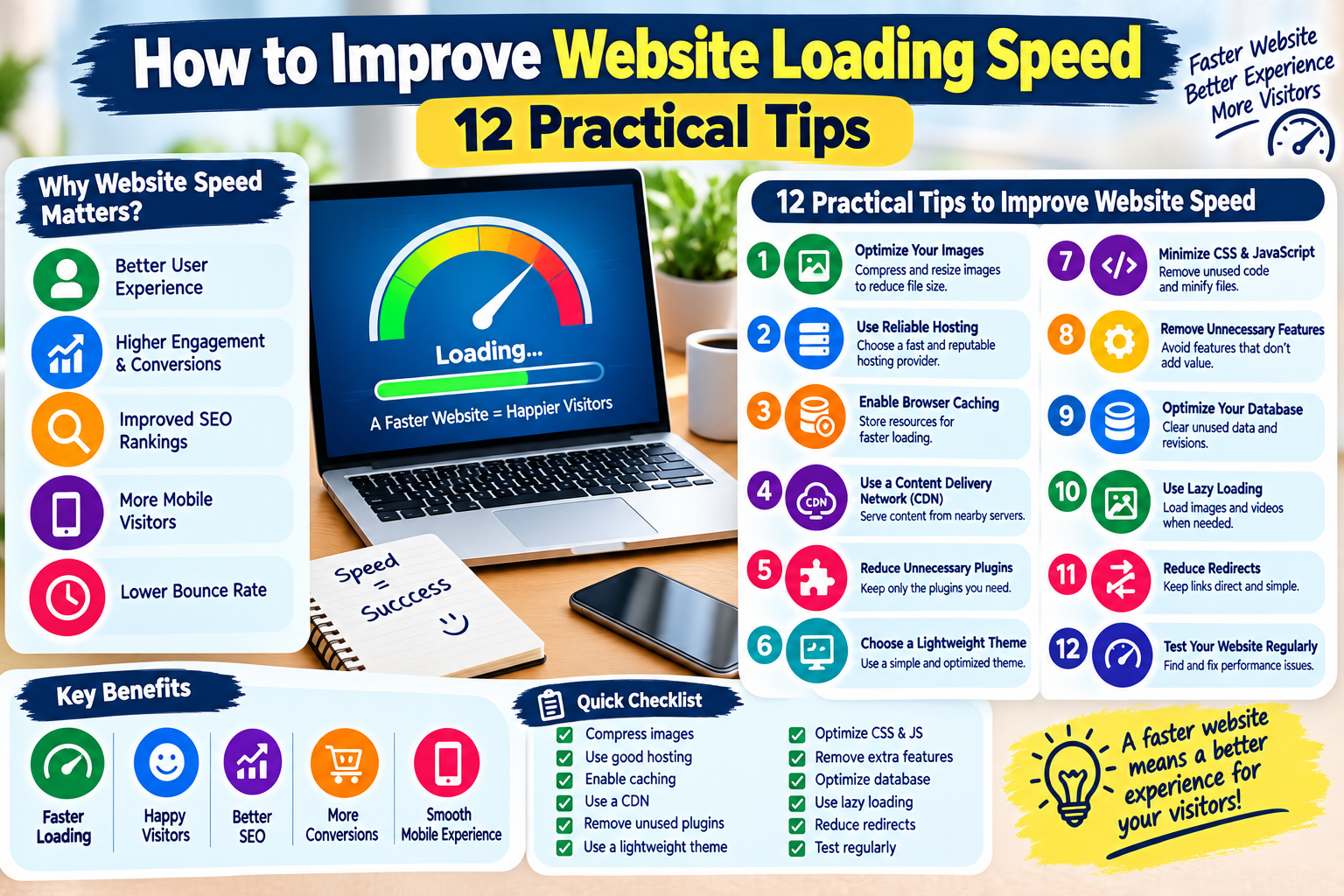
12 Practical Ways to Improve Website Loading Speed
1. Optimize Your Images
Large images are one of the most common reasons websites become slow.
Before uploading images, reduce their file size without unnecessarily reducing their visual quality.
You can also use modern image formats when supported by your website.
Good practices include:
- Resize images before uploading
- Compress large images
- Use appropriate image formats
- Avoid uploading unnecessarily large photos
- Use responsive images when possible
For example, there is usually no reason to upload a huge image when it will only be displayed as a small thumbnail.
2. Use a Reliable Web Hosting Provider
Your hosting server plays an important role in website performance.
A low-quality or overloaded server can increase the time required to deliver webpages to visitors.
When choosing hosting, consider:
- Server performance
- Reliability
- Server location
- Available resources
- Support quality
- Scalability
As your website grows, you may need more server resources.
3. Enable Browser Caching
Caching allows certain website resources to be stored temporarily so they do not always need to be downloaded again.
For returning visitors, caching can make pages load more efficiently.
Common cached resources include:
- Images
- CSS files
- JavaScript
- Fonts
Caching configuration depends on your hosting environment and website software.
4. Use a Content Delivery Network
A Content Delivery Network, commonly called a CDN, uses servers distributed across different geographic locations.
When a visitor requests content, the CDN can often deliver cached resources from a server that is geographically closer to the visitor.
This can help reduce loading times for visitors located far away from your main server.
CDNs can be especially useful for websites with visitors from multiple countries.
5. Reduce Unnecessary Plugins
If you use WordPress, plugins can add useful features to your website.
However, installing too many unnecessary plugins can increase complexity and may affect performance.
Review your installed plugins regularly.
Ask yourself:
- Do I still use this plugin?
- Is the plugin necessary?
- Does another plugin already provide the same feature?
- Is the plugin regularly maintained?
Remove plugins that are unnecessary, outdated, or no longer used.
6. Choose a Lightweight Theme
Your website theme can affect how much code needs to be loaded.
A theme with many unnecessary features may require additional files and resources.
When choosing a theme, look for:
- Clean design
- Responsive layout
- Regular updates
- Good performance
- Only the features you actually need
A simple website can often be easier to maintain and optimize than a website overloaded with unnecessary design elements.
7. Minimize CSS and JavaScript
CSS controls the visual appearance of a website, while JavaScript can provide interactive features.
Large or unnecessary CSS and JavaScript files can increase the amount of data that browsers need to process.
Minification can remove unnecessary characters such as spaces and comments from code without changing its basic functionality.
Depending on your website setup, optimization tools may be able to handle this automatically.
Always test your website after changing code-related settings.
8. Remove Unnecessary Website Features
Every additional feature can potentially require additional resources.
For example, you may not need:
- Multiple animations
- Auto-playing videos
- Unnecessary sliders
- Excessive tracking scripts
- Decorative effects
- Unused widgets
Ask whether each feature improves the visitor experience.
If a feature provides little value but adds performance costs, consider removing it.
9. Optimize Your Database
Websites that use databases can accumulate unnecessary information over time.
For example, a WordPress website may contain:
- Old revisions
- Unused metadata
- Temporary data
- Spam comments
- Other unnecessary records
Database optimization should be performed carefully.
Always keep a current backup before making significant database changes.
10. Use Lazy Loading for Images and Videos
Lazy loading allows certain resources to load when they are needed rather than loading everything immediately.
For example, images lower down on a long webpage may not need to load until a visitor approaches them.
This can reduce the amount of data that needs to be loaded when the page initially opens.
Modern websites and content management systems may support lazy loading automatically.
11. Reduce Redirects
A redirect sends a visitor from one URL to another.
Redirects can be useful and sometimes necessary, but excessive redirect chains can add unnecessary steps before the final page loads.
Review your website for unnecessary redirects.
Whenever possible, keep navigation and internal links pointing directly to the correct destination.
12. Test Your Website Regularly
Website performance can change over time.
A website that was fast several months ago may become slower after adding:
- New plugins
- More images
- New advertisements
- Tracking tools
- Additional scripts
- New website features
Test your important pages regularly.
Pay attention to both desktop and mobile performance.
How to Improve WordPress Website Speed
If you use WordPress, start with simple improvements.
Step 1: Review Your Plugins
Remove plugins you do not need.
Step 2: Optimize Images
Compress images before uploading them.
Step 3: Use Caching
Configure an appropriate caching solution.
Step 4: Keep WordPress Updated
Keep WordPress, themes, and plugins updated when compatible versions are available.
Step 5: Choose Quality Hosting
Make sure your hosting plan has enough resources for your website.
Step 6: Monitor Performance
Test your important pages after making major changes.
How Can You Check Website Speed?
There are several online tools that can help website owners evaluate performance.
These tools may provide information about:
- Page loading performance
- Mobile performance
- Desktop performance
- Image optimization
- Code-related issues
- Server response
- Potential improvements
Do not focus only on a single score.
Instead, use performance reports to identify specific problems and improve them one at a time.
Common Website Speed Mistakes
Avoid these common mistakes:
Uploading Huge Images
Large images can unnecessarily increase page size.
Installing Too Many Plugins
Every plugin can add functionality and potentially additional resources.
Using Excessive Animations
Animations can sometimes affect performance, particularly on lower-powered devices.
Adding Too Many External Scripts
Advertising, analytics, social widgets, and other services can increase page requests.
Ignoring Mobile Users
A website that performs well on a powerful desktop computer may perform differently on a smartphone.
Always consider mobile performance.
Simple Website Speed Checklist
Use this checklist to improve your website:
- Compress images
- Use a reliable hosting provider
- Enable caching
- Consider a CDN
- Remove unnecessary plugins
- Use a lightweight theme
- Optimize CSS and JavaScript
- Remove unnecessary features
- Optimize the database carefully
- Enable lazy loading
- Reduce unnecessary redirects
- Test your website regularly
Frequently Asked Questions
What makes a website slow?
Many things can affect website speed, including large images, slow hosting, excessive plugins, unoptimized code, external scripts, and poor caching.
Are images important for website speed?
Yes. Images can make up a large portion of a webpage’s total size. Proper compression and resizing can help reduce unnecessary loading time.
Does a CDN make a website faster?
A CDN can improve delivery of cached content by serving resources from geographically distributed servers. The actual benefit depends on the website, visitors, hosting setup, and CDN configuration.
Can too many WordPress plugins slow down a website?
They can. Plugins vary in how they affect performance, so it is better to use only the plugins that provide genuine value and keep them maintained.
Should I remove all website animations?
Not necessarily. Useful animations can improve design and user experience. The goal is to avoid excessive effects that provide little value while consuming unnecessary resources.
How often should I test website speed?
There is no single required schedule. It is useful to test after major changes and periodically monitor important pages to catch performance problems early.
Final Thoughts
A fast website provides a better experience for visitors and can make your content easier to access.
You do not need to make every optimization at once. Start with the biggest issues, such as large images, unnecessary plugins, slow hosting, and missing caching.
Then test your website again and continue improving it gradually.
Keep your website simple, optimize your resources, monitor performance, and always consider the experience of your visitors.
SEO Meta Tags
Meta Title: How to Improve Website Loading Speed: 12 Practical Tips
Meta Description: Learn how to improve website loading speed with 12 practical tips, including image optimization, caching, hosting, CDN, plugins, and mobile performance.
Focus Keyword: website loading speed
Secondary Keywords:
- how to speed up a website
- improve website speed
- website performance tips
- WordPress website speed
- how to make a website faster
- website optimization tips
URL Slug:how-to-improve-website-loading-speed
SEO Tags:Website Speed, Website Performance, SEO Tips, WordPress Tips, Web Development, Website Optimization, Page Speed, Internet Tips, Blogging Tips, Technology
Suggested Category:Technology
Suggested Featured Image Alt Text:How to improve website loading speed with practical optimization tips