How to Protect Your Smartphone From Online Threats: 12 Essential Tips
Smartphones have become an important part of everyday life. People use them to communicate, browse websites, check email, manage social media accounts, shop online, store photos, and access many different services.
Because smartphones contain so much personal information, protecting them is extremely important.
A smartphone can contain private conversations, photographs, contacts, saved passwords, documents, applications, and other sensitive information. If the device or an account connected to it is compromised, that information could potentially be exposed.
Fortunately, you do not need to be a technology expert to improve smartphone security. A few simple habits can make your device safer and reduce common online risks.
In this guide, we will discuss 12 practical tips for protecting your smartphone from common online threats.
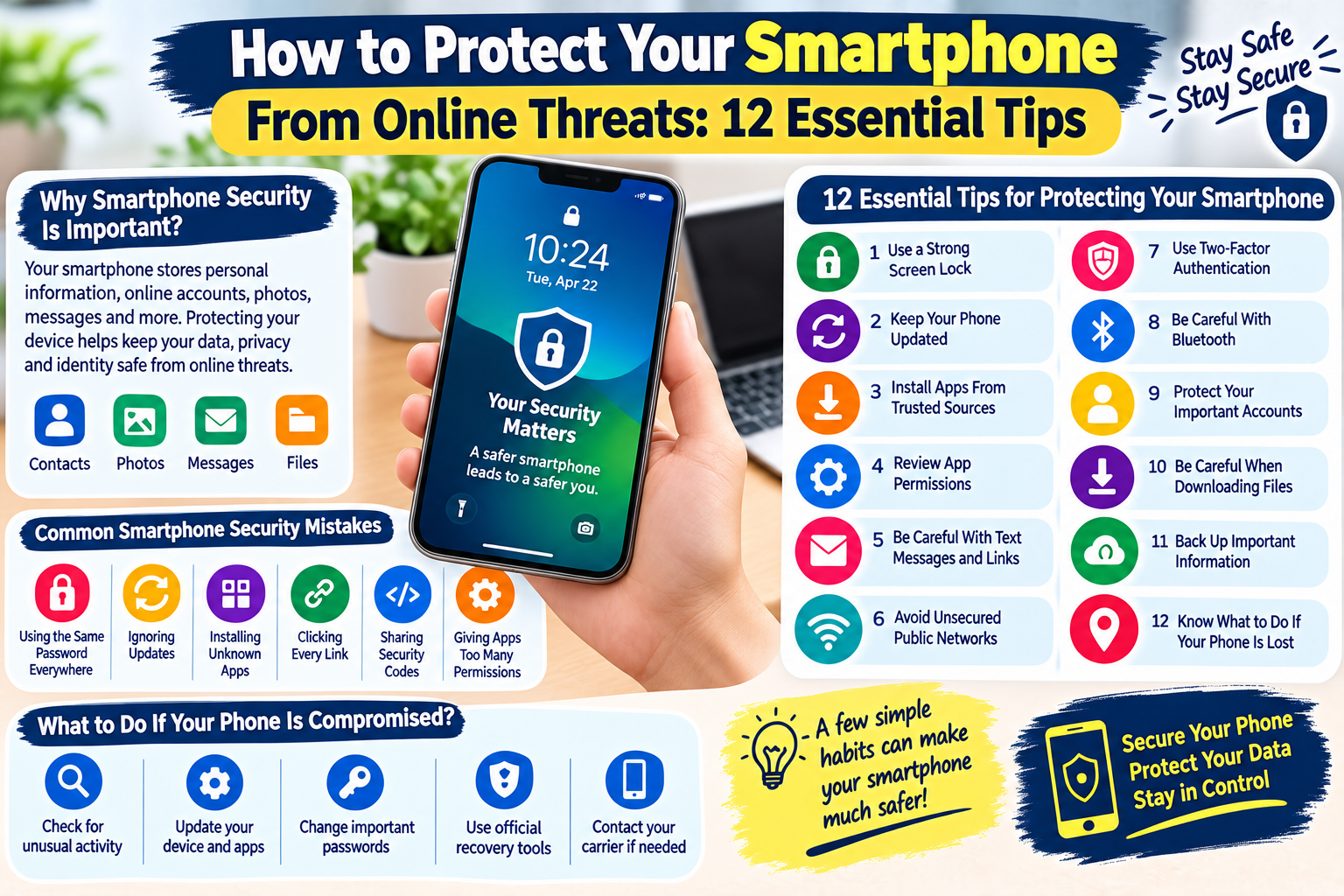
Why Is Smartphone Security Important?
Your smartphone is more than a device for making calls. It may provide access to many of your online accounts.
For example, you may use your phone to access:
- Social media
- Online shopping
- Cloud storage
- Banking applications
- Work accounts
- Educational services
- Messaging applications
If someone gains unauthorized access to your phone or important accounts, the consequences can be more serious than simply losing the device.
Good smartphone security can help protect your:
- Personal information
- Photos and videos
- Online accounts
- Contacts
- Messages
- Files
- Applications
12 Essential Smartphone Security Tips
1. Use a Strong Screen Lock
The first step in protecting your smartphone is securing access to the device itself.
Use a strong PIN, password, fingerprint, or facial recognition feature when supported by your device.
Avoid simple combinations such as:
- 1234
- 0000
- Your birth year
- Easy patterns
- Other predictable numbers
A screen lock provides an important layer of protection if your phone is lost or stolen.
2. Keep Your Smartphone Updated
Software updates often include security improvements and bug fixes.
When an operating system update becomes available, install it from the device’s official update system when practical.
You should also keep important applications updated.
Using outdated software for long periods can leave known security issues unresolved.
3. Install Apps From Trusted Sources
Be careful when installing applications.
Whenever possible, use the official application store provided for your device.
Before installing an app, consider:
- Who developed it?
- Does it have a trustworthy history?
- What permissions does it request?
- Does the app really need those permissions?
- Are the reviews and information consistent?
Avoid installing unknown applications simply because a website or message tells you to do so.
4. Review App Permissions
Applications may request access to different parts of your smartphone.
Depending on the application, permissions can include access to:
- Camera
- Microphone
- Contacts
- Location
- Photos
- Files
- Notifications
Think about whether each permission is necessary.
For example, a simple calculator application may not need access to your contacts or microphone.
Review permissions regularly and disable unnecessary access when your device allows it.
5. Be Careful With Text Messages and Links
Scammers can send deceptive messages through SMS, messaging applications, and other communication services.
A message might claim:
- Your package could not be delivered.
- Your account needs verification.
- You have won a prize.
- A payment failed.
- Your subscription is expiring.
- Your account has a security problem.
Do not click links simply because a message appears urgent.
If the message claims to come from a company you use, open the company’s official application or website independently and check your account there.
6. Avoid Unsecured Public Networks When Possible
Public Wi-Fi can be useful when you are away from home, but you should be careful when using unfamiliar networks.
Avoid performing highly sensitive activities on networks you do not trust unless you understand the security protections being used.
When possible:
- Use a trusted network
- Keep your device updated
- Avoid connecting automatically to unknown networks
- Disconnect from public Wi-Fi when you no longer need it
Your smartphone’s mobile data connection may be preferable for sensitive activity when a public network is unfamiliar.
7. Use Two-Factor Authentication
Two-factor authentication provides an additional security layer for supported accounts.
Instead of relying only on a password, you may also need a verification code, authentication app, security key, or another verification method.
Consider enabling 2FA on important accounts such as:
- Social media
- Cloud storage
- Work accounts
- Other important online services
Never share your authentication codes with another person.
8. Be Careful With Bluetooth and Nearby Connections
Bluetooth is useful for connecting wireless headphones, keyboards, cars, and other devices.
However, you should avoid connecting your smartphone to devices you do not recognize.
When you are not using Bluetooth or another nearby connection feature, consider turning it off if appropriate for your device and routine.
Also review previously connected devices and remove ones you no longer use.
9. Protect Your Important Accounts
Your smartphone may automatically keep you signed in to many services.
This is convenient, but it also makes account security important.
Use unique passwords for important accounts and avoid saving sensitive login information in unsafe locations.
If your phone is lost, use the account and device security features available from the manufacturer or service provider to protect your information.
10. Be Careful When Downloading Files
Unknown files can potentially contain harmful software or unwanted content.
Be especially careful with files received through:
- Unknown messages
- Unexpected emails
- Suspicious websites
- Unfamiliar social media accounts
Do not download a file simply because someone tells you that it is important.
If you were not expecting the file, verify the sender before opening it.
11. Back Up Important Information
Security is not only about preventing attacks. It is also about preparing for unexpected problems.
A backup can help you recover important information if your phone is:
- Lost
- Stolen
- Damaged
- Reset
- Replaced
Depending on your needs, you can back up important photos, contacts, documents, and other files using a trusted backup service or another secure method.
Make sure your backup account is protected with strong security as well.
12. Know What to Do If Your Phone Is Lost
Losing a smartphone can be stressful, but preparing in advance can make the situation easier.
Many modern smartphones provide features that allow you to locate, lock, or remotely manage a lost device.
If your phone is lost:
- Try to locate the device using its official device-finding feature.
- Lock the phone remotely if possible.
- Contact your mobile carrier when appropriate.
- Change important account passwords if necessary.
- Review recent account activity.
- Report the loss if required.
Having these features configured before losing your phone is much better than trying to set them up afterward.
Common Smartphone Security Mistakes
Even careful users can make simple mistakes.
Here are some common examples.
Using the Same Password Everywhere
If one password is exposed, other accounts using the same password may also become vulnerable.
Ignoring Updates
Repeatedly postponing important updates can leave security issues unresolved.
Installing Unknown Apps
Applications from untrusted sources can create unnecessary security risks.
Clicking Every Link
Not every message or notification deserves an immediate response.
Sharing Security Codes
Verification codes should remain private.
Giving Apps Too Many Permissions
Only provide permissions that are appropriate for the application’s purpose.
What Should You Do If You Think Your Smartphone Is Compromised?
If you notice unusual behavior, do not immediately assume the worst.
Possible warning signs can include:
- Unexpected applications
- Unusual account activity
- Unknown login notifications
- Unfamiliar device connections
- Unexpected messages being sent
- Unusual battery or data usage
Start by reviewing recently installed applications and account activity.
Update your device and applications, change important passwords from a trusted device if necessary, and enable additional security protections.
If you believe a specific account has been compromised, use that service’s official account recovery and security procedures.
Simple Smartphone Security Checklist
Use this checklist to improve your device security:
- Use a strong screen lock
- Keep the operating system updated
- Update applications regularly
- Install apps from trusted sources
- Review app permissions
- Avoid suspicious links
- Be careful with public Wi-Fi
- Enable two-factor authentication
- Review Bluetooth connections
- Protect important accounts
- Avoid unknown downloads
- Back up important information
Frequently Asked Questions
Can smartphones get viruses or malware?
Yes. Smartphones can be targeted by malicious or unwanted software. Installing applications from trusted sources, keeping software updated, and avoiding suspicious links can reduce common risks.
Should I install every available security application?
Not necessarily. Installing many unnecessary security applications can create additional complexity. Use trusted security features and reputable software appropriate for your device.
Is public Wi-Fi always dangerous?
No. Public Wi-Fi is not automatically unsafe, but you should be cautious with unfamiliar networks, especially when handling sensitive information.
Should I leave Bluetooth on all the time?
Bluetooth can be convenient, but you can turn it off when you do not need it if that fits your usage. More importantly, avoid connecting to unknown devices.
What is the most important smartphone security tip?
There is no single solution. A combination of a strong screen lock, regular updates, trusted applications, careful browsing, strong account passwords, and two-factor authentication provides a much better overall security approach.
What should I do if I lose my phone?
Use the device’s official location and remote-lock features if available, contact your carrier when appropriate, and protect important accounts by reviewing activity and changing passwords when necessary.
Final Thoughts
Smartphones contain a large amount of personal information, making device security an important part of everyday online safety.
You can reduce many common risks by keeping your phone updated, using a strong screen lock, installing applications carefully, reviewing permissions, avoiding suspicious links, and protecting your online accounts with strong passwords and two-factor authentication.
You should also prepare for unexpected situations by keeping important information backed up and knowing how to remotely locate or lock your device.
A secure smartphone starts with simple habits. Stay updated, think before you click, protect your accounts, and keep your personal information safe.