What Is an IP Address and How Does It Work?
Every device connected to the internet requires a unique identifier to communicate, which is where understanding an IP address and how does it work becomes essential for anyone navigating the digital landscape. Think of it as a digital home address that allows information to travel across global networks to reach your specific computer or smartphone.
Without this system, the internet would have no way of knowing where to send the data you request. By learning the mechanics behind this protocol, you gain a clearer view of how your digital footprint functions every time you go online.
Defining the Foundation of Internet Communication

An IP address, or Internet Protocol address, is a numerical label assigned to each device connected to a computer network that uses the Internet Protocol for communication. It serves two primary functions: host or network interface identification and location addressing. Just as a physical mailbox requires a street address to receive letters, your laptop or phone needs an IP address to receive web pages, emails, and streaming media.
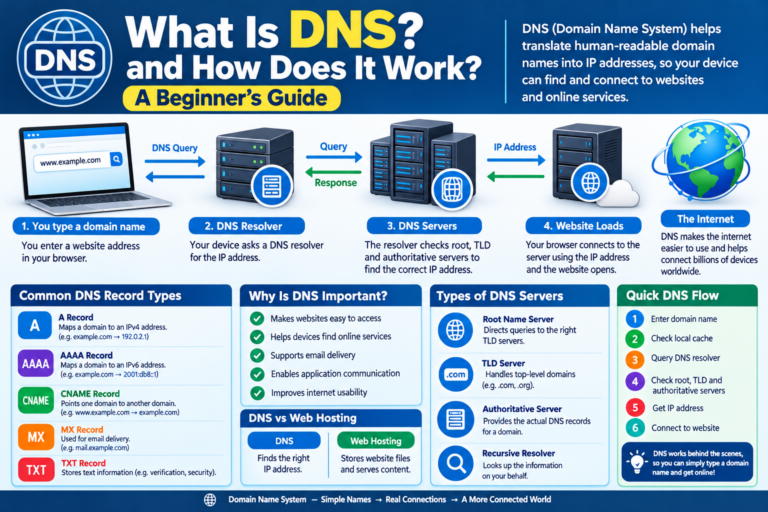
When you type a website address into your browser, your device sends a request to a server. That server needs to know where to send the requested content, so it looks at the IP address attached to your request.
If your device didn’t have this unique number, the network would essentially be shouting data into the void, hoping it finds the right destination. This protocol ensures that packets of information are routed precisely to the correct hardware.
The internet operates on these addresses through a set of rules defined by the Internet Engineering Task Force. You can read more about the technical standards behind these identifiers at the Internet Engineering Task Force official repository.
These standards ensure that devices from different manufacturers, such as Apple, Samsung, or Dell, can all speak the same language. This universal compatibility is what makes the global internet possible.
The Evolution from IPv4 to IPv6
The original version of the internet protocol, known as IPv4, uses a 32-bit address scheme. This allows for approximately 4.3 billion unique addresses, which seemed like an infinite number when the system was designed in the early 1980s.
However, as the number of internet-connected devices exploded, the world began to run out of available addresses. To solve this, experts developed the IPv6 protocol.
IPv6 uses a 128-bit address scheme, which increases the number of available addresses to a staggering 340 undecillion. That number is so large it effectively ensures we will never run out of unique identifiers for future devices. While IPv4 addresses look like four sets of numbers separated by dots, such as 192.168.1.1, IPv6 addresses use eight groups of hexadecimal numbers separated by colons.
Most modern networks run both protocols simultaneously to ensure backward compatibility. Your home router likely handles IPv4 internally while communicating with the wider web using both types. This transition is a quiet success story of engineering, allowing the internet to expand without breaking the existing infrastructure that millions of people rely on daily.
Public versus Private IP Addresses
One of the most important distinctions to understand is the difference between public and private addresses. A public IP address is assigned to your home or business network by your Internet Service Provider (ISP).
This is the address that the rest of the internet sees when you visit websites or interact with online services. It acts as the primary gateway for your entire household’s traffic.
Conversely, a private IP address is assigned to your specific device by your local router. When you connect your phone to your home WiFi, your router gives it a private address so it can distinguish your phone from your laptop or smart TV.
These private addresses are not visible to the outside world. They exist solely to help your local network manage traffic between your various gadgets.
This internal management happens through a process called Network Address Translation (NAT). Your router acts as a translator, taking requests from your various private devices and funneling them through your single public IP address. It keeps track of which device requested which piece of data, ensuring the correct images or text arrive on the correct screen.
How Dynamic and Static Addresses Function
You might wonder if your digital address ever changes, and the answer depends on your specific setup. Most residential users are assigned a dynamic IP address by their ISP.
This means your public address can change periodically, such as when you restart your router or when the ISP’s lease on that address expires. Dynamic addresses are cost-effective and efficient for providers to manage.
Static IP addresses, on the other hand, are manually configured and do not change. These are typically reserved for servers, business networks, or devices that need to be consistently accessible from the internet. If you host a website or run a remote access server, a static address ensures that other computers can always find you at the same digital location.
| Feature | Dynamic IP | Static IP |
|---|---|---|
| Consistency | Changes over time | Permanent |
| Cost | Usually included in plan | Often requires extra fee |
| Best Use | General browsing | Servers and hosting |
| Security | Slightly more private | Easier to target |
The Role of Routers and Subnets
Your router is the traffic controller of your local network. It manages the flow of data between your devices and the outside world by maintaining a routing table.
This table keeps track of the private IP addresses assigned to your hardware. When a data packet arrives from the internet, the router checks its table to determine which specific device requested that information.
Subnets further divide these networks into smaller, more manageable segments. By using a subnet mask, a network administrator can group devices together based on their function or physical location.
This reduces network congestion and improves overall performance. While most home users never need to configure a subnet, it is a critical component for large corporate networks.
These systems work together to ensure that even if you have fifty devices connected to a single router, they don’t interfere with one another. Each device stays within its assigned lane, thanks to the precision of these addressing rules. It is an elegant solution to the problem of managing thousands of simultaneous data streams in a single household.
Common Addressing Patterns and Reserved Ranges
You may have noticed that many local networks use addresses starting with 192.168. These are part of a special range reserved specifically for private networks.
These addresses are not routable on the global internet, which is why they are safe for home use. Because they are not globally unique, millions of homes can use the same 192.168.1.1 address for their router without any conflict.
Other reserved ranges include the 10.0.0.0 and 172.16.0.0 blocks. These are also set aside for private use, allowing for flexibility in network design. Another unique address is 127.0.0.1, known as the loopback address.
If you type this into a browser, your computer sends the request to itself. Developers often use this to test software locally before deploying it to the live internet.
Understanding these patterns helps demystify the numbers you see in your network settings. When you see an address beginning with 169.254, it often indicates a configuration error where your device failed to receive a valid address from the router. Recognizing these common prefixes can be a helpful first step in troubleshooting connectivity issues.
Security and Privacy Considerations
An IP address can reveal a significant amount of information about your approximate location, such as your city, region, and ISP. While it does not pinpoint your exact physical address, it provides enough data for advertisers to track your browsing habits across different sites. This is why many people use Virtual Private Networks (VPNs) to mask their true address.
A VPN works by routing your internet traffic through a remote server in a different location. The website you visit only sees the IP address of the VPN server, not your actual home address.
This provides a layer of anonymity and prevents your ISP from seeing exactly which websites you are visiting. However, it is important to remember that a VPN does not make you invisible to the sites you log into.
Security experts often emphasize that your IP address is not a secret, but it is a piece of data that can be used to target you. Keeping your router firmware updated is one of the best ways to protect your network. Strong passwords and modern encryption standards, such as WPA3, ensure that unauthorized users cannot easily join your network and spoof your identity.
Frequently Asked Questions
Can two people have the same IP address?
Yes, multiple people can share the same public IP address if they are on the same network or behind the same ISP gateway. However, every device on a local network must have a unique private IP address to communicate with the router.
What will an IP address tell you?
An IP address can reveal the location of your internet service provider’s hub, which is usually a city or region. It does not typically provide your exact street address or name, though that information is linked to the account held by the ISP.
Is your IP address just your WiFi?
Your IP address is assigned to your network connection, whether that is via WiFi or a wired Ethernet cable. If you switch from WiFi to a cellular data connection, your device will be assigned an entirely different IP address by your mobile provider.
Why would someone have an IP address?
Every device needs an IP address to participate in the internet. Without one, the device would be unable to send or receive data, making it impossible to browse the web, check email, or use connected applications.
How do I find my current IP address?
You can find your local IP address by checking your device’s network settings or running a command like “ipconfig” on Windows or “ifconfig” on macOS. To find your public IP address, you can simply search “what is my IP” in any web browser.
Final Thoughts on Network Connectivity
Understanding an IP address and how does it work provides a fascinating glimpse into the infrastructure that keeps our world connected. These numbers, while seemingly mundane, are the backbone of every digital interaction you have.
From the moment you connect a device to the network, this protocol begins its silent work of routing information across oceans and continents. By grasping these basics, you become a more informed user capable of troubleshooting your own connections and better protecting your privacy online.
As you continue to use the internet, remember that your digital identity is built on these foundational protocols. Whether you are browsing from a coffee shop or your own living room, the system is constantly working to ensure your data reaches its destination.
If you ever run into connectivity issues, checking your address status is often the first step toward a solution. Keep exploring the technology that powers your day-to-day life, and you will find that the internet is much more manageable than it first appears.