What Is a CDN and How Does It Work? A Beginner’s Guide
Website speed is an important part of the modern internet. Visitors expect websites to load quickly, whether they are reading an article, viewing images, watching videos, or using an online application.
One technology that can help websites deliver content more efficiently is a CDN, which stands for Content Delivery Network.
CDNs are widely used by websites and online services to improve content delivery, reduce delays, and handle traffic more efficiently.
In this beginner-friendly guide, we will explain what a CDN is, how it works, why websites use it, its benefits and limitations, and what beginners should know about CDN technology.
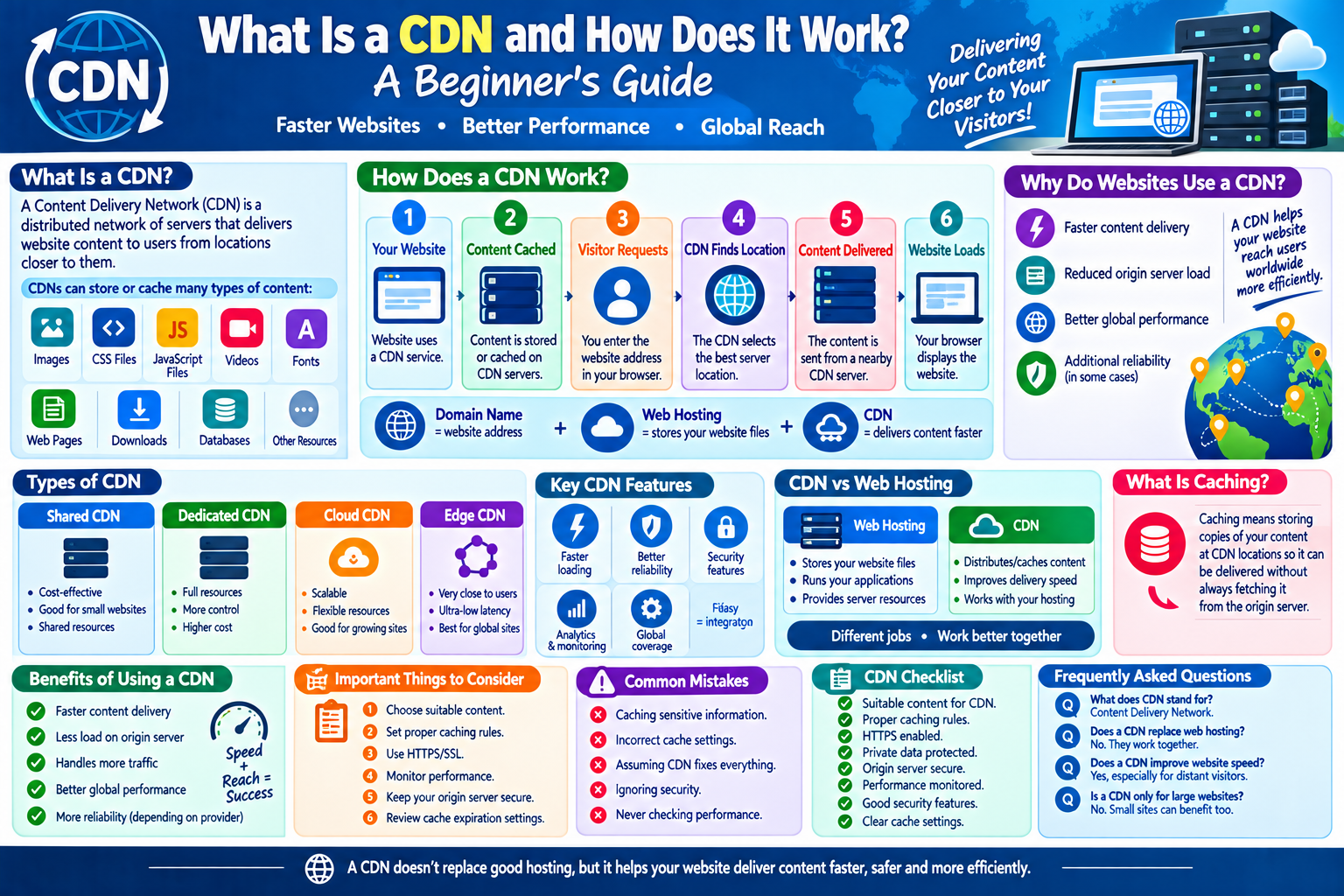
What Is a CDN?
A Content Delivery Network (CDN) is a distributed network of servers designed to deliver website content to users from locations that are generally closer to them.
Instead of relying on a single server location for every visitor, a CDN can store or cache certain website resources across multiple locations.
These resources may include:
- Images
- CSS files
- JavaScript files
- Videos
- Fonts
- Web pages
- Downloads
- Other static content
When a visitor requests content, the CDN can deliver eligible content from an appropriate server location.
Why Do Websites Use a CDN?
Imagine a website’s main server is located in one country while visitors are located around the world.
If every visitor has to retrieve every resource directly from that single server, network distance and server workload can sometimes affect performance.
A CDN provides additional servers in different locations, allowing content to be delivered through a distributed network.
This can help improve the experience for visitors in different regions.
How Does a CDN Work?
The basic process can be explained in a few steps.
Step 1: A Website Uses a CDN
The website owner configures selected content or services to use the CDN.
Step 2: Content Is Stored or Cached
The CDN may store copies of certain resources at different network locations.
Step 3: A Visitor Requests a Resource
For example, a visitor opens a webpage containing an image.
Step 4: The CDN Determines Where to Deliver the Content
The CDN uses its network configuration to determine an appropriate server location.
Step 5: The Content Is Delivered
If the requested resource is available from a nearby or suitable CDN location, it can be delivered from there.
Step 6: The Website Continues Loading
The visitor’s browser receives the requested resources and displays the webpage.
The exact process depends on the CDN provider and website configuration.
What Is a CDN Server?
A CDN server is part of the distributed infrastructure used to deliver content to visitors.
These servers may be located in different cities, countries, or regions.
They are sometimes called edge servers because they are positioned closer to the users they serve.
The goal is to reduce unnecessary distance between visitors and frequently requested content.
What Is Caching?
Caching is one of the key concepts behind CDN technology.
A cache is a temporary copy of information that can be reused when the same information is requested again.
For example, suppose a website has a large image that many visitors need to download.
Instead of retrieving that image from the main server for every visitor, a CDN may cache the image at an edge location.
Later visitors can receive the cached copy when appropriate.
What Is an Origin Server?
The origin server is the main server where a website’s original content or application is hosted.
A CDN works alongside the origin server rather than necessarily replacing it.
A simplified structure looks like this:
Visitor → CDN → Origin Server
If the CDN already has a cached copy of the requested content, it may deliver the content directly.
If the content is not available in the cache, the CDN may request it from the origin server and then deliver it to the visitor.
Benefits of Using a CDN
CDNs can provide several advantages.
1. Faster Content Delivery
A CDN can deliver cached resources from locations closer to visitors.
This can reduce network distance and improve loading performance.
2. Reduced Origin Server Load
Frequently requested content can be served from CDN servers instead of repeatedly requesting it from the origin.
This can reduce the workload on the main server.
3. Better Handling of Traffic
A distributed network can help websites handle large numbers of content requests more efficiently.
4. Improved Global Performance
Websites with visitors in multiple countries can benefit from having content distributed across different regions.
5. Additional Reliability
Some CDN systems can continue serving cached resources during certain origin-server problems, depending on configuration.
However, a CDN does not guarantee that an entire website will remain available during every outage.
Does a CDN Make Every Website Faster?
Not necessarily.
A CDN can improve delivery of certain types of content, but overall website performance depends on many factors.
These can include:
- Website code
- Server performance
- Database queries
- Image sizes
- JavaScript
- Hosting configuration
- Network conditions
- Browser performance
- CDN configuration
A poorly optimized website may still be slow even when it uses a CDN.
CDN and Website Security
Many CDN providers offer security features in addition to content delivery.
Depending on the service, these may include:
- DDoS protection
- Traffic filtering
- Web application firewall features
- TLS/HTTPS support
- Bot management
- Rate limiting
Security features vary between providers and plans.
A CDN should therefore be viewed as one part of a larger website security strategy rather than a complete security solution.
What Is DDoS Protection?
DDoS stands for Distributed Denial-of-Service.
A DDoS attack attempts to overwhelm a website or online service with a large amount of traffic or requests.
Some CDN providers have distributed infrastructure that can help absorb or filter certain types of malicious traffic.
The effectiveness depends on the provider, attack type, configuration, and available protection.
CDN vs. Web Hosting
A CDN and web hosting serve different purposes.
Web Hosting
Web hosting provides the server environment where website files, databases, applications, and other resources can be stored and operated.
CDN
A CDN distributes or caches eligible content across multiple network locations to help deliver that content efficiently.
Many websites use both.
A simple example is:
Web hosting → stores and runs the website
CDN → helps deliver selected content to visitors
Static vs. Dynamic Content
CDNs are often especially useful for static content.
Static content generally does not change for every individual visitor.
Examples include:
- Images
- Stylesheets
- JavaScript files
- Fonts
- Videos
- Downloadable files
Dynamic content may need to be generated or personalized for each request.
Examples can include:
- Account dashboards
- Personalized recommendations
- Shopping carts
- Real-time information
Some modern CDN systems can also support dynamic content, but the caching strategy can be more complicated.
What Is a CDN Cache Hit?
A cache hit occurs when a CDN can fulfill a content request using a resource already stored in its cache.
For example:
- A visitor requests an image.
- The CDN checks its cache.
- The image is already available.
- The CDN sends the cached image to the visitor.
This can avoid an additional request to the origin server.
What Is a Cache Miss?
A cache miss happens when the requested resource is not currently available in the relevant CDN cache.
The CDN may then request the resource from the origin server.
Depending on the configuration, the CDN may store the resource for future requests.
How to Use a CDN Effectively
Website owners can follow several basic practices.
1. Identify Suitable Content
Determine which website resources are appropriate for CDN delivery.
2. Configure Caching Carefully
Caching rules should match how frequently your content changes.
3. Use HTTPS
Secure connections are important for modern websites.
4. Monitor Performance
Check website speed and CDN performance regularly.
5. Keep the Origin Server Secure
Using a CDN does not mean the origin server can be ignored.
6. Review Cache Rules
Incorrect cache settings can cause outdated content to remain available longer than intended.
7. Monitor Traffic
Analytics can help identify unusual traffic patterns and performance problems.
Common CDN Mistakes
Caching Sensitive Information
Private or personalized information should not be cached as public content.
Incorrect Cache Settings
Poorly configured caching can result in visitors seeing outdated information.
Assuming a CDN Fixes Everything
A CDN cannot automatically solve slow databases, inefficient code, oversized images, or poor hosting.
Ignoring Security
A CDN does not replace strong passwords, software updates, secure applications, or other security measures.
Never Checking Performance
Website owners should monitor whether the CDN is actually improving performance.
CDN Checklist
If you are considering a CDN, check:
- Your website has suitable content for CDN delivery.
- Caching rules are correctly configured.
- HTTPS is enabled.
- Private information is protected from public caching.
- Your origin server remains secure.
- Website performance is monitored.
- Cache expiration settings are appropriate.
- Traffic patterns are reviewed.
- Security features are understood.
- You know how to clear or update cached content.
Frequently Asked Questions
What does CDN stand for?
CDN stands for Content Delivery Network.
Does a CDN replace web hosting?
No. A CDN and web hosting perform different functions. A CDN can work alongside a hosting server to distribute or cache content.
Does a CDN improve website speed?
It can improve the delivery of certain content, especially when visitors are geographically far from the origin server. Overall speed also depends on website design, hosting, code, and other factors.
Is a CDN only useful for large websites?
No. Smaller websites can also benefit from CDN services, although the usefulness depends on traffic, audience locations, content types, and technical requirements.
Can a CDN improve website security?
Some CDN providers offer security features such as traffic filtering and DDoS protection. However, a CDN should not be considered a complete website security solution.
What is CDN caching?
CDN caching means storing copies of eligible website resources at CDN locations so they can be delivered without always retrieving them from the origin server.
Final Thoughts
A Content Delivery Network is an important technology used by many modern websites. By distributing and caching content across different network locations, a CDN can help websites deliver resources more efficiently to visitors.
CDNs can improve performance, reduce origin-server workload, support global audiences, and provide additional security features depending on the provider.
However, a CDN is not a replacement for good hosting, website optimization, backups, or proper security practices. Understanding how caching, edge servers, and origin servers work can help website owners make better decisions about their online infrastructure.