
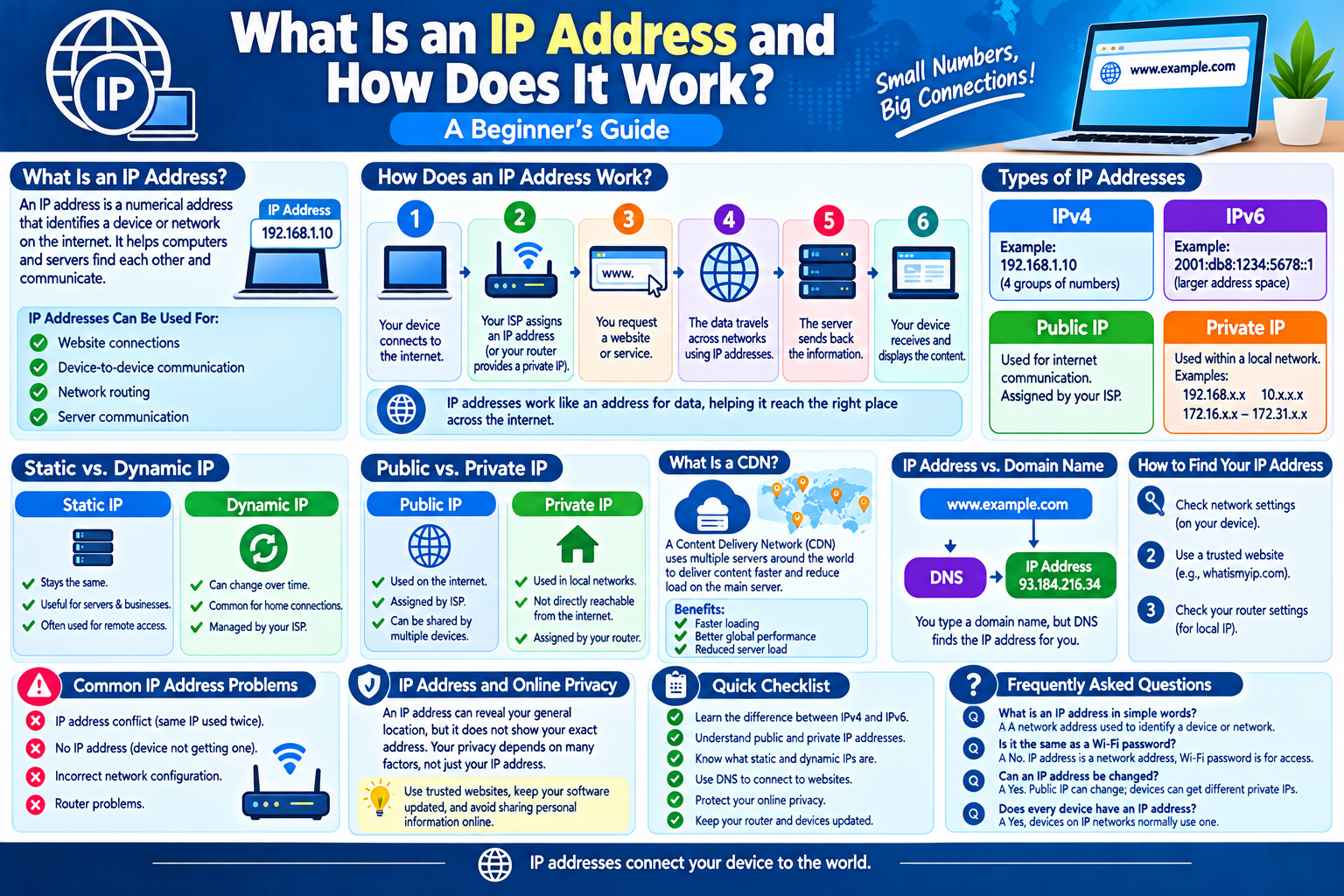
What Is an IP Address and How Does It Work? A Beginner’s Guide
Every time you connect your phone, computer, tablet, or another device to the internet, your device communicates with other computers and servers. To make this communication possible, devices need an identifying address. This is known as an IP address.
You may have heard terms such as IP address, IPv4, IPv6, public IP, or private IP, but you may not know exactly what they mean. Understanding IP addresses can help beginners learn how the internet works and why devices can communicate with websites and online services.
In this guide, we will explain what an IP address is, how it works, the different types of IP addresses, and why they are important.
What Is an IP Address?
An IP address, or Internet Protocol address, is a numerical address assigned to a device or network interface that uses the Internet Protocol to communicate over a network.
In simple terms, an IP address works somewhat like an address for communication.
When you visit a website, your device needs to communicate with the server hosting that website. IP addresses help networks identify where information should be sent and where it came from.
An IP address does not necessarily identify a specific person. It can identify a network connection or device interface, and the same public IP may be shared by many devices through a router.
Why Are IP Addresses Important?
IP addresses are important because internet-connected devices need a way to communicate with one another.
For example, when you open a website:
- Your device connects to a network.
- The network provides or assigns an IP address.
- Your device sends a request for the website.
- The request travels across different networks.
- The website’s server sends information back.
- Your device receives and displays the website.
Without addressing systems such as IP addresses, data could not be properly routed between devices and servers.
What Does an IP Address Look Like?
There are two major versions of Internet Protocol addresses: IPv4 and IPv6.
IPv4
IPv4 is the older and still widely used addressing system.
An IPv4 address consists of four groups of numbers separated by periods.
For example:
192.168.1.10
Each group can contain a value from 0 to 255.
Another example could be:
203.0.113.25
IPv4 provides approximately 4.3 billion possible addresses. Because the number of internet-connected devices has grown significantly, IPv4 addresses have become limited.
IPv6
IPv6 was developed to provide a much larger number of addresses.
An IPv6 address uses hexadecimal characters and is much longer than an IPv4 address.
For example:
2001:db8:1234:5678::1
IPv6 provides an extremely large address space, making it suitable for the growing number of computers, smartphones, smart devices, servers, and other connected equipment.
What Is a Public IP Address?
A public IP address is an address used to identify a network connection on the public internet.
Your internet service provider, commonly called an ISP, generally assigns your home or business connection a public IP address.
When multiple devices in your home connect through a router, they can share the same public IP address when communicating with the internet.
For example, your:
- Smartphone
- Laptop
- Desktop computer
- Smart TV
- Tablet
may all access the internet through the same public IP address.
What Is a Private IP Address?
A private IP address is used inside a local network.
For example, your home router may assign different private IP addresses to devices connected to your Wi-Fi network.
Common private IPv4 address ranges include:
- 192.168.x.x
- 10.x.x.x
- 172.16.x.x through 172.31.x.x
A device might have a private address such as:
192.168.1.25
This address is used within the local network and is not normally directly reachable from the public internet.
Public IP vs. Private IP
Public and private IP addresses serve different purposes.
Public IP
A public IP address:
- Is associated with an internet connection.
- Can be used for communication across the public internet.
- Is generally assigned by an ISP.
- May be shared by multiple devices behind a router.
Private IP
A private IP address:
- Is used within a local network.
- Helps devices communicate with the router and each other.
- Is normally assigned by the router or another local network service.
- Is not directly used as a public internet address.
Understanding this difference makes it easier to understand how home networks operate.
What Is a Static IP Address?
A static IP address generally stays the same over time.
Static addresses can be useful for certain servers, business systems, remote-access setups, and other services that need a consistent address.
For example, a company hosting a service may use a static public IP so that users can reliably connect to it.
Static IP addresses are not necessary for most everyday home internet users.
What Is a Dynamic IP Address?
A dynamic IP address can change over time.
Many residential internet connections use dynamically assigned public IP addresses. The ISP manages these addresses and may assign a different one when the connection reconnects or according to its network policies.
Dynamic addressing helps ISPs efficiently manage available addresses.
How Does an IP Address Work?
An IP address works as part of a larger networking system.
Imagine sending a letter through the postal system. The letter needs an appropriate destination address so that the postal network can route it.
Internet data works differently, but the basic idea of addressing is useful for understanding the concept.
When your device sends data:
- The data is divided into packets.
- Network information is added to help deliver those packets.
- Routers examine addressing information.
- Routers forward packets toward their destination.
- The destination receives the packets.
- The information is processed and displayed by the receiving device or application.
This process happens extremely quickly.
What Is an IP Address Used For?
IP addresses have many important networking purposes.
They can help with:
- Device-to-device communication
- Website connections
- Network routing
- Server communication
- Local network management
- Troubleshooting network problems
- Identifying network endpoints
IP addresses are one of the fundamental components of modern computer networking.
Can Two Devices Have the Same IP Address?
Two devices can have the same private IP address if they are on completely separate networks.
However, two devices generally should not use the same private IP address within the same local network at the same time. This can cause an IP address conflict and communication problems.
Public IP addresses also need to be managed carefully so that internet routing works correctly.
Network equipment and internet providers use various systems to manage IP addresses.
What Is a Local Network?
A local network, often called a LAN, connects devices within a limited area.
For example, a home Wi-Fi network is a local network.
It may include:
- A wireless router
- Smartphones
- Computers
- Printers
- Smart TVs
- Game consoles
- Smart home devices
The router can assign private IP addresses to devices on the local network.
What Is DHCP?
DHCP, or Dynamic Host Configuration Protocol, is a networking system that can automatically provide devices with network configuration information.
When you connect a device to a home network, DHCP can provide information such as:
- IP address
- Network gateway
- Subnet information
- DNS server information
This automation means most users do not have to manually configure an IP address every time they connect a new device.
What Is DNS and How Is It Related to IP Addresses?
DNS, or Domain Name System, translates domain names into IP addresses that computers can use.
For example, people prefer to type a website domain name rather than remember a numerical IP address.
When you enter a website address into your browser, DNS can help determine which IP address is associated with that domain.
The browser can then use the resulting information to connect to the appropriate server.
DNS and IP addresses therefore work together, but they are not the same thing.
Does an IP Address Reveal Your Exact Location?
An IP address can sometimes provide an approximate geographic location, such as a country, region, or city.
However, an IP address generally does not provide a person’s exact street address by itself.
The accuracy of IP-based location information can vary because of:
- ISP network design
- Mobile networks
- VPNs
- Proxy servers
- Corporate networks
- Shared connections
- Location databases
Therefore, an IP address should not automatically be treated as an exact physical location.
Can Your IP Address Change?
Yes, your public IP address can change depending on your internet connection and ISP.
Your IP address may change when:
- Your router reconnects.
- Your ISP changes your assignment.
- You switch networks.
- You move from Wi-Fi to mobile data.
- You connect through a VPN or proxy.
A static IP, when provided by an ISP or network administrator, is designed to remain consistent.
How Can You Find Your IP Address?
You can usually find your device’s private IP address through its network settings.
For example, on many devices you can open:
Settings → Network or Wi-Fi → Connected Network → Network Details
The exact menu names vary depending on the operating system and device.
To see your public IP address, you can use a reputable IP-checking website or check information provided by your network service.
Be cautious when entering personal information into unfamiliar websites.
IP Address and Online Privacy
An IP address is a piece of network information and can be visible to websites and online services that your device communicates with.
However, an IP address alone does not reveal everything about a person.
Online privacy depends on many other factors, including:
- Account information
- Browser settings
- Cookies
- Device information
- Applications
- Network configuration
- Tracking technologies
If privacy is important to you, use reputable services, review privacy settings, keep your software updated, and avoid sharing unnecessary personal information online.
Common IP Address Problems
Sometimes networking problems are related to IP configuration.
Common problems include:
IP Address Conflict
Two devices may accidentally receive the same local IP address, causing connection problems.
No IP Address
A device may fail to receive an IP address from the network.
Incorrect Network Configuration
Incorrect gateway, DNS, or other settings can prevent internet access.
Router Problems
A router may temporarily stop assigning addresses correctly or experience other network issues.
Restarting the router and reconnecting the device can sometimes resolve simple problems.
Simple IP Address Checklist
If you are learning about IP addresses, remember these basic points:
- IP stands for Internet Protocol.
- IP addresses help devices communicate across networks.
- IPv4 uses numerical addresses such as 192.168.1.10.
- IPv6 provides a much larger address space.
- Public IP addresses are used for internet communication.
- Private IP addresses are used inside local networks.
- Dynamic IP addresses can change.
- Static IP addresses are designed to remain consistent.
- DNS helps translate domain names into IP addresses.
- An IP address does not automatically reveal an exact physical address.
Frequently Asked Questions
1. What is an IP address in simple words?
An IP address is a network address used to help identify a device or network interface and route information to the correct destination.
2. What is the difference between IPv4 and IPv6?
IPv4 uses 32-bit addresses and has a limited number of possible addresses. IPv6 uses 128-bit addresses and provides a vastly larger address space.
3. Is an IP address the same as a Wi-Fi password?
No. An IP address is a network address, while a Wi-Fi password is used to authenticate a device to a protected wireless network.
4. Does every device have an IP address?
Devices communicating on an IP network normally use an IP address. A device can have different addresses on different networks or interfaces.
5. Can an IP address be changed?
Yes. Public IP addresses can change depending on the ISP and network connection. Devices can also receive different private IP addresses from a local router.
6. Is an IP address private information?
An IP address is network-related information and can be considered sensitive in some contexts. It is wise to avoid unnecessarily sharing network information and to use trusted websites and services.
Final Thoughts
An IP address is one of the basic building blocks of internet communication. It helps networks identify destinations and route data between devices, servers, and other systems.
For beginners, the most important concepts to understand are the difference between IPv4 and IPv6, public and private IP addresses, and static and dynamic addressing.
Once you understand these concepts, many other networking topics—such as routers, DNS, Wi-Fi, servers, and internet security—become easier to understand.

Good