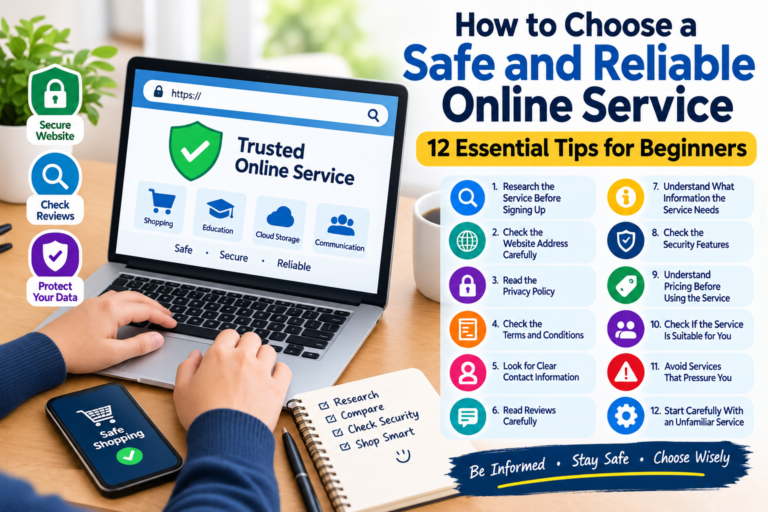
How to Protect Your Personal Information Online: 12 Essential Safety Tips
The internet has become an important part of everyday life. We use websites and mobile apps to communicate, shop, work, study, manage accounts, store photos, and access financial services. While the internet offers many benefits, it is also important to understand how to protect personal information online.
Personal information can include your name, email address, phone number, passwords, account details, location information, photographs, and other information that could identify or affect you.
Fortunately, improving your online privacy and security does not always require advanced technical knowledge. A few simple habits can significantly reduce common security risks.
In this guide, you will learn practical ways to protect your personal information while using the internet.
What Is Personal Information?
Personal information is information that relates to an identifiable person.
Examples can include:
- Full name
- Email address
- Phone number
- Home or mailing address
- Login credentials
- Account information
- Photos
- Location information
- Identification details
- Online activity and preferences
Different websites and services may collect different types of information. Before providing personal information online, it is a good idea to understand why the website is requesting it and how the information may be used.
Why Is Online Privacy Important?
Online privacy is important because personal information can be valuable.
If an online account is compromised, attackers may potentially gain access to private messages, stored information, contacts, or other connected services.
Protecting your information can help reduce risks such as:
- Account theft
- Identity fraud
- Phishing attacks
- Unauthorized access
- Privacy violations
- Unwanted tracking
- Social engineering
Good security habits are therefore useful for anyone who regularly uses the internet.
1. Use Strong and Unique Passwords
One of the simplest ways to improve online security is to use strong passwords.
Avoid passwords based on easily guessed information such as:
- Your name
- Birthday
- Phone number
- Family member’s name
- Simple number combinations
- Common words
It is also important to avoid using the same password for multiple important accounts.
If one website suffers a data breach and your password is reused elsewhere, other accounts could also become vulnerable.
A password manager can make it easier to create and manage unique passwords for different services.
2. Turn On Two-Factor Authentication
Two-factor authentication, often called 2FA, adds another layer of protection to an online account.
With 2FA enabled, signing in may require both your password and another verification method.
Depending on the service, the second factor could be:
- An authentication app
- A security key
- A verification code
- Another approved authentication method
Even if someone discovers your password, an additional authentication step can make unauthorized access more difficult.
Whenever an important online service offers a strong two-factor authentication option, consider enabling it.
3. Be Careful With Suspicious Emails
Phishing is a common online threat.
A phishing message may pretend to come from a bank, company, delivery service, social platform, or another organization. The message may attempt to convince you to click a link, open an attachment, provide a password, or reveal other information.
Before clicking a link in an unexpected message, consider:
- Did you expect this message?
- Does the sender address look legitimate?
- Is the message asking for sensitive information?
- Does the link lead to the correct website?
- Is the message creating unnecessary urgency?
If something seems suspicious, visit the organization’s official website directly rather than using a link in the message.
4. Keep Your Devices Updated
Software updates are not only about adding new features.
Updates can also contain security fixes that address known vulnerabilities.
Keep your:
- Smartphone
- Computer
- Web browser
- Applications
- Operating system
updated whenever practical.
Using outdated software for long periods can increase exposure to known security problems.
5. Check Website Security Before Sharing Information
Before entering sensitive information into a website, check that you are using the correct website.
Look carefully at the website address and make sure the domain name is spelled correctly.
A secure connection, commonly shown by HTTPS in the browser address, helps protect information while it travels between your browser and the website. However, HTTPS alone does not prove that a website is trustworthy.
You should still verify that you are visiting the legitimate website.
6. Limit the Personal Information You Share
Not every website needs to know everything about you.
When creating an account or filling out an online form, consider whether the requested information is actually necessary.
Avoid publicly sharing sensitive details such as:
- Home address
- Personal phone number
- Financial information
- Passwords
- Private identification information
The less unnecessary personal information you publish online, the less information is available for misuse.
7. Review Social Media Privacy Settings
Social media accounts can contain a large amount of personal information.
Depending on your privacy settings, information may be visible to people you do not know.
Review the privacy settings on your social media accounts and consider limiting who can see:
- Posts
- Photos
- Contact information
- Birthdays
- Friends or followers
- Location information
Also remember that changing privacy settings does not necessarily remove information that someone has already copied or shared.
8. Be Careful When Using Public Wi-Fi
Public Wi-Fi can be convenient in airports, hotels, cafés, restaurants, and other locations.
However, you should be cautious when using unfamiliar networks.
Avoid performing highly sensitive activities on networks you do not trust, particularly if you are unsure who operates the network.
When using public internet access, make sure your device is updated and use secure connections. For particularly sensitive activities, using a trusted network or an appropriate security solution can provide additional protection.
9. Download Apps From Trusted Sources
Mobile applications can request access to information and device features.
Before installing an app, consider:
- Who published it?
- Does it have a legitimate purpose?
- What permissions does it request?
- Does the requested access make sense?
- Is the app from an official app store?
Be cautious if an application requests permissions that do not appear necessary for its main function.
You should also remove applications that you no longer use.
10. Back Up Important Information
Backups can help protect important files if your device is lost, damaged, or affected by a security incident.
Important information may include:
- Family photographs
- Work documents
- Personal projects
- Important records
- Contacts
- Other irreplaceable files
You can use an external storage device, a trusted cloud service, or another suitable backup method.
For especially important information, maintaining more than one backup can provide additional protection.
11. Be Careful About What You Share With Chatbots and Online Tools
AI tools and online services can be useful for writing, research, productivity, and many other tasks.
However, users should think carefully before submitting sensitive personal information.
Avoid entering information such as passwords, private financial details, authentication codes, or confidential documents into an online service unless you understand why the information is needed and how that service handles it.
A good general rule is to share only the information necessary for the task.
12. Learn to Recognize Online Scams
Online scams can appear in many forms.
Some common examples include:
- Fake prize notifications
- Investment scams
- Fake technical-support messages
- Phishing websites
- Fake shopping websites
- Impersonation scams
- Job scams
- Account-verification scams
Scammers often use urgency or fear to encourage people to act quickly.
Take a moment to verify unexpected requests before sending money, sharing information, or clicking unfamiliar links.
What Should You Do If You Think Your Account Has Been Compromised?
If you believe someone has gained unauthorized access to one of your accounts, act quickly.
Consider these steps:
- Change the affected password.
- Use a new password that you do not use elsewhere.
- Enable two-factor authentication.
- Review recent account activity.
- Sign out of unfamiliar sessions or devices.
- Check recovery email and phone settings.
- Contact the service provider if necessary.
- Monitor other accounts that used the same password.
If financial information may have been exposed, contact the relevant financial institution using its official contact information.
Simple Online Security Checklist
Use this checklist to review your current security habits:
- Use unique passwords for important accounts.
- Enable two-factor authentication where available.
- Keep your devices and software updated.
- Avoid clicking suspicious links.
- Check website addresses carefully.
- Review social media privacy settings.
- Limit unnecessary personal information.
- Download apps from trusted sources.
- Back up important files.
- Be cautious with public Wi-Fi.
- Watch for common online scams.
- Review account activity regularly.
Frequently Asked Questions
How can I protect my personal information online?
Start by using strong unique passwords, enabling two-factor authentication, keeping software updated, avoiding suspicious links, limiting the information you share, and reviewing your privacy settings.
Is HTTPS enough to make a website safe?
No. HTTPS helps protect the connection between your browser and the website, but it does not automatically mean that the website itself is legitimate. Always check the domain name and consider whether you trust the website.
Should I use the same password for different websites?
It is better to use a unique password for each important account. Reusing passwords can increase the potential impact of a compromised password.
Is public Wi-Fi dangerous?
Public Wi-Fi can carry additional security and privacy risks, particularly when the network is unfamiliar or unsecured. Use caution and avoid exposing sensitive information on networks you do not trust.
What is two-factor authentication?
Two-factor authentication is an additional account-security method that requires another verification step beyond your password.
How often should I check my privacy settings?
It is useful to review important privacy settings periodically, especially after major changes to an app, website, operating system, or social media platform.
Final Thoughts
Protecting personal information online does not require being a cybersecurity expert. Simple habits such as using unique passwords, enabling two-factor authentication, updating software, recognizing suspicious messages, and limiting unnecessary information sharing can make your online accounts and personal data more secure.
Internet safety is an ongoing process. As technology changes, continue learning about new risks and review the security settings of the services you use.
The most important rule is simple: pause before you share, click, download, or respond to an unexpected request online.