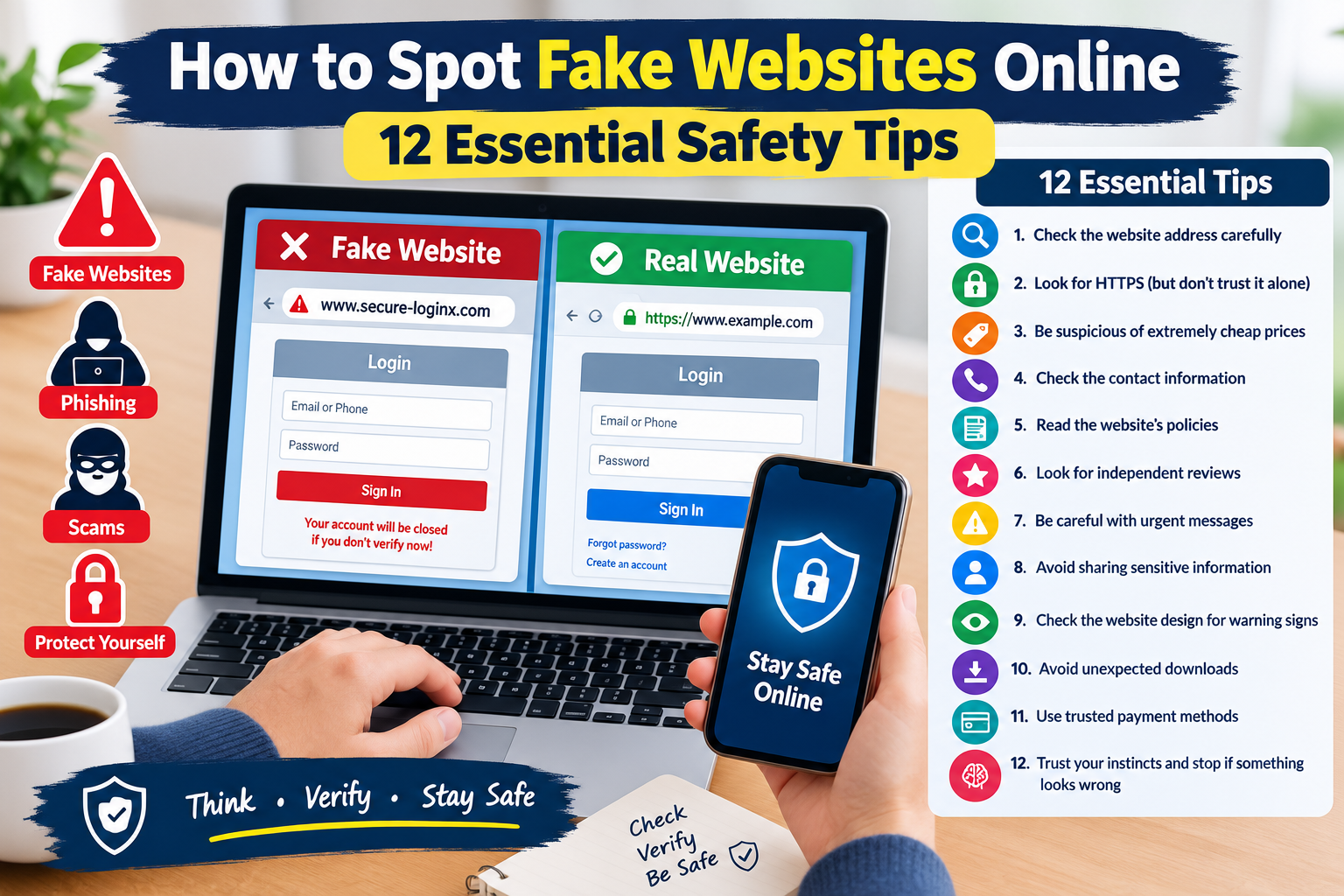
How to Spot Fake Websites Online: 12 Essential Safety Tips
The internet has made it easier than ever to shop, communicate, learn, work, and access online services. However, not every website you find online is genuine.
Fake websites are designed to look like legitimate businesses, shopping stores, banks, social media platforms, or other trusted services. Some may attempt to steal passwords and personal information, while others may try to trick visitors into making payments or downloading harmful software.
The good news is that you can often identify suspicious websites by paying attention to a few important warning signs.
In this guide, you will learn 12 practical ways to identify fake websites and protect yourself from common online scams.
What Is a Fake Website?
A fake website is a website created to imitate a legitimate website or mislead visitors.
A fraudulent website may look professional and contain logos, images, product listings, contact information, and other features designed to appear trustworthy.
Fake websites can be created for different purposes, including:
- Stealing login information
- Collecting personal information
- Taking payments for products that do not exist
- Spreading malicious software
- Promoting fraudulent offers
- Stealing financial information
- Impersonating legitimate organizations
Because fake websites can look convincing, it is important to check more than just their appearance.
Why Are Fake Websites Dangerous?
A fraudulent website can potentially cause financial and privacy problems.
For example, you might enter your email address and password into a fake login page without realizing that the information is being collected by someone else.
Other risks may include:
- Financial loss
- Account theft
- Identity fraud
- Malware infections
- Stolen passwords
- Unwanted subscriptions
- Privacy violations
Learning how to recognize warning signs can help reduce these risks.
1. Check the Website Address Carefully
One of the first things you should check is the website address.
Scammers may create domains that look similar to legitimate websites but contain small spelling changes.
For example, a fake website might use:
- Extra characters
- Misspelled words
- Unusual combinations
- Different domain extensions
- Additional words in the domain
Always check the address carefully before entering sensitive information.
2. Look for HTTPS, But Do Not Trust It Alone
HTTPS helps encrypt information between your browser and a website.
A website using HTTPS may display a lock symbol in the browser address bar.
However, HTTPS does not automatically mean that a website is legitimate.
Scammers can also use HTTPS on fraudulent websites.
Therefore, check both the connection and the actual domain name before trusting a website.
3. Be Suspicious of Extremely Cheap Prices
Fake shopping websites often attract visitors with prices that seem too good to be true.
For example, a website may advertise an expensive product at an unusually low price.
Before making a purchase, compare the price with several established retailers.
An unusually large discount does not always mean that a website is fraudulent, but it is a reason to investigate further.
4. Check the Contact Information
Legitimate businesses generally provide ways for customers to contact them.
Look for:
- Business address
- Customer support email
- Telephone number
- Contact page
- Company information
Be cautious if a website provides very little information about who operates it.
Also check whether the contact information appears realistic and consistent across the website.
5. Read the Website’s Policies
Before buying something from an unfamiliar online store, look for important policies.
These may include:
- Return policy
- Refund policy
- Shipping information
- Privacy policy
- Terms and conditions
A website with copied, incomplete, or poorly written policies may deserve additional scrutiny.
Do not assume that the presence of a policy page automatically proves that the website is legitimate.
6. Look for Independent Reviews
Before purchasing from an unfamiliar website, search for independent information about the business.
Look for reviews from sources that are not controlled by the website itself.
Pay attention to repeated complaints involving:
- Products never arriving
- Unexpected charges
- Poor customer support
- Fake tracking information
- Refund problems
Remember that online reviews can also be fake, so consider multiple sources rather than relying on a single review.
7. Be Careful With Urgent Messages
Scammers often use urgency to encourage people to act without thinking.
A fake website may tell you:
- Your account will be deleted.
- Your payment must be completed immediately.
- You have won a prize.
- Your package is waiting.
- Your account needs urgent verification.
Take a moment before responding.
If the message is connected to an important account, open the official website or application directly instead of clicking the provided link.
8. Avoid Entering Sensitive Information Too Quickly
Never enter sensitive information simply because a website asks for it.
Think carefully before providing:
- Passwords
- Banking information
- Credit or debit card information
- Authentication codes
- Identification information
- Personal addresses
Ask yourself whether the website genuinely needs the information.
If you are unsure, leave the website and verify the service through an official source.
9. Check the Website Design for Warning Signs
Design alone cannot prove whether a website is legitimate, but poor-quality presentation can sometimes be a warning sign.
Look for:
- Numerous spelling mistakes
- Broken pages
- Low-quality images
- Strange advertisements
- Inconsistent branding
- Missing information
- Repeated content
- Suspicious pop-ups
Professional websites can still contain occasional mistakes, so consider these signs together rather than treating one problem as proof of fraud.
10. Be Careful With Unexpected Downloads
Some suspicious websites may ask you to download software, browser extensions, documents, or applications.
Do not download files simply because a website tells you that your device needs an urgent update or security tool.
Unexpected downloads can potentially contain malicious software.
Only download software from trusted sources and verify what you are installing before opening it.
11. Use Trusted Payment Methods
If you decide to purchase something online, consider using a payment method that provides appropriate security and transaction protections.
Be especially cautious if an unfamiliar website demands unusual payment methods.
Never send payment information through an unsecured message or provide sensitive financial information to someone who contacts you unexpectedly.
Before paying, confirm:
- The website address is correct.
- The payment page belongs to the expected service.
- The amount is correct.
- You understand what you are purchasing.
- The business appears legitimate.
12. Trust Your Instincts and Stop When Something Looks Wrong
Sometimes a website simply does not feel right.
Perhaps the offer is unusually attractive, the website address looks strange, or the seller is pressuring you to make a payment immediately.
Do not feel obligated to continue.
You can close the page and investigate the business independently.
Taking a few extra minutes to verify a website is usually better than dealing with the consequences of a fraudulent transaction.
What Should You Do If You Entered Information on a Fake Website?
If you accidentally entered sensitive information into a suspicious website, take action as soon as possible.
Consider these steps:
- Change the affected password immediately.
- Use a completely new password.
- Enable two-factor authentication.
- Review recent account activity.
- Contact your financial institution if payment information was exposed.
- Monitor your accounts for unusual activity.
- Remove unauthorized devices or sessions.
- Report the fraudulent website when appropriate.
If you downloaded an unfamiliar file, avoid opening it and consider checking your device with appropriate security software.
Simple Fake Website Detection Checklist
Before trusting an unfamiliar website, ask yourself:
- Is the website address correct?
- Does the domain name look legitimate?
- Is HTTPS being used?
- Does the business provide real contact information?
- Are the prices realistic?
- Can I find independent reviews?
- Does the website have clear policies?
- Is the website pressuring me to act quickly?
- Is it asking for unnecessary personal information?
- Is it asking me to download an unexpected file?
- Does the payment process look legitimate?
- Does anything about the website seem suspicious?
Frequently Asked Questions
How can I tell if a website is fake?
Check the domain name, business information, prices, policies, independent reviews, payment process, and other warning signs. Do not rely on website design or HTTPS alone.
Does HTTPS mean a website is safe?
No. HTTPS helps protect data transmitted between your browser and the website, but it does not prove that the website itself is legitimate.
Can fake websites look professional?
Yes. Modern fraudulent websites can look very similar to legitimate websites. Always verify the website address and other important information.
Should I trust extremely cheap online deals?
Be cautious. An unusually low price can be a warning sign, especially when the seller is unknown and the offer creates pressure to purchase immediately.
What should I do if I accidentally gave my password to a fake website?
Change the password immediately, use a unique replacement password, enable two-factor authentication, and review recent account activity.
Can I safely shop on an unfamiliar website?
You can investigate an unfamiliar website before deciding whether to use it. Check its domain, business information, independent reviews, policies, and payment options before providing sensitive information or making a purchase.
Final Thoughts
Fake websites are an increasingly common part of the online scam landscape. They can imitate legitimate businesses and services closely enough to deceive unsuspecting visitors.
The best protection is to slow down and verify information before clicking, downloading, logging in, or making a payment.
Always check the website address, be cautious with unrealistic offers, investigate unfamiliar businesses, avoid suspicious downloads, and never provide sensitive information without understanding who you are giving it to.
Remember the simple rule: if a website is rushing you, asking for unusual information, or offering something that seems too good to be true, stop and verify it first.