What Is a VPN and How Does It Work? A Beginner’s Guide
The internet allows people to browse websites, communicate with others, watch videos, use online services, and access information from almost anywhere. However, when using the internet, your device communicates with other computers and servers through a network connection. A VPN, or Virtual Private Network, is a technology designed to create a more private connection between your device and the internet.
VPNs are commonly used on computers, smartphones, tablets, and other connected devices. In this beginner-friendly guide, we will explain what a VPN is, how it works, what it can and cannot do, and the important things to understand before using one.
What Is a VPN?
VPN stands for Virtual Private Network.
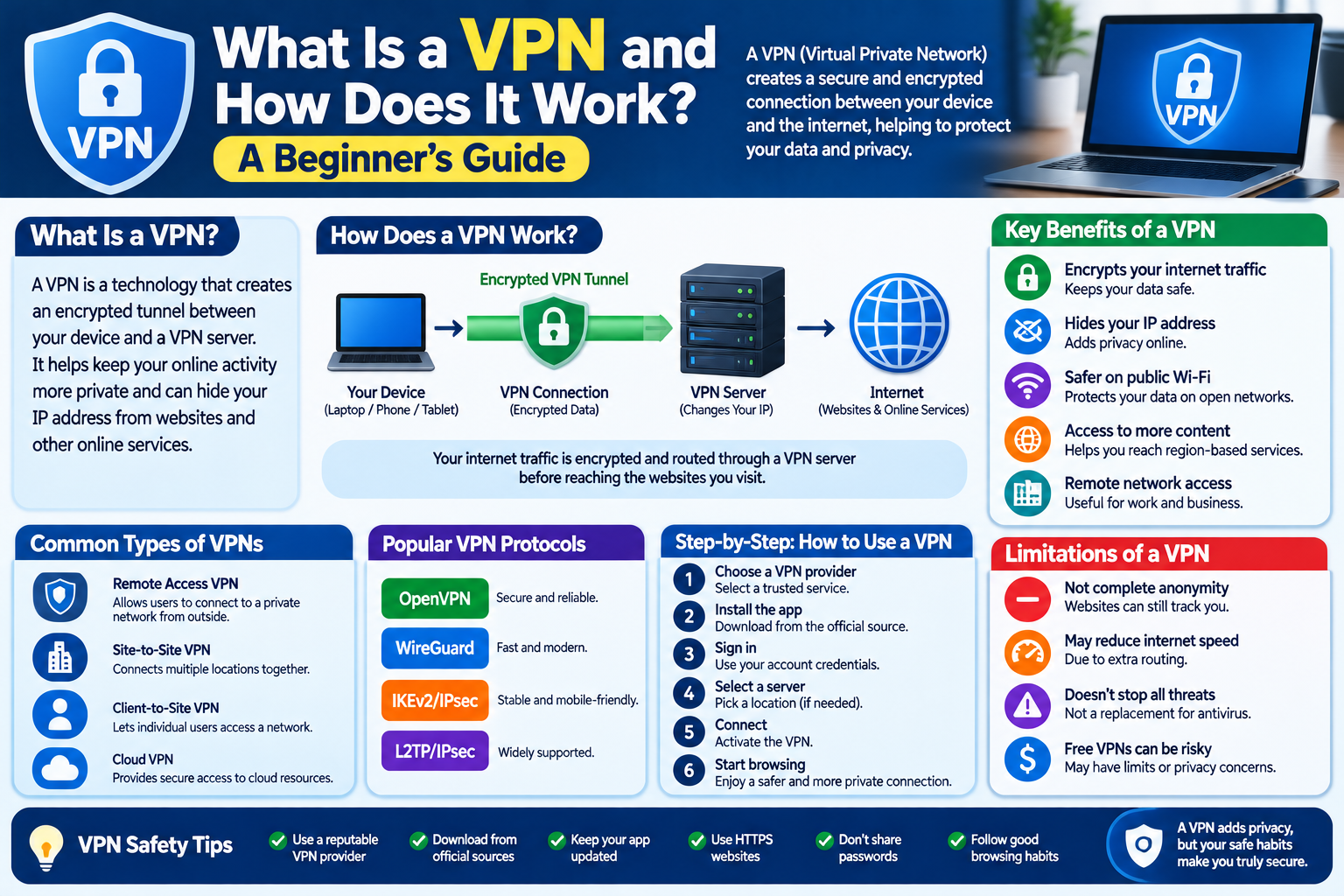
A VPN creates an encrypted connection between your device and a VPN server. Instead of sending internet traffic directly from your device to an online service, the traffic first travels through the VPN connection.
In simple terms, a VPN can work like a protected pathway between your device and a VPN server.
For example, without a VPN, a basic connection may look like:
Your Device → Internet Service Provider → Website
With a VPN, it may look like:
Your Device → Encrypted VPN Connection → VPN Server → Website
The exact behavior depends on the VPN technology, application, and settings being used.
Why Do People Use VPNs?
People use VPNs for different reasons. Some common purposes include:
- Protecting data while using certain networks
- Encrypting internet traffic between a device and VPN server
- Adding privacy when connecting through public Wi-Fi
- Accessing a network remotely
- Connecting to an organization’s private network
- Reducing the exposure of a device’s public IP address to websites
- Managing secure connections for business or educational environments
A VPN is a tool for managing network connections and privacy. It is not a complete internet security solution by itself.
How Does a VPN Work?
A VPN usually requires a VPN application or operating-system configuration on the user’s device.
After the VPN connection is established, the device creates an encrypted tunnel to a VPN server. Internet traffic is then routed through that connection according to the VPN configuration.
The basic process is:
- You connect your device to the internet.
- You open or activate the VPN.
- The VPN establishes a connection with a VPN server.
- The connection between your device and the VPN server is encrypted.
- Your internet traffic is routed through the VPN connection.
- The destination website receives the request from the VPN server rather than directly from your device’s original network connection.
The exact details depend on the VPN protocol and service.
What Is a VPN Tunnel?
A VPN tunnel is a protected communication path created between your device and a VPN endpoint.
The word “tunnel” does not mean that internet traffic physically travels through a separate cable. It describes the way network traffic is encapsulated and transported through another connection.
Encryption is commonly used to help protect information traveling through the tunnel.
What Is VPN Encryption?
Encryption changes readable information into a form that cannot be easily understood without the appropriate method of decryption.
When a VPN encrypts traffic between your device and its server, someone monitoring that part of the network may have difficulty reading the protected traffic.
However, encryption does not mean every part of your online activity is automatically private.
For example, websites may still collect information about your account, activity, browser, or device depending on their own systems and privacy practices.
What Is a VPN Server?
A VPN server is a server operated or configured to provide VPN connections.
When you connect to a VPN, your device establishes a secure connection with a VPN server. Depending on the service, you may be able to select a server location from a list.
The VPN server can then forward your internet requests to their destinations.
What Is an IP Address?
An IP address is a numerical address associated with a device or network connection.
Websites and online services can often see the public IP address from which a connection reaches them.
When using a VPN, websites may see the public IP address associated with the VPN server instead of the public IP address associated with your original internet connection.
This does not make you completely anonymous.
Does a VPN Make You Anonymous?
No. A VPN should not be treated as a guarantee of complete anonymity.
A VPN can change how your internet connection appears to websites and can encrypt traffic between your device and the VPN server, but many other factors can identify or track activity.
For example:
- You may log into personal accounts.
- Websites may use cookies.
- Browser or device information may be collected.
- Online services may maintain account records.
- Search engines may store activity according to their policies.
- The VPN provider may have its own logging and privacy practices.
Therefore, privacy and anonymity are not the same thing.
Does a VPN Protect You From Viruses?
A VPN is not an antivirus program.
It does not automatically remove malware, detect every malicious file, or prevent every harmful website.
For better protection, users should also:
- Keep operating systems updated.
- Update browsers and applications.
- Use reputable security software where appropriate.
- Avoid suspicious downloads.
- Be careful with unexpected email attachments.
- Use strong passwords.
- Enable additional account security features when available.
A VPN can be one part of a broader security strategy.
VPN and Public Wi-Fi
Public Wi-Fi is commonly available in places such as hotels, airports, cafes, libraries, and other public locations.
When using an unfamiliar network, users should be careful about the information they transmit and the websites they visit.
A VPN can encrypt traffic between the device and the VPN server, which can provide an additional layer of protection for that part of the connection.
However, users should still use HTTPS websites, avoid suspicious links, and keep their devices updated.
What Is HTTPS?
HTTPS stands for Hypertext Transfer Protocol Secure.
HTTPS helps protect communication between a web browser and a website through encryption.
A VPN and HTTPS provide different layers of protection.
For example:
VPN: Helps protect traffic between your device and the VPN server.
HTTPS: Helps protect communication between your browser and a website when the website supports HTTPS.
Using a VPN does not replace the importance of HTTPS.
What Are VPN Protocols?
A VPN protocol is a set of rules and technologies used to establish and manage a VPN connection.
Different VPN technologies can provide different combinations of security, speed, compatibility, and configuration options.
Some commonly known VPN protocols and technologies include:
- WireGuard
- OpenVPN
- IKEv2/IPsec
- IPsec
The availability of specific protocols depends on the VPN provider and device.
For most beginners, the easiest approach is to use a reputable VPN application and follow its recommended configuration.
What Is a VPN Kill Switch?
Some VPN applications provide a feature called a kill switch.
A kill switch is designed to block certain internet traffic if the VPN connection unexpectedly disconnects.
Without such a feature, a device may automatically return to its normal internet connection.
The exact behavior of a kill switch varies between VPN applications and operating systems.
What Are the Advantages of a VPN?
A VPN can provide several useful features.
1. Encrypted Connection
A VPN can encrypt traffic between your device and the VPN server.
2. Additional Privacy
A VPN can change the public IP address presented to websites.
3. Useful on Certain Networks
A VPN can provide an additional layer of protection when using some unfamiliar networks.
4. Remote Network Access
Businesses and organizations can use VPN technology to allow authorized users to connect to private internal networks.
5. Flexible Connectivity
VPN services may provide servers in different locations, allowing users to select different connection endpoints.
What Are the Limitations of a VPN?
VPNs are useful, but they have limitations.
A VPN Does Not Stop All Tracking
Websites and online services may still identify users through accounts, cookies, browser information, and other technologies.
A VPN Does Not Make You Completely Anonymous
Your VPN provider may be able to see certain connection information, depending on its technology and policies.
A VPN Does Not Guarantee Safety
Users can still encounter phishing websites, scams, malware, and unsafe downloads while connected to a VPN.
A VPN Can Reduce Internet Speed
Your traffic may travel through an additional server, which can sometimes increase latency or reduce connection speed.
VPN Services Can Have Different Privacy Policies
Not every VPN provider operates in the same way. Users should review the provider’s privacy policy and terms before using the service.
Free VPN vs. Paid VPN
VPN services can be free or paid.
Free services may have limitations such as:
- Fewer server locations
- Data limits
- Speed restrictions
- Fewer features
- Advertising
- Different privacy practices
Paid VPN services may offer additional features, larger server networks, customer support, and different privacy options.
The important point is to understand how the service operates rather than assuming that a free or paid VPN is automatically safe.
How to Choose a VPN Service
If you decide to use a VPN, consider the following factors.
1. Privacy Policy
Read the provider’s privacy policy and understand what information it collects.
2. Security Features
Look for clearly explained security features and supported VPN protocols.
3. Device Compatibility
Check whether the service supports your computer, smartphone, tablet, or other devices.
4. Connection Speed
VPN performance can vary depending on server location, network conditions, and provider infrastructure.
5. Server Locations
If server location matters to you, check the provider’s available locations.
6. Data Limits
Some services restrict how much data you can use.
7. Pricing
Compare subscription costs and understand whether the advertised price is an introductory rate or regular price.
8. Reputation and Transparency
Look for clear company information, documentation, privacy policies, and understandable terms of service.
How to Use a VPN
Using a VPN is generally straightforward.
Step 1: Choose a VPN Provider
Select a service that meets your requirements.
Step 2: Install the VPN Application
Download the official application for your device.
Step 3: Sign In
If the service requires an account, sign in using your credentials.
Step 4: Select a Server
Choose an available server according to your needs.
Step 5: Connect
Press the connection button in the application.
Step 6: Confirm the Connection
Check that the application indicates that the VPN connection is active.
Step 7: Browse Normally
Once connected, you can use websites and online services as usual.
Common VPN Problems
Sometimes a VPN may not work as expected.
Common problems include:
- Slow connection speed
- VPN connection failures
- Websites loading slowly
- Certain services not working correctly
- Frequent disconnections
- Incorrect VPN configuration
- Network restrictions
Simple Troubleshooting Steps
If you experience problems:
- Check your internet connection.
- Restart the VPN application.
- Try another VPN server.
- Change the VPN protocol if the application allows it.
- Restart your device.
- Update the VPN application.
- Check the provider’s support documentation.
VPNs for Businesses
VPN technology is also widely used by organizations.
A company may use a VPN to allow authorized employees to securely connect to internal systems from outside the office.
For example:
Employee → VPN Connection → Company Network → Internal Resources
Access controls and authentication are usually important parts of business VPN deployments.
A business VPN is different from simply using a consumer VPN application for personal browsing.
VPNs on Smartphones
VPN applications can also be installed on smartphones.
Modern VPN services may support common mobile operating systems and allow users to connect through the application’s interface.
Before installing an application, users should check:
- The developer or provider
- App permissions
- Privacy information
- Reviews and reputation
- Official download source
Avoid installing VPN applications from unknown websites or suspicious download pages.
VPN Safety Tips for Beginners
Keep these basic practices in mind:
- Use a reputable VPN provider.
- Download VPN software from an official source.
- Read the provider’s privacy policy.
- Keep the VPN application updated.
- Use HTTPS websites.
- Do not share passwords unnecessarily.
- Avoid suspicious downloads.
- Use strong passwords for your accounts.
- Enable two-factor authentication where available.
- Remember that a VPN is not a complete security solution.
VPN Checklist
Before using a VPN, consider this checklist:
- I understand what a VPN does.
- I understand that a VPN does not provide complete anonymity.
- I checked the provider’s privacy policy.
- I downloaded the application from an official source.
- I understand the available security features.
- I checked device compatibility.
- I understand any data or speed limitations.
- I will continue using safe browsing practices.
- I will keep my device and applications updated.
Frequently Asked Questions
Is a VPN necessary for everyone?
Not necessarily. Whether you need a VPN depends on your network environment, privacy requirements, work or school requirements, and how you use the internet.
Does a VPN hide my IP address?
A VPN can make websites see the public IP address associated with the VPN server rather than your original public IP address.
Can a VPN increase internet speed?
Usually, a VPN is not intended to increase internet speed. Because traffic may travel through an additional server, a VPN can sometimes reduce speed.
Is a free VPN safe?
Safety depends on the specific provider. Users should investigate its privacy practices, security features, ownership, reputation, and terms before using it.
Can I use a VPN on my phone?
Yes. Many VPN providers offer applications or configuration options for smartphones.
Does a VPN protect against phishing?
A VPN does not automatically prevent phishing. Users still need to check website addresses, avoid suspicious links, and protect their accounts.
Final Thoughts
A VPN, or Virtual Private Network, creates a protected connection between your device and a VPN server. It can encrypt traffic across that connection and change the public IP address that websites see.
However, a VPN is not a replacement for good security habits. It does not guarantee anonymity, stop all tracking, remove malware, or prevent every online threat.
For beginners, the most useful approach is to understand what a VPN actually does, choose a service carefully, keep software updated, use HTTPS websites, and combine VPN technology with sensible online security practices.