What Is an Operating System and Why Is It Important?
An operating system acts as the foundational bridge between your computer‘s physical components and the software you use every day. Without this essential layer of code, a machine would remain an inert collection of metal and silicon, unable to interpret your commands or execute basic tasks. Understanding what an operating system is and why it is important provides clarity on how your phone, laptop, and server manage complex operations behind the scenes.
This article explores the core functions, historical evolution, and critical role that these systems play in modern technology. By grasping these concepts, you will better appreciate how your digital environment functions and stays secure.
Defining the Operating System
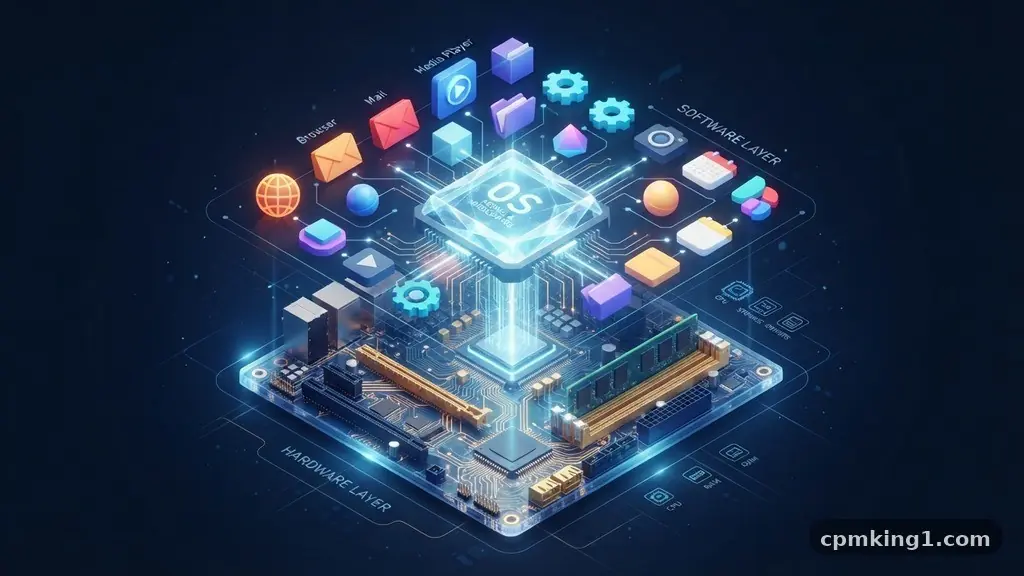
At its core, an operating system is a specialized set of programs that coordinates the activity of a computer. It manages the interaction between the hardware, such as the processor, memory, and storage, and the software applications you run. You can think of it as a traffic controller for data, ensuring that your word processor, web browser, and music player don’t crash into each other while using system resources.
Without this software, every single program would need to know exactly how to communicate with the motherboard, the graphics card, and the hard drive independently. This would lead to chaotic development, as programmers would have to rewrite code for every possible hardware variation.
Instead, the operating system provides a standardized interface. This allows developers to focus on features rather than low-level hardware communication.
Most users interact with the operating system through a graphical user interface, which includes icons, windows, and menus. However, the system also operates in the background through a command-line interface or system services that require no human input. These background processes are essential for maintaining system stability and ensuring that the machine remains responsive during heavy workloads.
Core Functions and Resource Management
The primary responsibility of an operating system is the efficient management of system resources. This involves allocating CPU time to different tasks, managing how data is read from and written to storage, and overseeing the allocation of RAM. If two programs try to access the same file at the exact same moment, the operating system intervenes to prevent data corruption.
Memory management is perhaps the most critical aspect of this process. The system tracks every byte of memory being used, ensuring that one application doesn’t accidentally overwrite the data belonging to another. It also implements virtual memory techniques, where a portion of the hard drive is used as temporary RAM when physical memory becomes full.
The operating system also handles the file system, which is the logical structure used to organize data on your drives. It keeps track of where files are stored, who has permission to access them, and how much space remains. Without this structured management, your data would be impossible to locate or manage effectively, leading to complete digital disorganization.
Hardware Interaction and Device Drivers
Your computer contains a vast array of hardware components, from keyboards and mice to complex graphics processing units. The operating system uses device drivers to communicate with these components. A driver is a small piece of software that acts as a translator, converting the system’s general commands into specific instructions that the hardware can understand.
When you plug in a new device, such as a printer or a camera, the operating system typically attempts to identify it and load the appropriate driver automatically. This process, often called Plug and Play, has made modern computing significantly more accessible. If the system cannot find a suitable driver, it may prompt you to install one manually from the manufacturer.
This abstraction layer is why you can switch between different brands of mice or keyboards without needing to learn how to operate the computer differently. The operating system ensures that the input from these devices is processed in a consistent manner. It creates a unified experience that allows users to focus on their work rather than the technical details of peripheral connectivity.
The Evolution of Modern Computing
The history of operating systems is a journey from simple, single-tasking monitors to complex, multi-user environments. Early systems were often tied to specific mainframe hardware, requiring specialized knowledge to operate. Over time, the industry moved toward general-purpose systems that could run on a wide variety of machines.
In the 1980s and 1990s, the rise of personal computing brought operating systems into the home. Systems like MS-DOS and early versions of Windows shifted the focus toward user accessibility. This era saw the introduction of graphical interfaces that replaced text-based commands, making computers usable for people without deep technical expertise.
Today, the landscape includes a diverse array of platforms designed for different needs. Mobile devices run on stripped-down, touch-optimized systems, while servers run on highly optimized, stable environments designed for continuous uptime. You can find more information on the history of these platforms at the Computer History Museum.
| System Type | Primary Target | Key Characteristic |
|---|---|---|
| Desktop OS | Personal Computers | High-level application support |
| Mobile OS | Smartphones/Tablets | Battery and touch optimization |
| Server OS | Data Centers | High stability and networking |
| Embedded OS | Appliances/IoT | Minimal footprint and real-time |
Security and User Access Control
Security is a fundamental pillar of modern operating system design. The system acts as the gatekeeper, ensuring that only authorized users can access specific files or system settings. By implementing user accounts and permissions, the operating system protects sensitive information from unauthorized modification or theft.
Modern systems also include built-in firewalls and anti-malware protections. These features monitor system activity for suspicious patterns that might indicate a security breach. Because the operating system has deep access to the hardware, it is uniquely positioned to stop threats before they can gain a foothold in the system’s core.
Furthermore, the operating system enforces isolation between different user sessions. If one user is logged into the computer, they generally cannot access the files of another user unless they have administrative privileges. This compartmentalization is essential for shared computers and corporate environments where data privacy is of the utmost importance.
Common Types of Operating Systems
The market for operating systems is dominated by a few major players, each catering to specific needs and preferences. Windows is widely used in corporate and personal environments due to its vast software compatibility. macOS, by contrast, is known for its tight integration with hardware and its focus on creative professional workflows.
Linux occupies a unique space, particularly in the server and developer communities. Because it is open-source, users can modify the underlying code to suit their specific needs. This flexibility makes it the engine behind much of the internet’s infrastructure, powering everything from web servers to supercomputers.
Mobile operating systems have also gained immense importance in recent years. Android and iOS have become the primary computing platforms for billions of people. These systems are designed with mobility in mind, prioritizing power efficiency, location awareness, and app-based interactions over traditional file management.
- Windows: Dominant in the enterprise and gaming sectors.
- macOS: Standard for creative design and Apple ecosystem users.
- Linux: The backbone of web servers, cloud infrastructure, and technical development.
- Android: The most widely used mobile operating system globally.
- iOS: A highly optimized, secure platform for Apple mobile devices.
The Role of Process Management
The operating system is responsible for process management, which involves scheduling tasks so that the CPU is always working efficiently. A single computer might be running dozens of background processes alongside your active applications. The scheduler decides which task gets to use the processor for a few milliseconds, ensuring that everything feels smooth.
When a program becomes unresponsive, it is often because the operating system is struggling to manage the process. The “task manager” or “force quit” functionality allows you to intervene and stop a process that has entered an infinite loop or crashed. This capability prevents a single faulty application from bringing down the entire system.
Multitasking is another key feature managed by the OS. It allows you to switch between a web browser, a video call, and a document editor without closing any of them. The system preserves the state of each application in memory, swapping them in and out of the CPU as needed to keep the user experience fluid.
Future Trends and Emerging Technologies
As computing continues to evolve, operating systems are adapting to new hardware architectures and usage patterns. Artificial intelligence is increasingly being integrated into the core of these systems to predict user needs, manage battery life more effectively, and automate maintenance tasks. We are moving toward a future where the OS anticipates the user’s intent.
Cloud-based operating systems represent another significant shift. With the rise of high-speed internet, many tasks that were previously handled locally are now processed in the cloud.
This allows for lighter, more portable hardware that relies on remote servers for heavy lifting. This trend is already visible in the growth of browser-based platforms.
Security remains the greatest challenge for the future. As threats become more sophisticated, operating systems must evolve to become more resilient. This includes better hardware-level encryption and more frequent, automated security updates that protect users from emerging vulnerabilities without requiring manual intervention.
Frequently Asked Questions
Can a computer run without an operating system?
Technically, a computer can run without a modern operating system if it is programmed to perform a single, specific task directly on the hardware. However, for general-purpose computing, an operating system is essential to provide a user interface, file management, and hardware communication.
What is the difference between an OS and an application?
An operating system is the base software that manages hardware and system resources, while an application is a program designed to perform a specific task for the user. You use applications to create documents or browse the web, but you need the operating system to run those applications.
How does an operating system manage memory?
The operating system acts as an accountant for your computer’s RAM. It assigns specific blocks of memory to each open application and tracks their usage, ensuring that no two programs conflict with each other and reclaiming memory when a program is closed.
What happens when an operating system crashes?
When an operating system crashes, it usually means that a critical system service or the kernel has encountered an error it cannot resolve. This often results in a system restart to clear the memory and restore the OS to a stable state.
Why do operating systems need to be updated?
Updates are necessary to patch security vulnerabilities, improve system performance, and add support for new hardware. Keeping your system updated ensures that it remains secure against the latest threats and continues to function smoothly with modern software.
Conclusion
Understanding what an operating system and why it is important helps you see beyond the screen to the complex orchestration happening in your device. It is the invisible backbone that allows for everything from professional creative work to simple communication. By managing resources, securing data, and providing a bridge to hardware, it enables the modern digital experience.
As you continue to use your devices, remember that the software running underneath is constantly working to maintain stability and performance. Staying informed about your system’s capabilities is a great way to get the most out of your technology. Feel free to explore your system settings today to see how these fundamental management tools are working for you.