What Is a Computer Network and How Does It Work? A Beginner’s Guide
Computers and other digital devices rarely work completely alone. They often need to communicate with other devices to share information, access websites, transfer files, use printers, or connect to online services.
This communication is made possible through computer networks.
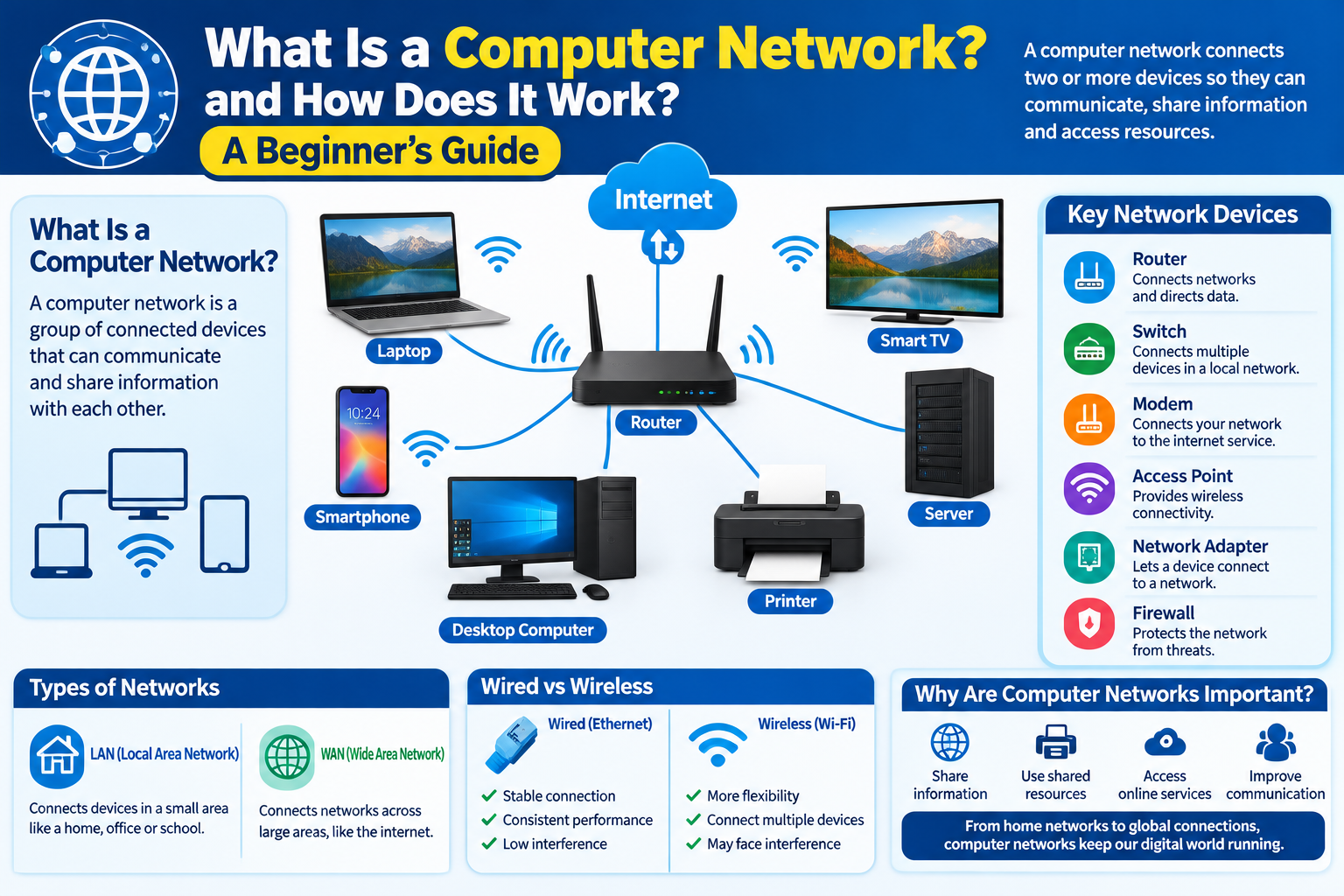
A computer network connects two or more devices so they can exchange information and share resources. Networks can be very small, such as the network inside a home, or extremely large, such as the global internet.
In this beginner-friendly guide, we will explain what a computer network is, how networks work, common types of networks, important networking devices, wired and wireless connections, and basic network security.
What Is a Computer Network?
A computer network is a group of connected devices that can communicate and share information with each other.
Devices on a network can include:
- Desktop computers
- Laptops
- Smartphones
- Tablets
- Printers
- Servers
- Smart TVs
- Network storage devices
- Routers
- Other connected devices
The connection can be wired, wireless, or a combination of both.
Why Are Computer Networks Important?
Networks make it possible for devices to communicate and share resources.
For example, a home network can allow you to:
- Connect several devices to the internet
- Share a printer
- Transfer files between computers
- Stream media to compatible devices
- Connect smart home devices
- Access network storage
Businesses also rely on networks for communication, file sharing, applications, databases, and other everyday operations.
How Does a Computer Network Work?
A simplified network works like this:
- Devices connect to a network.
- Each device receives appropriate network configuration.
- Devices send data in small units called packets.
- Network equipment helps direct the packets.
- The destination device receives the data.
- The device processes and displays the information.
The actual process can involve many technologies and protocols, but this basic model explains the general idea.
What Is a Network Device?
Network devices are hardware components that help connect and manage devices.
Common network devices include:
- Router
- Switch
- Modem
- Access point
- Network adapter
- Firewall
Each device has a different role.
What Is a Router?
A router connects different networks and helps direct network traffic between them.
In a typical home setup, a router may connect your local devices to your internet service.
It can also provide local network services such as assigning private IP addresses to connected devices.
For example, your laptop, phone, and smart TV may all connect to the same home router.
What Is a Network Switch?
A network switch connects multiple devices within a local network.
Switches are commonly used in offices, schools, data centers, and other environments where several wired devices need to communicate.
For example, multiple desktop computers can connect to a network switch using Ethernet cables.
What Is a Modem?
A modem is a device that helps establish communication between a local network and an internet service provided through certain types of connections.
The exact equipment used depends on the internet technology provided by the service provider.
Some modern devices combine modem and router functions into a single unit.
What Is a Network Access Point?
A wireless access point provides wireless connectivity to devices.
It allows devices such as laptops and smartphones to connect to a network without using a physical Ethernet cable.
Home routers often include wireless access-point functionality.
What Is a Network Adapter?
A network adapter allows a device to connect to a network.
A computer may have:
- Wi-Fi hardware
- Ethernet hardware
- Both
Modern laptops and smartphones commonly include built-in wireless networking.
Desktop computers may use built-in or add-on network adapters.
What Is a LAN?
LAN stands for Local Area Network.
A LAN connects devices within a relatively limited area.
Examples include:
- Home network
- Office network
- School network
- Small business network
A LAN allows connected devices to communicate and share resources.
What Is a WAN?
WAN stands for Wide Area Network.
A WAN connects networks across larger geographic areas.
The internet is the most well-known example of a global network made up of many interconnected networks.
Businesses may also use WAN technologies to connect offices in different cities or countries.
LAN vs. WAN
The basic difference is the area covered.
| Feature | LAN | WAN |
|---|---|---|
| Coverage | Smaller area | Larger geographic area |
| Example | Home or office network | Networks across cities or countries |
| Main purpose | Local communication | Connecting separate networks |
| Common use | Device and resource sharing | Long-distance connectivity |
What Is a Wired Network?
A wired network uses physical cables to connect devices.
Ethernet is one of the most common wired networking technologies.
Advantages of wired connections can include:
- Stable connection
- Consistent performance
- Low interference
- Useful for desktop computers and other fixed devices
Wired connections are commonly used for computers, network equipment, servers, and other devices.
What Is a Wireless Network?
A wireless network allows devices to communicate without a physical network cable.
Wi-Fi is the most familiar example for everyday users.
Wireless networks are convenient because users can connect devices while moving within the coverage area.
However, wireless performance can be affected by:
- Distance
- Walls
- Interference
- Network congestion
- Device capabilities
What Is Wi-Fi?
Wi-Fi is a technology used to connect devices to a wireless local network.
A Wi-Fi network can allow smartphones, laptops, tablets, smart TVs, and other compatible devices to communicate with a router or access point.
Wi-Fi is commonly used in homes, offices, schools, hotels, airports, and public spaces.
What Is Ethernet?
Ethernet is a family of technologies used for wired networking.
An Ethernet connection usually uses a network cable to connect a device to a router or switch.
Ethernet is widely used because it can provide a stable and reliable connection for many types of network equipment.
What Is a Network Protocol?
A network protocol is a set of rules that devices use to communicate.
Protocols define how information is formatted, transmitted, received, and interpreted.
Some important networking protocols and technologies include:
- IP
- TCP
- UDP
- DNS
- HTTP
- HTTPS
- DHCP
Different protocols perform different functions.
What Is TCP?
TCP stands for Transmission Control Protocol.
TCP is designed to provide reliable communication between devices.
It helps ensure that data is delivered in the correct order and that missing information can be detected and handled.
What Is UDP?
UDP stands for User Datagram Protocol.
UDP provides a simpler communication method than TCP and does not provide the same type of delivery guarantees.
It can be useful for applications where speed and low overhead are important.
The appropriate protocol depends on the application.
What Is DNS?
DNS stands for Domain Name System.
DNS helps translate human-readable domain names into IP addresses that network systems can use.
For example, when you enter a website address into a browser, DNS can help your device determine which server address is associated with that domain.
What Is DHCP?
DHCP stands for Dynamic Host Configuration Protocol.
It can automatically provide network configuration information to devices.
This may include:
- IP address
- Network configuration
- Default gateway
- DNS server information
DHCP makes connecting devices to networks easier because users do not normally have to configure every setting manually.
What Are Network Packets?
When information travels across a network, it is commonly divided into smaller units called packets.
Packets contain information that helps network equipment handle and deliver the data.
For example, when you access a webpage, information may travel between your device and a server through many packets.
The receiving system processes the information so the requested webpage or service can be displayed.
What Is Network Bandwidth?
Bandwidth refers to the amount of data that can be transferred through a network connection over a given period.
It is commonly measured in units such as:
- Mbps
- Gbps
Higher bandwidth can allow more data to be transferred, but actual performance also depends on other factors.
What Is Network Latency?
Latency refers to the delay involved in transmitting data between two points.
Low latency is particularly useful for applications that require quick responses, such as:
- Online gaming
- Video calls
- Remote applications
- Interactive services
Bandwidth and latency are different concepts. A connection can have high bandwidth but still experience noticeable latency.
What Is Network Security?
Network security involves protecting network devices, connections, and information from unauthorized access and other threats.
Basic security practices include:
- Use strong Wi-Fi passwords.
- Keep routers and network devices updated.
- Use modern wireless security standards.
- Change default administrator credentials.
- Avoid unknown public networks when handling sensitive information.
- Keep connected devices updated.
- Review unfamiliar devices connected to your network.
Why Should Router Firmware Be Updated?
Router manufacturers may release firmware updates to address:
- Security issues
- Bugs
- Compatibility problems
- Performance improvements
- Other technical issues
Keeping network equipment updated can be an important part of maintaining a secure and reliable network.
What Is a Home Network?
A home network is a small network connecting devices in a household.
A typical home network may contain:
- Router
- Smartphone
- Laptop
- Desktop computer
- Smart TV
- Printer
- Gaming console
- Smart home devices
The router generally manages communication between the local devices and the internet connection.
What Is a Business Network?
Business networks can be much more complex than home networks.
They may include:
- Multiple switches
- Wireless access points
- Servers
- Firewalls
- Network storage
- Printers
- Employee computers
- Security systems
Businesses often use network management systems to monitor performance, security, and connected devices.
Common Network Problems
Network problems can have many different causes.
Common symptoms include:
- No internet connection
- Slow connection
- Frequent disconnections
- Wi-Fi signal problems
- Devices unable to communicate
- DNS errors
- IP configuration problems
The cause may be related to the router, cables, service provider, device settings, interference, or other network components.
Basic Network Troubleshooting
When a network is not working correctly, try these simple steps:
1. Check the Connection
Make sure your device is connected to the correct network.
2. Check Other Devices
If several devices cannot connect, the problem may be related to the router or internet service.
3. Restart Network Equipment
Restarting a router can sometimes resolve temporary problems.
4. Check Cables
For wired connections, make sure Ethernet cables are securely connected.
5. Move Closer to the Router
If Wi-Fi signal strength is poor, moving closer to the router may improve the connection.
6. Contact Your Internet Provider
If the problem continues across multiple devices, your internet provider may need to investigate the connection.
Common Computer Network Mistakes
Using a Weak Wi-Fi Password
A weak password can make unauthorized access easier.
Ignoring Router Updates
Outdated firmware can leave network equipment without important fixes.
Placing the Router in a Poor Location
Physical obstacles and interference can reduce wireless performance.
Connecting Too Many Unnecessary Devices
A large number of connected devices can make network management more difficult.
Using Old Network Equipment
Older hardware may not support newer networking features or security standards.
Computer Network Checklist
For a basic and reliable network:
- Use a suitable router.
- Protect your Wi-Fi with a strong password.
- Keep network equipment updated.
- Use wired connections where appropriate.
- Place wireless equipment in a suitable location.
- Monitor connected devices.
- Understand basic network settings.
- Troubleshoot one component at a time.
- Keep computers and smart devices updated.
Frequently Asked Questions
What is a computer network?
A computer network is a group of connected devices that can communicate and share information or resources.
What is the difference between LAN and WAN?
A LAN generally connects devices within a smaller area, while a WAN connects networks across larger geographic distances.
What does a router do?
A router connects networks and directs traffic between them. Home routers commonly connect local devices to an internet service.
Is Wi-Fi a computer network?
Wi-Fi is a wireless networking technology that allows compatible devices to connect to a local network.
What is Ethernet?
Ethernet is a group of wired networking technologies commonly used to connect devices using network cables.
Why is network security important?
Network security helps protect connected devices, network resources, and information from unauthorized access and other threats.
Final Thoughts
Computer networks are a fundamental part of modern technology. They allow devices to communicate, share resources, access online services, and exchange information.
From a simple home Wi-Fi network to a large business infrastructure, the basic purpose remains the same: connecting devices so they can communicate effectively.
Understanding routers, switches, Wi-Fi, Ethernet, IP addresses, DNS, protocols, bandwidth, and network security can help beginners better understand how their everyday digital devices connect and communicate.