What Is a CPU and How Does It Work? A Beginner’s Guide
Every computer, laptop, smartphone, and many other smart devices have a component that plays a central role in processing instructions. This component is called the CPU, or Central Processing Unit.
The CPU is often described as the “brain” of a computer because it performs calculations, processes instructions, and coordinates many of the tasks required to run applications and the operating system.
Understanding what a CPU does can help beginners make better decisions when choosing or using a computer. In this guide, we will explain what a CPU is, how it works, what CPU cores and clock speed mean, and how processors affect everyday computer performance.
What Is a CPU?
CPU stands for Central Processing Unit.
It is the primary processor responsible for executing instructions provided by computer programs.
When you open an application, type a document, browse a website, or perform a calculation, the CPU processes instructions that help make these actions possible.
A CPU works together with other hardware components, including:
- RAM
- Storage
- Graphics processor
- Motherboard
- Network hardware
- Operating system
The CPU is important, but computer performance depends on the entire system.
What Does a CPU Do?
A CPU performs many different types of operations.
Its responsibilities can include:
- Processing instructions
- Performing calculations
- Managing logical operations
- Coordinating software tasks
- Communicating with memory
- Working with other hardware components
For example, when you open a calculator application and perform a calculation, the CPU processes the instructions required to produce the result.
How Does a CPU Work?
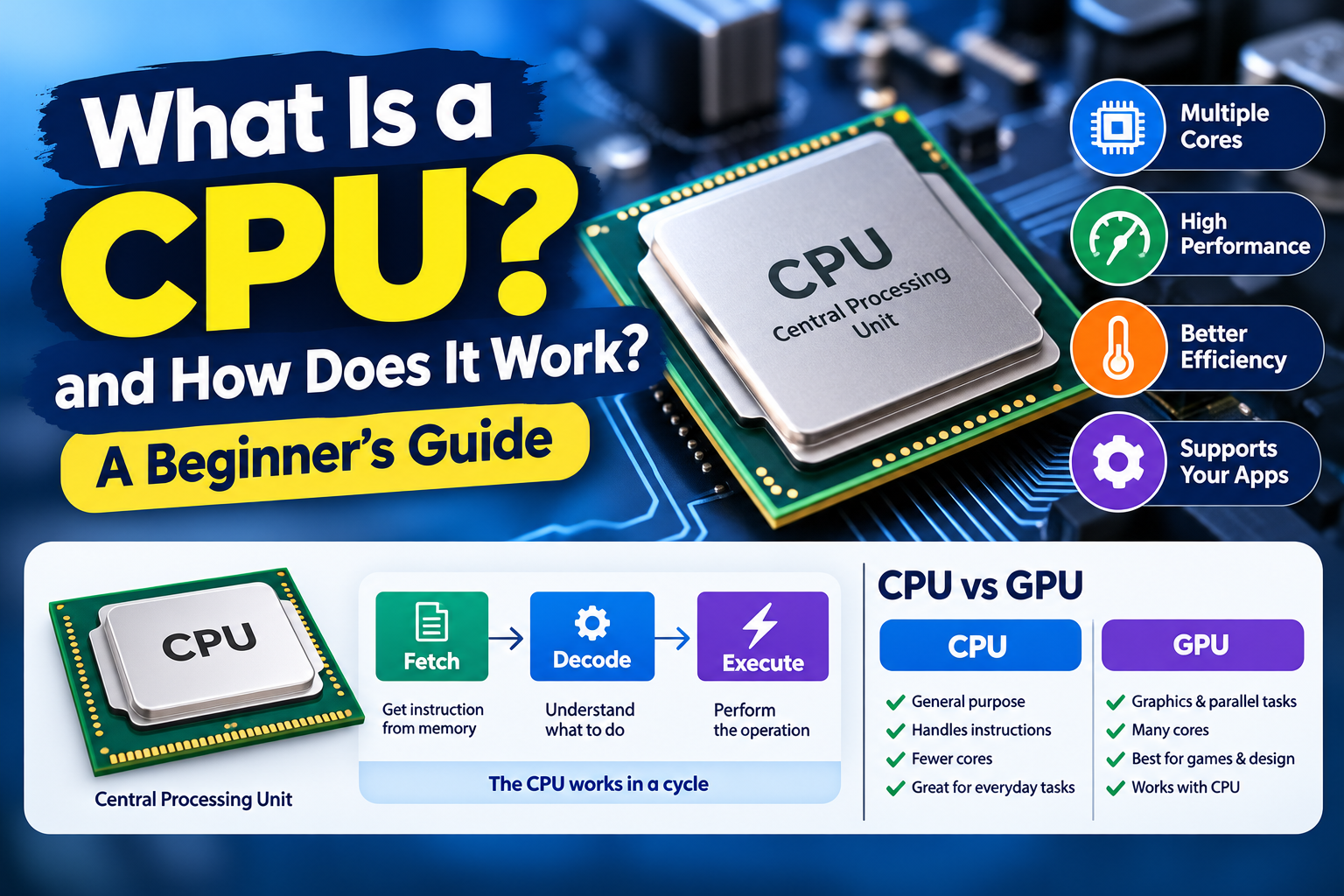
A simplified CPU process can be described in three basic stages:
1. Fetch
The CPU retrieves an instruction from memory.
2. Decode
The CPU determines what the instruction means and what operation needs to be performed.
3. Execute
The CPU performs the required operation.
This process happens extremely quickly and repeatedly while a computer is running.
Modern processors use much more sophisticated techniques than this simplified model, but the basic concept helps beginners understand how instructions are processed.
What Is a CPU Core?
A CPU core is an individual processing unit within a processor.
Modern CPUs can contain multiple cores.
For example, a processor might have:
- 2 cores
- 4 cores
- 6 cores
- 8 cores
- More cores in higher-end systems
Multiple cores allow a processor to handle different tasks more effectively.
However, the number of cores alone does not determine overall performance.
What Is Multicore Processing?
A multicore processor contains multiple processing cores in one CPU package.
This can help a computer handle multiple tasks at the same time.
For example, a user might be:
- Browsing the internet
- Playing music
- Editing a document
- Running background applications
The operating system can distribute tasks across available processing resources.
Software that is designed to use multiple cores can also benefit from multicore processors.
What Is CPU Clock Speed?
CPU clock speed describes how quickly a processor’s clock operates.
It is commonly measured in gigahertz (GHz).
For example, a processor may have a clock speed expressed as 3.5 GHz.
However, clock speed should not be used alone to compare processors.
Two CPUs with similar clock speeds can provide different performance because of differences in:
- Architecture
- Number of cores
- Cache
- Power efficiency
- Manufacturing technology
- Instruction capabilities
- Software optimization
What Is CPU Cache?
CPU cache is a small amount of very fast memory located within or closely associated with the processor.
It stores frequently needed information so the CPU can access it more quickly.
Modern processors may include different levels of cache, commonly referred to as:
- L1 cache
- L2 cache
- L3 cache
Generally, smaller cache levels are faster, while larger levels can hold more information.
What Is a CPU Thread?
A thread represents a sequence of instructions that can be scheduled for execution.
Modern processors may support multiple threads per core through technologies designed to improve the use of processor resources.
For example, a CPU with several physical cores may be capable of handling more software threads efficiently.
The exact behavior depends on the processor architecture and operating system.
CPU vs. GPU
CPU and GPU are both processors, but they are designed for different types of workloads.
CPU
A CPU is designed for general-purpose computing and handles a wide range of instructions and tasks.
GPU
A GPU is designed to perform many calculations in parallel and is especially useful for graphics and certain highly parallel workloads.
Modern computers may use both a CPU and a dedicated or integrated GPU.
What Is an Integrated GPU?
Some CPUs include graphics processing capabilities on the same chip or processor package.
This is commonly called integrated graphics.
Integrated graphics can be useful for:
- Web browsing
- Video playback
- Office applications
- Basic photo editing
- Everyday computer tasks
More demanding graphics workloads may benefit from a dedicated graphics processor.
What Is a Dedicated GPU?
A dedicated GPU is a separate graphics processor designed primarily for demanding graphical workloads.
It can be useful for:
- Modern games
- 3D applications
- Video production
- Graphics design
- Certain computational workloads
The CPU and GPU can work together to process different parts of a workload.
Why Is CPU Performance Important?
CPU performance affects many everyday tasks.
A capable processor can help with:
- Opening applications
- Running multiple programs
- Processing documents
- Browsing complex websites
- Editing media
- Running software
- Performing calculations
However, the impact depends on the specific workload.
A person who mainly reads websites and writes documents may have very different CPU requirements from someone editing high-resolution video.
CPU and RAM Work Together
The CPU and RAM perform different but connected roles.
RAM provides temporary working space for active data, while the CPU processes instructions.
A simplified example is:
Storage → RAM → CPU → RAM → Application
When an application is running, the operating system manages data between storage and memory while the CPU processes instructions.
Having enough RAM can help with multitasking, while CPU performance affects how quickly processing tasks can be completed.
CPU and Storage
The CPU also works with storage devices.
Storage devices hold files and applications when the computer is powered off.
When you launch an application, information is read from storage and loaded into memory. The CPU then processes the instructions required to run the application.
Modern SSDs can provide much faster storage access than older mechanical hard drives, but the CPU and storage still perform different jobs.
What Is CPU Architecture?
CPU architecture refers to the design and organization of a processor and the instruction set it supports.
Different processor architectures can have different approaches to:
- Instruction processing
- Memory management
- Power efficiency
- Performance
- Compatibility
The architecture is an important factor when comparing processors.
What Is a Processor Generation?
Processor manufacturers often release new generations of CPUs with updated designs.
Newer generations may introduce improvements such as:
- Better performance
- Improved power efficiency
- Updated features
- Better integrated graphics
- Improved memory support
- New connectivity options
However, newer does not automatically mean better for every specific workload. Comparing actual specifications and requirements is important.
What Is CPU Power Consumption?
CPUs require electrical power to operate.
Power consumption can vary depending on:
- Processor design
- Workload
- Clock speed
- Number of active cores
- Power settings
- Cooling system
Laptop processors are often designed with power efficiency in mind because battery life is important for portable devices.
Why Does CPU Temperature Matter?
A CPU generates heat while operating.
If the processor becomes too hot, the system may reduce its performance to control temperature.
This is commonly known as thermal throttling.
Good cooling can help maintain stable operation.
Desktop computers may use:
- Air coolers
- Liquid cooling systems
- Case fans
Laptops generally use compact cooling systems designed for their form factor.
How to Keep a CPU Running Properly
Users do not normally need to perform complicated maintenance on a CPU.
However, general computer maintenance can help:
- Keep air vents clear.
- Make sure cooling fans can operate properly.
- Keep the operating system updated.
- Avoid blocking laptop ventilation.
- Keep the computer in a suitable environment.
- Monitor unusual temperature or performance problems.
How to Choose the Right CPU
When buying a computer, do not choose a processor based only on its advertised clock speed.
Consider:
Your Main Tasks
Think about whether you mainly browse the internet, work with documents, edit media, develop software, or perform other demanding tasks.
Number of Cores
More cores can be useful for multitasking and applications designed for parallel processing.
Power Efficiency
For laptops, efficiency can affect battery life and heat generation.
Compatibility
A CPU must be compatible with the computer’s motherboard and other hardware.
Overall System
Consider the CPU together with RAM, storage, graphics, and cooling.
Common CPU Mistakes
Focusing Only on GHz
Clock speed is useful information, but it does not tell the entire performance story.
Assuming More Cores Always Means Better
Additional cores can help with suitable workloads, but not every application benefits equally.
Ignoring Cooling
A powerful processor still needs an appropriate cooling solution.
Choosing Without Checking Compatibility
Desktop CPUs require compatible motherboards, memory, and cooling solutions.
Comparing Only One Specification
A better comparison considers the entire processor specification and the intended workload.
CPU Checklist for Beginners
Before choosing or evaluating a CPU, consider:
- Number of cores
- Supported threads
- Clock speeds
- CPU architecture
- Cache
- Power requirements
- Integrated graphics
- Motherboard compatibility
- Cooling requirements
- Intended workload
Frequently Asked Questions
What does CPU stand for?
CPU stands for Central Processing Unit.
What is the main job of a CPU?
The CPU executes instructions and performs calculations required by software and the operating system.
Is the CPU the same as RAM?
No. The CPU processes instructions, while RAM temporarily stores information that the computer is actively using.
Is a higher GHz CPU always faster?
No. Clock speed is only one factor. Architecture, cores, cache, power design, and other specifications also affect performance.
What is the difference between a CPU and a GPU?
A CPU is designed for general-purpose processing, while a GPU is optimized for highly parallel workloads, particularly graphics and other suitable computations.
Does a CPU need cooling?
Yes. CPUs generate heat during operation and require appropriate cooling to maintain safe and stable performance.
Final Thoughts
The CPU is one of the most important components in a modern computer. It processes instructions, performs calculations, and works with RAM, storage, graphics hardware, and other components to run applications and the operating system.
Understanding concepts such as CPU cores, clock speed, cache, threads, architecture, and cooling can make computer specifications much easier to understand.
When choosing a computer, focus on the processor’s overall capabilities and how they match your actual needs rather than relying on a single specification. A balanced system with suitable RAM, storage, graphics, and cooling can provide a better everyday experience.