What Is a Database and How Does It Work? A Beginner’s Guide
Every day, websites, applications, businesses, schools, banks, and online services handle enormous amounts of information. This information needs to be stored, organized, and retrieved efficiently. One of the most important technologies used for this purpose is a database.
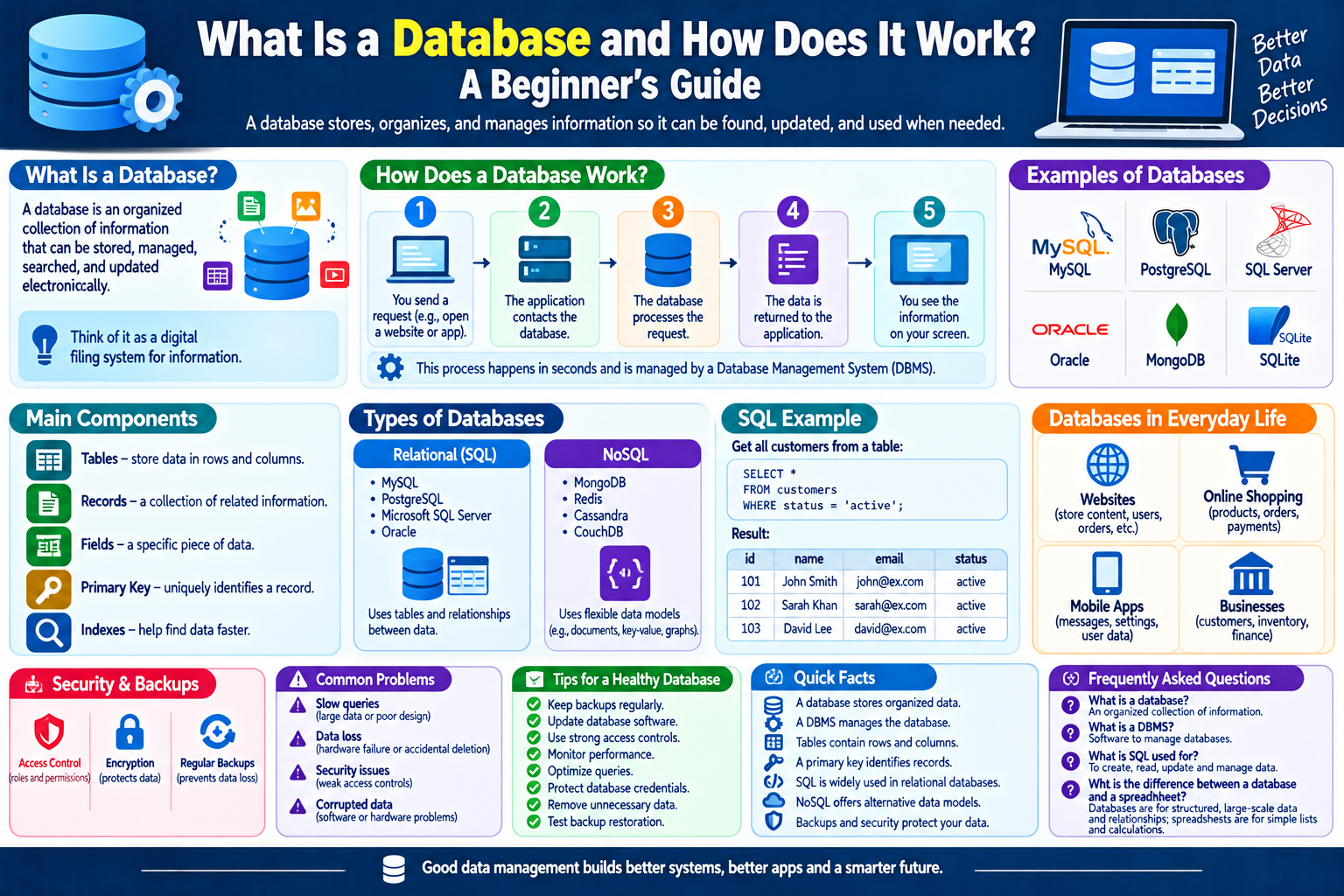
A database allows information to be stored in an organized way so that it can be found, updated, and managed when needed.
For example, when you create an account on a website, information such as your username, email address, and account settings may be stored in a database.
In this beginner’s guide, we will explain what a database is, how databases work, the different types of databases, what database management systems do, and why databases are important.
What Is a Database?
A database is an organized collection of information that can be stored, managed, searched, and updated electronically.
In simple terms, you can think of a database as a digital system for organizing information.
A small database might contain information about a few hundred customers, while a large database can contain billions of records.
Databases are used by many different types of applications and services.
Why Are Databases Important?
Without organized data storage, many modern digital services would be difficult to operate.
Databases help organizations and applications manage information such as:
- Customer accounts
- Product information
- Orders
- Student records
- Employee information
- Website content
- Financial records
- Inventory
- Messages
- Application settings
A database makes it possible to retrieve and manage this information efficiently.
How Does a Database Work?
The basic process can be explained in a few simple steps:
- Information is collected.
- The information is stored in a database.
- An application sends a request for information.
- The database processes the request.
- The requested information is returned.
- The application displays or uses the information.
For example, when you log in to a website, the website may check the database to determine whether the account information matches the login details.
What Is a Database Management System?
A Database Management System, commonly called a DBMS, is software used to create, manage, and interact with databases.
A DBMS provides tools for tasks such as:
- Storing data
- Searching data
- Updating records
- Deleting information
- Managing users
- Controlling access
- Maintaining database integrity
The database contains the information, while the DBMS provides the software environment used to manage that information.
What Is a Database Table?
Many databases organize information into tables.
A table can be compared to a spreadsheet.
For example, a customer table might contain:
| Customer ID | Name | |
|---|---|---|
| 101 | John | john@example.com |
| 102 | Sarah | sarah@example.com |
| 103 | David | david@example.com |
Each row represents a record, while each column represents a particular type of information.
What Is a Record?
A record is a collection of related information about one item or entity.
For example, one customer record could contain:
- Customer ID
- Name
- Email address
- Phone number
- Account status
A database may contain thousands or millions of individual records.
What Is a Field?
A field represents a specific piece or category of information within a record.
For example, a customer database might have fields for:
- First name
- Last name
- Phone number
- Address
Fields help organize information consistently.
What Is a Primary Key?
A primary key is a value used to uniquely identify a record in a database table.
For example:
Customer ID: 102
could uniquely identify one customer.
A primary key helps the database distinguish one record from another.
What Is a Database Query?
A query is a request for information or an operation performed on database data.
For example, a website might need to find all products belonging to a particular category.
A query could ask the database to:
- Find information
- Filter records
- Sort results
- Add new data
- Update existing data
- Delete data
Applications use queries to interact with databases.
What Is SQL?
SQL, or Structured Query Language, is widely used to work with relational databases.
SQL can be used for tasks such as:
- Creating tables
- Adding information
- Searching records
- Updating information
- Removing records
A simple SQL query might request all records from a particular table.
SQL is widely used in web development, business applications, data analysis, and many other areas.
What Is a Relational Database?
A relational database stores information in structured tables and allows relationships to be created between different tables.
For example, an online store might have separate tables for:
- Customers
- Products
- Orders
- Payments
The tables can be connected using related identifiers.
This structure helps organizations manage complex information efficiently.
Examples of Relational Database Systems
Popular relational database systems include:
- MySQL
- PostgreSQL
- Microsoft SQL Server
- Oracle Database
- SQLite
Different systems are designed for different requirements and environments.
What Is a NoSQL Database?
NoSQL databases use approaches that differ from traditional relational tables.
They can be useful for certain applications that need flexible data structures or specific scalability characteristics.
NoSQL databases may store information using structures such as:
- Documents
- Key-value pairs
- Graphs
- Wide-column formats
Examples include MongoDB, Redis, Cassandra, and others.
The choice between SQL and NoSQL depends on the application’s requirements.
SQL vs. NoSQL
Both approaches have important uses.
Relational Databases
- Organize information into tables.
- Support relationships between data.
- Commonly use SQL.
- Work well for many structured-data applications.
NoSQL Databases
- Can provide flexible data structures.
- Support several different storage models.
- Can be useful for particular large-scale or specialized applications.
- Often allow data structures that do not fit traditional tables.
There is no single database type that is best for every situation.
What Is Database Storage?
Databases need physical or cloud-based storage to keep information.
Storage can include:
- SSDs
- Hard drives
- Cloud storage systems
- Specialized database infrastructure
Modern databases can be hosted on physical servers, virtual machines, cloud platforms, or distributed systems.
What Is a Database Server?
A database server is a system that hosts and manages database software and data.
Applications can communicate with a database server to request or modify information.
For example:
User → Website → Application Server → Database Server
The database server processes database-related requests and returns the appropriate results.
Databases and Websites
Many websites rely heavily on databases.
A content website may store:
- Articles
- Categories
- Authors
- Comments
- User accounts
- Website settings
When a visitor opens a webpage, the website may retrieve information from a database before generating the page.
This allows websites to manage large amounts of content without creating every page manually as a separate static file.
Databases and Online Shopping
Online stores use databases to manage large amounts of information.
A store database may contain:
- Product names
- Prices
- Stock levels
- Customer accounts
- Orders
- Shipping information
- Payment-related records
When you search for a product, the website may query its database and return matching products.
Databases and Mobile Applications
Mobile applications can also use databases.
For example, an application may store:
- User preferences
- Messages
- Settings
- Downloaded information
- Activity records
Some mobile applications use local databases, while others communicate with databases hosted on remote servers.
What Is Database Security?
Database security involves protecting stored information from unauthorized access, accidental damage, or other threats.
Security measures can include:
- Strong authentication
- Access controls
- Encryption
- Regular backups
- Monitoring
- Software updates
- Secure network configurations
Organizations should carefully control who can access sensitive database information.
Why Are Database Backups Important?
A database backup is a separate copy of database information that can be used for recovery.
Backups can help protect against:
- Hardware failure
- Accidental deletion
- Software problems
- Security incidents
- Data corruption
- Other unexpected events
Important databases should have an appropriate backup and recovery strategy.
A backup is most useful when it can actually be restored successfully, so organizations should test their recovery procedures.
What Is Database Scaling?
As an application grows, its database may need to handle more information and more users.
Database scaling means increasing the system’s ability to handle additional workload.
This can involve:
- More powerful hardware
- Better database design
- Caching
- Indexing
- Replication
- Distributing workloads
- Cloud infrastructure
The appropriate approach depends on the application.
What Is a Database Index?
A database index is a structure that can help a database find information more efficiently.
It works somewhat like an index in a book.
Instead of searching every record, the database can use an index to locate relevant information more quickly.
However, indexes also consume storage and can add overhead to certain data modifications, so they should be designed carefully.
Common Database Problems
Databases can experience various problems.
Slow Queries
Poorly designed queries or large amounts of data can result in slow responses.
Data Loss
Accidental deletion, hardware failure, or other incidents can cause data loss if suitable backups are not available.
Security Problems
Weak access controls can expose sensitive information.
Corrupted Data
Software, hardware, or operational problems can sometimes cause data corruption.
Insufficient Resources
A database server may become overloaded when it receives more work than it can efficiently handle.
How to Keep a Database Healthy
Organizations can follow several general practices:
- Perform regular backups.
- Keep database software updated.
- Use appropriate access controls.
- Monitor performance.
- Review database security.
- Remove unnecessary data when appropriate.
- Test backup restoration.
- Optimize queries when necessary.
- Protect database credentials.
- Document important database procedures.
Simple Database Checklist
If you are learning about databases, remember these key points:
- A database stores organized information.
- A DBMS is software used to manage databases.
- Tables contain structured records in relational databases.
- Rows generally represent records.
- Columns generally represent fields.
- Primary keys can uniquely identify records.
- Queries allow applications to request or modify data.
- SQL is widely used with relational databases.
- NoSQL databases use several alternative data models.
- Backups help protect important information.
- Database security helps prevent unauthorized access.
Frequently Asked Questions
1. What is a database in simple words?
A database is an organized collection of information that can be stored, searched, updated, and managed electronically.
2. What is a DBMS?
A Database Management System is software that allows users and applications to create, manage, access, and control databases.
3. What is SQL used for?
SQL is a language widely used to create, retrieve, update, and manage information in relational databases.
4. What is the difference between a database and a spreadsheet?
Both can organize information, but databases are designed for structured data management, querying, relationships, access control, and larger or multi-user applications. Spreadsheets are often better suited to calculations, simple lists, and smaller datasets.
5. What is a primary key?
A primary key is a value used to uniquely identify a record within a database table.
6. Why are database backups important?
Backups provide a separate copy of information that can help restore data after accidental deletion, hardware problems, corruption, or other unexpected events.
Final Thoughts
Databases are a fundamental part of modern technology. They allow websites, applications, businesses, and organizations to store and manage large amounts of information efficiently.
From online stores and content websites to mobile applications and business systems, databases work behind the scenes to provide information when it is needed.
Learning basic concepts such as tables, records, fields, queries, SQL, database servers, and backups provides a strong foundation for understanding how modern websites and applications manage data.