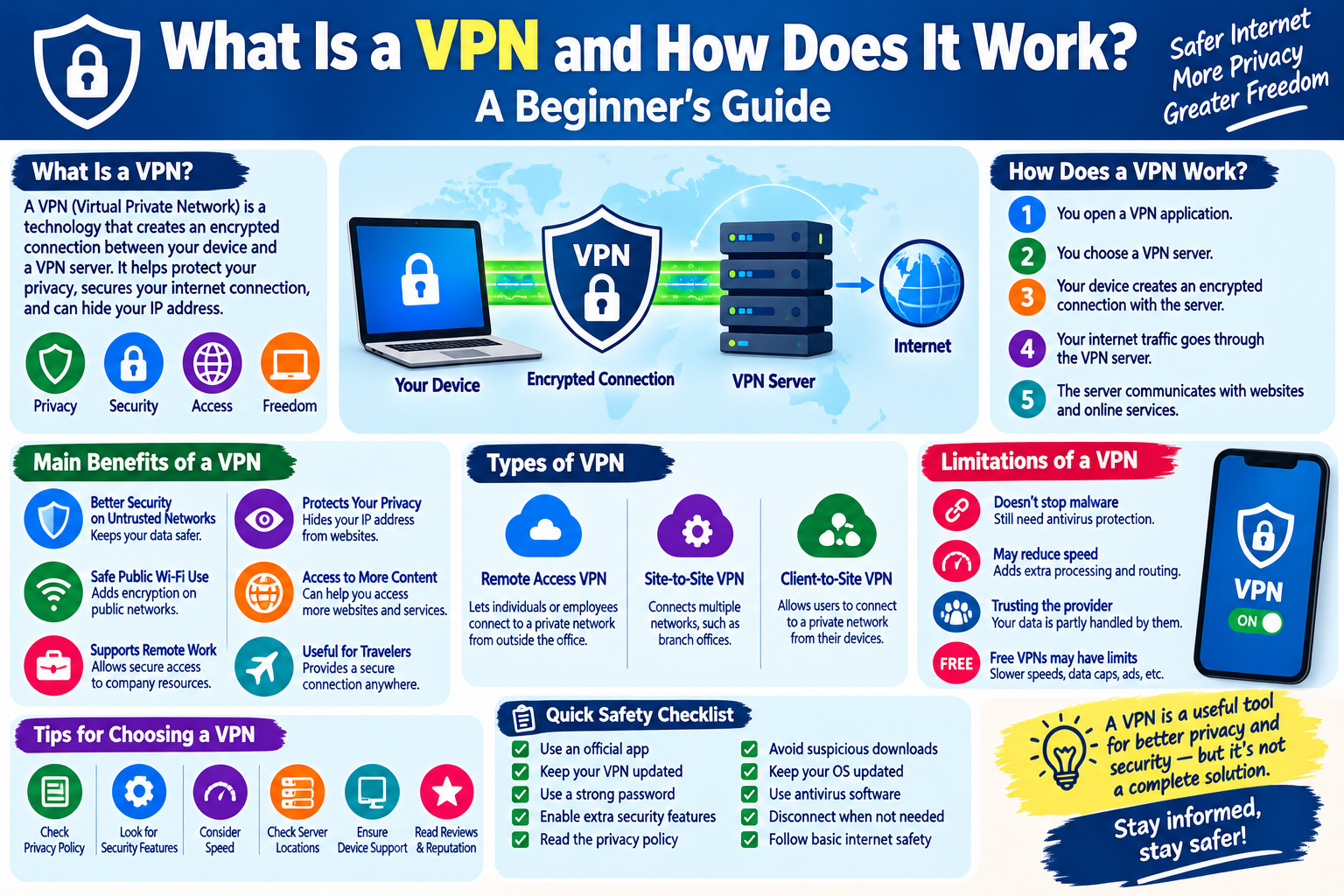
What Is a VPN and How Does It Work? A Beginner’s Guide
The internet has become an important part of everyday life. People use it to communicate, shop online, work remotely, watch videos, access websites, and manage personal accounts. While using the internet, protecting your privacy and securing your connection is also important.
One technology that can help improve online privacy and connection security is a VPN, which stands for Virtual Private Network. VPNs are used by individuals, businesses, students, and organizations for different purposes.
In this beginner-friendly guide, we will explain what a VPN is, how it works, its main benefits, its limitations, and how to use one responsibly.
What Is a VPN?
A VPN, or Virtual Private Network, is a technology that creates an encrypted connection between your device and a VPN server.
Normally, when you connect to the internet, your device communicates with websites and online services through your internet connection. A VPN adds another layer between your device and the wider internet.
When a VPN is active, your internet traffic is routed through a VPN server. The connection between your device and the VPN server is encrypted, which can make it more difficult for people on the same network to observe your traffic.
VPNs can be used on computers, smartphones, tablets, and other compatible devices.
How Does a VPN Work?
A VPN generally works through several basic steps:
- You install and open a VPN application.
- You choose a VPN server or allow the service to select one.
- Your device establishes an encrypted connection with the VPN server.
- Internet traffic travels through that connection.
- The VPN server then communicates with websites and online services.
This process helps protect the connection between your device and the VPN server.
However, it is important to understand that a VPN does not make you completely anonymous online. Websites can still collect information through accounts, cookies, browser settings, and other technologies.
Why Do People Use VPNs?
People use VPNs for several different reasons.
1. Improving Connection Security
A VPN can encrypt traffic between your device and the VPN server. This can be particularly useful when using networks where you do not fully control the network environment.
2. Protecting Privacy on Public Wi-Fi
Public Wi-Fi networks are commonly available in hotels, airports, cafes, libraries, and other locations.
Using a VPN on an untrusted network can add encryption to your connection, providing an additional layer of protection.
3. Changing Your Apparent IP Address
When you connect to the internet through a VPN server, websites may see the IP address of that server rather than the IP address assigned directly to your device.
This can provide an additional layer of privacy.
4. Supporting Remote Work
Businesses may use VPN technology to allow employees to securely connect to internal systems and company resources from outside the office.
5. Protecting Data While Traveling
People who travel frequently may connect to many different networks. A VPN can provide a consistent security layer when accessing the internet from different locations.
What Is an IP Address?
To understand VPNs better, it helps to understand IP addresses.
An IP address is a numerical address associated with a device or network connection. It helps internet systems identify where network traffic should be sent.
Your public IP address can sometimes provide information about your general geographic area and internet service provider.
A VPN can make websites see the VPN server’s public IP address instead of your normal public IP address.
VPN Encryption Explained Simply
Encryption is one of the most important concepts behind VPN technology.
Encryption converts readable information into a protected form that is difficult to understand without the appropriate method of decryption.
For example, imagine sending a letter inside a locked box. Someone might see that a box is being transported, but they cannot easily read what is inside.
VPN encryption works on a similar principle for network traffic between your device and the VPN server.
The exact security provided depends on the VPN technology, protocol, application, configuration, and service provider.
Are VPNs Completely Anonymous?
No.
A common misunderstanding is that using a VPN makes someone completely anonymous online.
A VPN can hide your normal IP address from websites and encrypt traffic between your device and the VPN server, but it cannot prevent every form of online tracking.
For example, websites may still recognize you when:
- You sign in to an account
- You provide your name or email address
- You accept certain cookies
- You use browser or device identifiers
- You share personal information
- You use services that already know your identity
Therefore, a VPN should be considered a privacy and security tool, not a complete anonymity solution.
Advantages of Using a VPN
A VPN can provide several useful advantages.
Better Security on Untrusted Networks
A VPN can add encryption when you are connected to networks that you do not fully trust.
Additional Privacy
A VPN can prevent websites from directly seeing your normal public IP address.
Useful for Remote Access
Organizations can use VPNs to securely connect employees to private company networks.
Convenient for Travelers
A VPN can provide an additional security layer when accessing the internet while traveling.
Protection Against Some Network-Level Monitoring
Encryption can make certain types of network observation more difficult.
Limitations of VPNs
VPNs also have limitations that users should understand.
A VPN Does Not Stop Malware
A VPN is not antivirus software. It cannot automatically protect your device from malicious files, infected applications, or unsafe downloads.
A VPN Does Not Make Unsafe Websites Safe
If a website is fraudulent or contains harmful content, a VPN does not automatically make it trustworthy.
VPNs Can Reduce Internet Speed
Because your traffic is routed through another server and encryption requires processing, a VPN may sometimes reduce connection speed.
VPN Providers Can Matter
When you use a VPN, you are trusting the VPN provider with some aspects of your network connection. This makes choosing a reputable provider important.
Free VPN Services May Have Limitations
Some free VPN services may have restrictions such as limited server locations, slower speeds, advertisements, data limits, or different privacy policies.
Always review the provider’s privacy policy before using the service.
How to Choose a VPN
If you decide to use a VPN, consider these factors.
1. Privacy Policy
Read the provider’s privacy policy and understand what information it collects and how that information is handled.
2. Security Features
Look for modern security technologies and reputable VPN protocols.
3. Speed
A VPN should provide reasonable performance for your normal activities.
4. Server Availability
Consider whether the provider offers servers in locations that are useful for your needs.
5. Device Support
Check whether the VPN supports your computer, smartphone, tablet, or other devices.
6. Reputation
Research the provider and look for independent information about its security practices and reliability.
7. Customer Support
Reliable customer support can be useful when troubleshooting connection or installation problems.
How to Use a VPN Safely
Follow these simple practices when using a VPN:
- Download VPN software from an official or reputable source.
- Keep the VPN application updated.
- Use a strong password for your VPN account.
- Enable additional security features when available.
- Read the provider’s privacy policy.
- Avoid downloading suspicious applications.
- Keep your operating system updated.
- Use antivirus or built-in device security features.
- Disconnect from unknown services when they are no longer needed.
- Remember that a VPN does not replace basic internet safety practices.
VPN Safety Checklist
Before choosing or using a VPN, check the following:
- The VPN provider has a clear privacy policy.
- The application comes from a trusted source.
- Your device and VPN software are updated.
- You use a strong account password.
- You understand what information the provider collects.
- You understand that a VPN does not provide complete anonymity.
- You continue using normal cybersecurity precautions.
- You avoid suspicious websites and downloads.
Frequently Asked Questions
Is a VPN necessary for everyone?
Not necessarily. Whether you need a VPN depends on your internet usage, privacy requirements, work environment, and the networks you commonly use.
Does a VPN make my internet completely private?
No. A VPN can improve privacy and encrypt certain network traffic, but websites, apps, accounts, cookies, and other technologies can still collect information.
Can I use a VPN on my phone?
Yes. Many VPN services provide applications for smartphones and tablets.
Does a VPN protect against viruses?
No. A VPN and antivirus software serve different purposes. A VPN primarily provides network privacy and security, while antivirus tools are designed to detect and help protect against malicious software.
Does a VPN slow down the internet?
It can. The effect depends on factors such as the VPN server location, server load, encryption, internet connection, and VPN technology.
Are free VPNs safe?
Not all free VPNs are the same. Before using one, carefully review its privacy policy, data practices, permissions, reputation, and limitations.
Final Thoughts
A VPN is a useful technology that can add privacy and security to an internet connection. It can be especially helpful when using public or unfamiliar networks, working remotely, or when you want websites to see a VPN server’s IP address instead of your normal public IP address.
However, a VPN is not a complete cybersecurity solution. Safe browsing habits, strong passwords, software updates, two-factor authentication, and careful handling of personal information are still important.
Understanding both the benefits and limitations of VPN technology can help you make better decisions about your online privacy and security.