What Is an Operating System? A Beginner’s Guide
Every computer, smartphone, tablet, and many other digital devices need software that helps them operate. This important software is called an operating system, or OS.
An operating system works in the background and helps users interact with their devices. It manages hardware, runs applications, handles files, controls memory, and performs many other essential tasks.
You may already use an operating system every day without thinking about it. Windows, macOS, Android, iOS, Linux, and ChromeOS are examples of operating systems.
In this beginner’s guide, we will explain what an operating system is, how it works, its main functions, common types, and why operating systems are important.
What Is an Operating System?
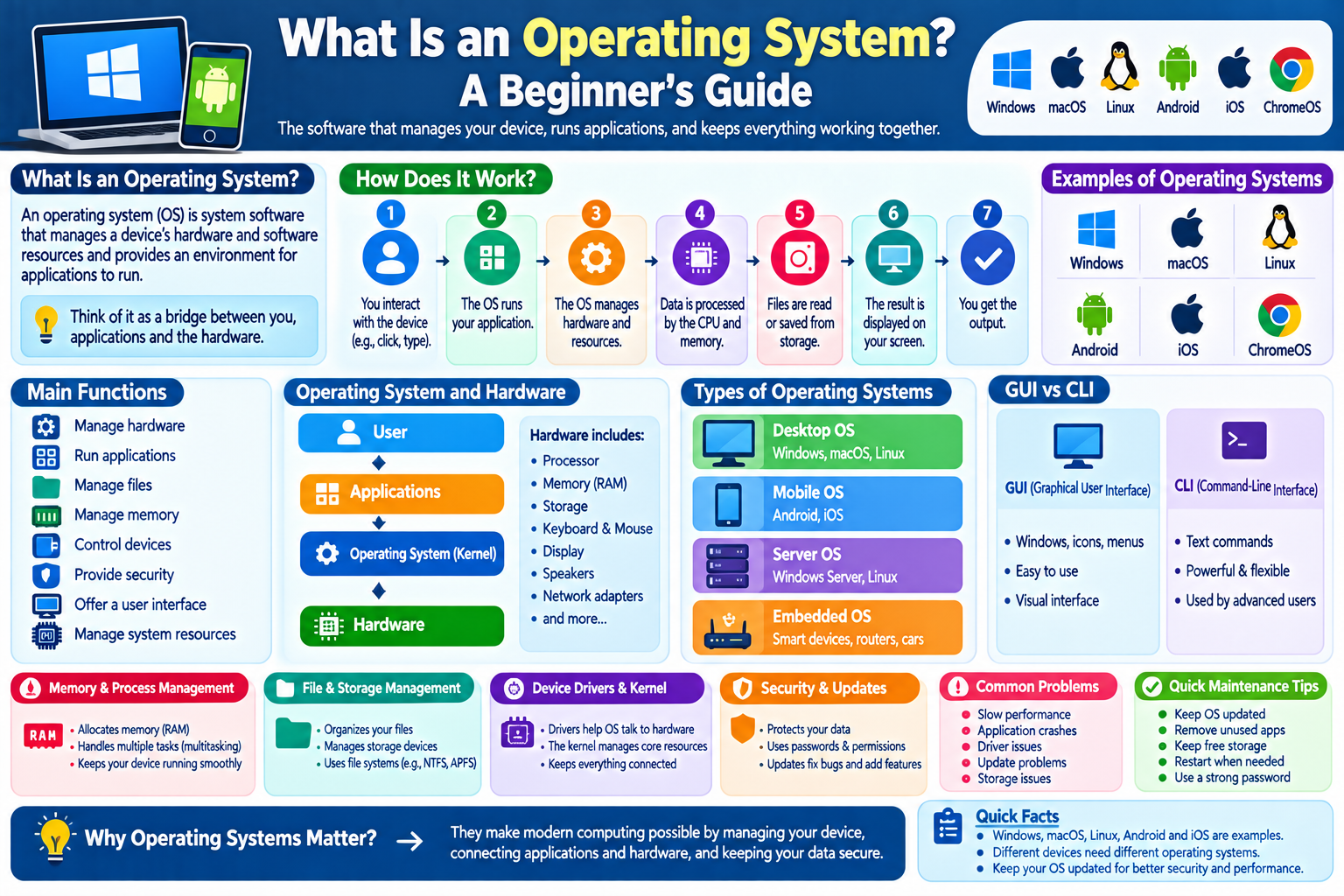
An operating system is system software that manages a device’s hardware and software resources and provides an environment for applications to run.
In simple terms, an operating system acts as a bridge between the user, applications, and computer hardware.
For example, when you open a photo, the operating system helps the application access the storage where the photo is saved. When you connect headphones, the operating system helps applications communicate with the audio hardware.
Without an operating system, using a modern computer or smartphone would be much more difficult.
Examples of Operating Systems
There are many operating systems designed for different types of devices.
Common examples include:
- Windows
- macOS
- Linux
- Android
- iOS
- ChromeOS
Each operating system has its own interface, features, design, and supported hardware.
What Does an Operating System Do?
An operating system performs many tasks behind the scenes.
Its major responsibilities include:
- Managing hardware
- Running applications
- Managing files
- Managing memory
- Managing processes
- Controlling connected devices
- Providing security features
- Providing a user interface
- Managing system resources
These functions allow users to interact with their devices without having to directly control individual hardware components.
Operating System and Hardware
Computer hardware includes physical components such as:
- Processor
- Memory
- Storage
- Keyboard
- Mouse
- Display
- Speakers
- Network adapters
The operating system communicates with this hardware through specialized software and system components.
For example, when you type on a keyboard, the operating system receives information from the keyboard and makes that information available to the appropriate application.
What Is a User Interface?
A user interface, or UI, is the part of an operating system that allows people to interact with a device.
Most modern operating systems provide a graphical user interface, commonly called a GUI.
A GUI can include:
- Windows
- Icons
- Menus
- Buttons
- Taskbars
- Settings
- Notifications
Smartphones also use graphical interfaces that allow users to open applications, change settings, browse files, and perform other actions.
What Is a GUI?
GUI stands for Graphical User Interface.
A GUI allows users to interact with a computer through visual elements instead of entering every instruction as text.
For example, clicking an application icon can open a program without requiring you to type a command.
Graphical interfaces have made computers much easier for beginners to use.
What Is a Command-Line Interface?
A Command-Line Interface, or CLI, allows users to interact with a computer by entering text commands.
Instead of clicking buttons, a user types instructions into a terminal or command prompt.
Command-line tools are commonly used by:
- Developers
- System administrators
- IT professionals
- Network administrators
- Advanced computer users
Although command-line interfaces can appear complicated to beginners, they can be extremely powerful.
How Does an Operating System Manage Applications?
When you open an application, the operating system allocates resources to it.
These resources can include:
- Processor time
- Memory
- Storage access
- Network access
- Input devices
- Display resources
The operating system helps multiple applications operate at the same time.
For example, you might listen to music while browsing the web and editing a document. The operating system coordinates these activities.
What Is Multitasking?
Multitasking means an operating system can manage multiple programs or tasks during the same period.
For example, you might have:
- A web browser open
- A music application playing
- A document editor running
- A messaging application active
The operating system manages the available resources so that these applications can function together.
What Is Memory Management?
An operating system manages the device’s memory, often called RAM.
RAM temporarily stores information that applications need while they are running.
When you open an application, the operating system helps provide it with memory.
If many applications are open simultaneously, available memory can become limited. The operating system manages memory allocation to keep the system functioning.
What Is File Management?
Operating systems also help users organize and manage files.
They provide tools for:
- Creating files
- Opening files
- Copying files
- Moving files
- Renaming files
- Deleting files
- Creating folders
For example, when you save a document into a folder, the operating system manages the process of storing that information on the device.
What Is Storage Management?
Operating systems interact with storage devices such as:
- SSDs
- Hard drives
- USB drives
- Memory cards
They use file systems to organize information on storage devices.
Different operating systems may support different file systems, although many modern systems can work with multiple formats.
What Are Device Drivers?
A device driver is software that helps an operating system communicate with particular hardware.
For example, a printer may require a driver so that the operating system can communicate correctly with it.
Drivers can be used for hardware such as:
- Printers
- Graphics cards
- Audio devices
- Network adapters
- Keyboards
- Mice
Modern operating systems can automatically install or update many drivers, although some hardware may require additional software.
What Is the Kernel?
The kernel is a central part of an operating system.
It manages important system resources and provides communication between applications and hardware.
The kernel can handle tasks related to:
- CPU resources
- Memory
- Processes
- Hardware communication
- System operations
Users normally do not interact directly with the kernel.
What Is a Process?
A process is a running instance of a program or task.
For example, when you open a web browser, the operating system creates one or more processes associated with that application.
The operating system manages these processes and determines how system resources are allocated.
What Is System Security?
Operating systems include security features designed to help protect devices and user information.
Depending on the operating system, these can include:
- User accounts
- Password protection
- Permissions
- Application controls
- Encryption
- Security updates
- Firewall features
- Device protection
Keeping an operating system updated is an important security practice because updates can include fixes for known vulnerabilities.
What Are Operating System Updates?
Operating system updates can improve a device in several ways.
An update may provide:
- Security fixes
- Bug fixes
- Performance improvements
- New features
- Compatibility improvements
- Stability improvements
Users should generally install legitimate operating system updates when they are available, especially important security updates.
Desktop Operating Systems
Desktop operating systems are designed primarily for computers such as desktops and laptops.
Examples include:
Windows
Windows is widely used on personal computers and is available from Microsoft.
macOS
macOS is Apple’s operating system for Mac computers.
Linux
Linux refers to a family of operating systems based on the Linux kernel. Many different Linux distributions are available for desktop and server use.
Mobile Operating Systems
Mobile operating systems are designed for smartphones and tablets.
Two major examples are:
Android
Android is a widely used mobile operating system found on smartphones, tablets, TVs, and other devices.
iOS
iOS is Apple’s mobile operating system used on iPhone devices.
Mobile operating systems are designed for touchscreens, battery-powered devices, mobile networks, cameras, sensors, and app ecosystems.
What Is a Server Operating System?
A server operating system is designed to manage computers that provide services to other computers or users.
Servers may provide services such as:
- Websites
- Databases
- File storage
- Applications
- Network services
Server operating systems are often designed to operate reliably for long periods and manage multiple users or services.
What Is an Embedded Operating System?
Embedded operating systems are designed for specialized devices.
They can be found in equipment such as:
- Smart appliances
- Cars
- Industrial machines
- Routers
- Smart TVs
- Internet-connected devices
These systems are often designed around the specific requirements of the device.
Operating System vs. Application
An operating system and an application are not the same thing.
Operating System
The operating system manages the device and provides a platform for applications.
Application
An application is software designed to perform a particular task.
For example:
- A web browser is an application.
- A photo editor is an application.
- A word processor is an application.
The operating system helps these applications access the hardware and other system resources they need.
Why Do Operating Systems Matter?
Operating systems make modern computing practical and accessible.
Without them, users would need much more direct knowledge of hardware and low-level computer operations.
An operating system provides a structured environment where users can:
- Run applications
- Store files
- Connect devices
- Browse the internet
- Manage settings
- Protect accounts
- Perform everyday tasks
Common Operating System Problems
Like any software, operating systems can sometimes experience problems.
Common issues include:
Slow Performance
Too many applications, limited memory, insufficient storage, or background processes can affect performance.
Application Crashes
An application may stop responding because of software bugs, compatibility problems, or insufficient resources.
Driver Problems
Incorrect or outdated drivers can cause hardware issues.
Update Problems
An operating system update may occasionally fail because of insufficient storage, connectivity issues, or compatibility problems.
Storage Problems
A nearly full storage drive can make it difficult to install updates or save new files.
Simple Operating System Maintenance Tips
You can help keep your device running smoothly by following a few basic practices:
- Keep the operating system updated.
- Install applications from trusted sources.
- Remove applications you no longer need.
- Keep enough free storage available.
- Restart your device when necessary.
- Use a strong account password.
- Enable available security features.
- Back up important files.
- Avoid suspicious software.
- Keep important applications updated.
Operating System Checklist
For beginners, remember these important points:
- An operating system manages computer resources.
- It helps applications communicate with hardware.
- Windows, macOS, Linux, Android, and iOS are examples.
- The kernel is a central part of an operating system.
- Operating systems manage memory and processes.
- They provide tools for managing files.
- Device drivers help software communicate with hardware.
- Updates can provide security and performance improvements.
- Different devices require different types of operating systems.
- Keeping the operating system updated is an important maintenance habit.
Frequently Asked Questions
1. What is an operating system in simple words?
An operating system is the main system software that manages a device’s hardware and software and allows users to run applications.
2. Is Windows an operating system?
Yes. Windows is an operating system designed primarily for personal computers and other compatible devices.
3. Is Android an operating system?
Yes. Android is a mobile operating system used on many smartphones, tablets, and other devices.
4. What is the difference between an operating system and an application?
An operating system manages the device and provides a platform for applications. An application performs a specific task for the user.
5. Why should I update my operating system?
Updates can include security fixes, bug fixes, performance improvements, and new features. Security updates are particularly important for protecting devices against known vulnerabilities.
6. Can a computer work without an operating system?
A computer’s hardware can technically operate at a very basic level without a conventional operating system, but everyday activities such as running applications, managing files, and using a graphical interface generally require an operating system or comparable system software.
Final Thoughts
An operating system is one of the most important pieces of software on a modern digital device. It connects applications and users with the underlying hardware while managing memory, files, processes, devices, and security features.
Whether you use a Windows computer, Mac, Android phone, iPhone, or another device, an operating system is working behind the scenes to make everyday computing possible.
Understanding the basic role of an operating system is an excellent starting point for learning more about computers, software, hardware, and modern technology.